So today we will be revisiting this piece of code, and making some improvements!
The API
Remember how we set the code to make a dictionary check every time text was changed? Well, as it turns out, this was clumsy as hell due to being an asynchronous operation. Since I've upgraded my account over at Oxford Dictionaries and now need to pay whenever somebody uses my account to make that API call, it only makes sense not to be quite so generous with these calls.For starters, let's remove the entire AJAX call from the processPassword() function. Leave the call to the getWords() function; that'll come in useful later.
js/main.js
$scope.processPassword=
function()
{
if ($scope.enteredPassword.length == 0) return;
if ($scope.enteredPassword.length < 8)
{
$scope.strengthCode = "weak";
$scope.strengthMessage = "Password is too short. 8 characters or above recommended.";
return;
}
var pts = 1;
$scope.strengthMessage = "";
if (/[~`!#$%\^&@*+=\-\[\]\\';,/{}|\\":<>\?]/g.test($scope.enteredPassword))
{
pts ++;
}
else
{
$scope.strengthMessage += "Try using special characters in your password.\n";
}
if (/[A-Z]/g.test($scope.enteredPassword))
{
pts ++;
}
else
{
$scope.strengthMessage += "Try using a mix of uppercase letter and lowercase letters.\n";
}
if (/[0-9]/g.test($scope.enteredPassword))
{
pts ++;
}
else
{
$scope.strengthMessage += "Try including numbers in your password.\n";
}
var possibleWords = getWords($scope.enteredPassword);
/*
if (possibleWords.length > 0)
{
var xmlhttp = new XMLHttpRequest();
xmlhttp.onreadystatechange = function()
{
if (this.readyState == 4 && this.status == 200)
{console.log(this.responseText);
var result = JSON.parse(this.responseText);
if (result.wordsFound)
{
pts --;
$scope.strengthMessage += "Avoid using dictionary words.\n";
$scope.strengthCode = getCode(pts);
return;
}
}
};
xmlhttp.open("POST", "validate.php", true);
xmlhttp.setRequestHeader("Content-type", "application/x-www-form-urlencoded");
xmlhttp.send("words=" + JSON.stringify(possibleWords) + "&url=https://od-api.oxforddictionaries.com/api/v1/entries/en/");
}
else
{
$scope.strengthCode = getCode(pts);
return;
}
*/
$scope.strengthCode = getCode(pts);
return;
};
function()
{
if ($scope.enteredPassword.length == 0) return;
if ($scope.enteredPassword.length < 8)
{
$scope.strengthCode = "weak";
$scope.strengthMessage = "Password is too short. 8 characters or above recommended.";
return;
}
var pts = 1;
$scope.strengthMessage = "";
if (/[~`!#$%\^&@*+=\-\[\]\\';,/{}|\\":<>\?]/g.test($scope.enteredPassword))
{
pts ++;
}
else
{
$scope.strengthMessage += "Try using special characters in your password.\n";
}
if (/[A-Z]/g.test($scope.enteredPassword))
{
pts ++;
}
else
{
$scope.strengthMessage += "Try using a mix of uppercase letter and lowercase letters.\n";
}
if (/[0-9]/g.test($scope.enteredPassword))
{
pts ++;
}
else
{
$scope.strengthMessage += "Try including numbers in your password.\n";
}
var possibleWords = getWords($scope.enteredPassword);
/*
if (possibleWords.length > 0)
{
var xmlhttp = new XMLHttpRequest();
xmlhttp.onreadystatechange = function()
{
if (this.readyState == 4 && this.status == 200)
{console.log(this.responseText);
var result = JSON.parse(this.responseText);
if (result.wordsFound)
{
pts --;
$scope.strengthMessage += "Avoid using dictionary words.\n";
$scope.strengthCode = getCode(pts);
return;
}
}
};
xmlhttp.open("POST", "validate.php", true);
xmlhttp.setRequestHeader("Content-type", "application/x-www-form-urlencoded");
xmlhttp.send("words=" + JSON.stringify(possibleWords) + "&url=https://od-api.oxforddictionaries.com/api/v1/entries/en/");
}
else
{
$scope.strengthCode = getCode(pts);
return;
}
*/
$scope.strengthCode = getCode(pts);
return;
};
And then move the entire AJAX call to application scope. We'll call this new function checkDictionary(). Note that we'll still call getWords() here.
js/main.js
function getCode(pts)
{
if (pts <= 0) return "weak";
if (pts == 1) return "moderate";
if (pts == 2) return "strong";
if (pts >= 3) return "excellent";
}
$scope.checkDictionary =
function()
{
var possibleWords = getWords($scope.enteredPassword);
var xmlhttp = new XMLHttpRequest();
xmlhttp.onreadystatechange = function()
{
if (this.readyState == 4 && this.status == 200)
{
var result = JSON.parse(this.responseText);
if (result.wordsFound)
{
pts --;
$scope.strengthMessage += "Avoid using dictionary words.\n";
$scope.strengthCode = getCode(pts);
return;
}
}
};
xmlhttp.open("POST", "validate.php", true);
xmlhttp.setRequestHeader("Content-type", "application/x-www-form-urlencoded");
xmlhttp.send("words=" + JSON.stringify(possibleWords) + "&url=https://od-api.oxforddictionaries.com/api/v1/entries/en/");
}
$scope.processPassword =
function()
{
{
if (pts <= 0) return "weak";
if (pts == 1) return "moderate";
if (pts == 2) return "strong";
if (pts >= 3) return "excellent";
}
$scope.checkDictionary =
function()
{
var possibleWords = getWords($scope.enteredPassword);
var xmlhttp = new XMLHttpRequest();
xmlhttp.onreadystatechange = function()
{
if (this.readyState == 4 && this.status == 200)
{
var result = JSON.parse(this.responseText);
if (result.wordsFound)
{
pts --;
$scope.strengthMessage += "Avoid using dictionary words.\n";
$scope.strengthCode = getCode(pts);
return;
}
}
};
xmlhttp.open("POST", "validate.php", true);
xmlhttp.setRequestHeader("Content-type", "application/x-www-form-urlencoded");
xmlhttp.send("words=" + JSON.stringify(possibleWords) + "&url=https://od-api.oxforddictionaries.com/api/v1/entries/en/");
}
$scope.processPassword =
function()
{
Remove these lines for now, won't need them. Also, change the API url.
js/main.js
$scope.checkDictionary =
function()
{
var possibleWords = getWords($scope.enteredPassword);
var xmlhttp = new XMLHttpRequest();
xmlhttp.onreadystatechange = function()
{
if (this.readyState == 4 && this.status == 200)
{
var result = JSON.parse(this.responseText);
if (result.wordsFound)
{
//pts --;
//$scope.strengthMessage += "Avoid using dictionary words.\n";
//$scope.strengthCode = getCode(pts);
//return;
}
}
};
xmlhttp.open("POST", "validate.php", true);
xmlhttp.setRequestHeader("Content-type", "application/x-www-form-urlencoded");
xmlhttp.send("words=" + JSON.stringify(possibleWords) + "&url=https://od-api.oxforddictionaries.com:443/api/v2/entries/en-us/");
}
function()
{
var possibleWords = getWords($scope.enteredPassword);
var xmlhttp = new XMLHttpRequest();
xmlhttp.onreadystatechange = function()
{
if (this.readyState == 4 && this.status == 200)
{
var result = JSON.parse(this.responseText);
if (result.wordsFound)
{
//pts --;
//$scope.strengthMessage += "Avoid using dictionary words.\n";
//$scope.strengthCode = getCode(pts);
//return;
}
}
};
xmlhttp.open("POST", "validate.php", true);
xmlhttp.setRequestHeader("Content-type", "application/x-www-form-urlencoded");
xmlhttp.send("words=" + JSON.stringify(possibleWords) + "&url=https://od-api.oxforddictionaries.com:443/api/v2/entries/en-us/");
}
Now add a new scope variable, showDictionaryButton. By default, its value is false.
js/main.js
$scope.strengthCode = "";
$scope.strengthMessage = "";
$scope.enteredPassword = "";
$scope.showDictionaryButton = false;
$scope.strengthMessage = "";
$scope.enteredPassword = "";
$scope.showDictionaryButton = false;
Remember in processPassword() we removed the AJAX call but left the call to getWords()? Well, after that call, check if the length of possibleWords is more than 0; and set showDictionaryButton accordingly.
js/main.js
var possibleWords = getWords($scope.enteredPassword);
$scope.showDictionaryButton = (possibleWords.length > 0);
$scope.strengthCode = getCode(pts);
return;
};
$scope.strengthCode = "";
$scope.strengthMessage = "";
$scope.enteredPassword = "";
$scope.showDictionaryButton = false;
$scope.showDictionaryButton = (possibleWords.length > 0);
$scope.strengthCode = getCode(pts);
return;
};
$scope.strengthCode = "";
$scope.strengthMessage = "";
$scope.enteredPassword = "";
$scope.showDictionaryButton = false;
Now in the front-end, add a button. When clicked. it calls checkDictionary().
index.html
<input type="text" id="txtPassword" ng-change="processPassword()" ng-model="enteredPassword">
<button ng-click="checkDictionary()">Dictionary Check</button>
<button ng-click="checkDictionary()">Dictionary Check</button>
But wait! Unless showDictionaryButton is true, we want to disable it. Because showDictionaryButton is true only if there are possible words, remember? So we want to enable this button only if there are words to check.
<button ng-disabled="!showDictionaryButton" ng-click="checkDictionary()">Dictionary Check</button>
So now we have a disabled button. Yay. But the code should still work.

Let's test this with input!

If you enter a series of five letters or more, the button should be enabled.
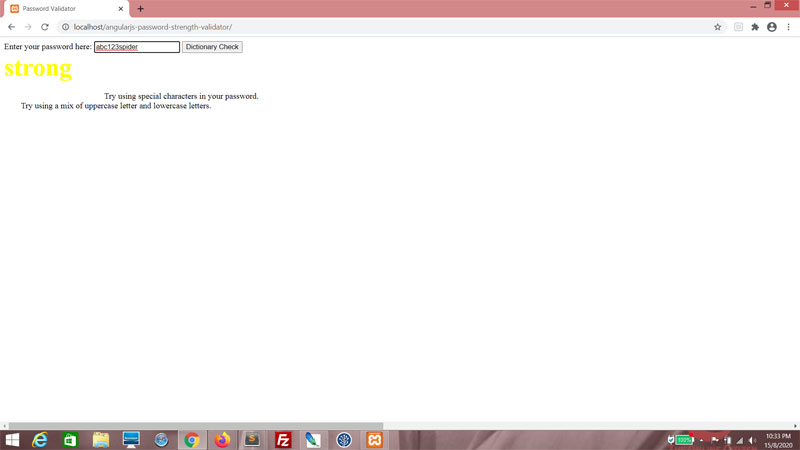
Back to the JavaScript, let's correct this Regular Expression. I somehow forgot to cater for underscores. Imagine that.
js/main.js
if (/[~`!#$%\_\^&@*+=\-\[\]\\';,/{}|\\":<>\?]/g.test($scope.enteredPassword))
{
pts ++;
}
else
{
$scope.strengthMessage += "Try using special characters in your password.\n";
}
{
pts ++;
}
else
{
$scope.strengthMessage += "Try using special characters in your password.\n";
}
Now let's go to the back-end code. This thing was hideously inefficient because it insisted on going through the entire list of words provided even though we only needed to check that at least one of these words was found via the API. We'll also improve it by returning the word found.
Add the variables response and word.
validate.php
$url = $_POST["url"];
$words = json_decode($_POST["words"]);
$wordsFound = false;
$wordToValidate = "";
$response = "";
$word = "";
for ($i = 0; $i < sizeof($words); $i++)
{
$wordToValidate = $words[$i];
$curl = curl_init();
curl_setopt($curl, CURLOPT_SSL_VERIFYHOST, 0);
curl_setopt($curl, CURLOPT_SSL_VERIFYPEER, 0);
curl_setopt_array($curl, array(
CURLOPT_URL => $url . $wordToValidate,
CURLOPT_RETURNTRANSFER => true,
CURLOPT_TIMEOUT => 30,
CURLOPT_HTTP_VERSION => CURL_HTTP_VERSION_1_1,
CURLOPT_CUSTOMREQUEST => "GET",
CURLOPT_HTTPHEADER => array(
"app_id: 958ab193",
"app_key: 60d5994148ce1699defd2194dd9c25b9"
),
));
$response = curl_exec($curl);
if (strpos($response, "404") === false) $wordsFound = true;
curl_close($curl);
}
$result = array("wordsFound" =>$wordsFound);
echo json_encode($result);
$words = json_decode($_POST["words"]);
$wordsFound = false;
$wordToValidate = "";
$response = "";
$word = "";
for ($i = 0; $i < sizeof($words); $i++)
{
$wordToValidate = $words[$i];
$curl = curl_init();
curl_setopt($curl, CURLOPT_SSL_VERIFYHOST, 0);
curl_setopt($curl, CURLOPT_SSL_VERIFYPEER, 0);
curl_setopt_array($curl, array(
CURLOPT_URL => $url . $wordToValidate,
CURLOPT_RETURNTRANSFER => true,
CURLOPT_TIMEOUT => 30,
CURLOPT_HTTP_VERSION => CURL_HTTP_VERSION_1_1,
CURLOPT_CUSTOMREQUEST => "GET",
CURLOPT_HTTPHEADER => array(
"app_id: 958ab193",
"app_key: 60d5994148ce1699defd2194dd9c25b9"
),
));
$response = curl_exec($curl);
if (strpos($response, "404") === false) $wordsFound = true;
curl_close($curl);
}
$result = array("wordsFound" =>$wordsFound);
echo json_encode($result);
Remove this entire If block. Because it's simplistic and just not very good.
validate.php
$response = curl_exec($curl);
//if (strpos($response, "404") === false) $wordsFound = true;
curl_close($curl);
//if (strpos($response, "404") === false) $wordsFound = true;
curl_close($curl);
Instead, run response through the json_decode() function and then attach the result to res.
validate.php
$response = curl_exec($curl);
//if (strpos($response, "404") === false) $wordsFound = true;
$res = json_decode($response);
curl_close($curl);
//if (strpos($response, "404") === false) $wordsFound = true;
$res = json_decode($response);
curl_close($curl);
Check if res has the "id" key using the array_key_exists() function.
validate.php
$response = curl_exec($curl);
//if (strpos($response, "404") === false) $wordsFound = true;
$res = json_decode($response);
if (array_key_exists("id", $res))
{
}
curl_close($curl);
//if (strpos($response, "404") === false) $wordsFound = true;
$res = json_decode($response);
if (array_key_exists("id", $res))
{
}
curl_close($curl);
If so, set wordsFound to true and word to the value of the id key in res.
validate.php
$response = curl_exec($curl);
//if (strpos($response, "404") === false) $wordsFound = true;
$res = json_decode($response);
if (array_key_exists("id", $res))
{
$wordsFound = true;
$word = $res->id;
}
curl_close($curl);
//if (strpos($response, "404") === false) $wordsFound = true;
$res = json_decode($response);
if (array_key_exists("id", $res))
{
$wordsFound = true;
$word = $res->id;
}
curl_close($curl);
And finally, use the break statement to end the For loop processing. You've already found one word and that was all we really wanted, right?
validate.php
if (array_key_exists("id", $res))
{
$wordsFound = true;
$word = $res->id;
break;
}
{
$wordsFound = true;
$word = $res->id;
break;
}
At the end of it, we want to return the word as well.
validate.php
$result = array("wordsFound" => $wordsFound, "word" => $word);
echo json_encode($result);
echo json_encode($result);
Now back to the AJAX call, we're expecting both wordsFound and word. So if wordsFound is true, use the alert() function to display the word. And if not, just say no words were found.
js/main.js
$scope.checkDictionary =
function()
{
var possibleWords = getWords($scope.enteredPassword);
var xmlhttp = new XMLHttpRequest();
xmlhttp.onreadystatechange = function()
{
if (this.readyState == 4 && this.status == 200)
{
var result = JSON.parse(this.responseText);
if (result.wordsFound)
{
//pts --;
//$scope.strengthMessage += "Avoid using dictionary words.\n";
//$scope.strengthCode = getCode(pts);
//return;
if (result.wordsFound)
{
alert("'" + result.word + "' found in dictionary!");
}
else
{
alert("No word found!");
}
}
}
};
xmlhttp.open("POST", "validate.php", true);
xmlhttp.setRequestHeader("Content-type", "application/x-www-form-urlencoded");
xmlhttp.send("words=" + JSON.stringify(possibleWords) + "&url=https://od-api.oxforddictionaries.com:443/api/v2/entries/en-us/");
}
function()
{
var possibleWords = getWords($scope.enteredPassword);
var xmlhttp = new XMLHttpRequest();
xmlhttp.onreadystatechange = function()
{
if (this.readyState == 4 && this.status == 200)
{
var result = JSON.parse(this.responseText);
if (result.wordsFound)
{
//pts --;
//$scope.strengthMessage += "Avoid using dictionary words.\n";
//$scope.strengthCode = getCode(pts);
//return;
if (result.wordsFound)
{
alert("'" + result.word + "' found in dictionary!");
}
else
{
alert("No word found!");
}
}
}
};
xmlhttp.open("POST", "validate.php", true);
xmlhttp.setRequestHeader("Content-type", "application/x-www-form-urlencoded");
xmlhttp.send("words=" + JSON.stringify(possibleWords) + "&url=https://od-api.oxforddictionaries.com:443/api/v2/entries/en-us/");
}
Don't forget to set showDictionaryButton here. We want to disable the button as the API is being called, so that the user can't keep clicking and making a flurry of API calls (and costing me money for no good reason).
js/main.js
$scope.checkDictionary =
function()
{
var possibleWords = getWords($scope.enteredPassword);
$scope.showDictionaryButton = false;
var xmlhttp = new XMLHttpRequest();
xmlhttp.onreadystatechange = function()
{
if (this.readyState == 4 && this.status == 200)
{
var result = JSON.parse(this.responseText);
if (result.wordsFound)
{
//pts --;
//$scope.strengthMessage += "Avoid using dictionary words.\n";
//$scope.strengthCode = getCode(pts);
//return;
if (result.wordsFound)
{
alert("'" + result.word + "' found in dictionary!");
}
else
{
alert("No word found!");
}
}
}
};
xmlhttp.open("POST", "validate.php", true);
xmlhttp.setRequestHeader("Content-type", "application/x-www-form-urlencoded");
xmlhttp.send("words=" + JSON.stringify(possibleWords) + "&url=https://od-api.oxforddictionaries.com:443/api/v2/entries/en-us/");
}
function()
{
var possibleWords = getWords($scope.enteredPassword);
$scope.showDictionaryButton = false;
var xmlhttp = new XMLHttpRequest();
xmlhttp.onreadystatechange = function()
{
if (this.readyState == 4 && this.status == 200)
{
var result = JSON.parse(this.responseText);
if (result.wordsFound)
{
//pts --;
//$scope.strengthMessage += "Avoid using dictionary words.\n";
//$scope.strengthCode = getCode(pts);
//return;
if (result.wordsFound)
{
alert("'" + result.word + "' found in dictionary!");
}
else
{
alert("No word found!");
}
}
}
};
xmlhttp.open("POST", "validate.php", true);
xmlhttp.setRequestHeader("Content-type", "application/x-www-form-urlencoded");
xmlhttp.send("words=" + JSON.stringify(possibleWords) + "&url=https://od-api.oxforddictionaries.com:443/api/v2/entries/en-us/");
}
Enter a series of five letters or more. The button should be enabled. Then click the button.

Search was successful!

And if we do this...

Search was not successful!

Thanks for reading!
I don't recommend doing back to this version of AngularJS, of course. But the point today was to update the API and improve the code. The framework used is really secondary.
May your search not be in vain,
T___T
T___T


