We'll start off with something simple. Just before displaying the theme, call the assignWords() method.
begin: function ()
{
this.themeIndex = this.generateRandomNo(themes.length);
this.assignWords();
this.displayTheme();
this.seconds = 300;
this.decrementCounter();
$(".dashboard .message").html("Search for words both horizontal and vertical. Each word is five letters and longer.");
$("#btnGo").html("↺");
},
{
this.themeIndex = this.generateRandomNo(themes.length);
this.assignWords();
this.displayTheme();
this.seconds = 300;
this.decrementCounter();
$(".dashboard .message").html("Search for words both horizontal and vertical. Each word is five letters and longer.");
$("#btnGo").html("↺");
},
Create the method. Grab themeIndex, and set words to an empty array. Declare variable possibleWordList and set it to the words array of the element in themes pointed to by themeIndex. There's only one possible value right now, so it should always return the list of sea creature names.
begin: function ()
{
this.themeIndex = this.generateRandomNo(themes.length);
this.assignWords();
this.displayTheme();
this.seconds = 300;
this.decrementCounter();
$(".dashboard .message").html("Search for words both horizontal and vertical. Each word is five letters and longer.");
$("#btnGo").html("↺");
},
assignWords: function()
{
themeIndex = this.themeIndex;
this.words = [];
var possibleWordList = themes[themeIndex].words;
},
decrementCounter: function ()
{
{
this.themeIndex = this.generateRandomNo(themes.length);
this.assignWords();
this.displayTheme();
this.seconds = 300;
this.decrementCounter();
$(".dashboard .message").html("Search for words both horizontal and vertical. Each word is five letters and longer.");
$("#btnGo").html("↺");
},
assignWords: function()
{
themeIndex = this.themeIndex;
this.words = [];
var possibleWordList = themes[themeIndex].words;
},
decrementCounter: function ()
{
And while words has less elements than maxWords...
assignWords: function()
{
themeIndex = this.themeIndex;
this.words = [];
var possibleWordList = themes[themeIndex].words;
while (this.words.length < this.maxWords)
{
}
},
{
themeIndex = this.themeIndex;
this.words = [];
var possibleWordList = themes[themeIndex].words;
while (this.words.length < this.maxWords)
{
}
},
Grab a random element from possibleWordList.
assignWords: function()
{
themeIndex = this.themeIndex;
this.words = [];
var possibleWordList = themes[themeIndex].words;
while (this.words.length < this.maxWords)
{
var assignedWord = possibleWordList[this.generateRandomNo(possibleWordList.length)];
}
},
{
themeIndex = this.themeIndex;
this.words = [];
var possibleWordList = themes[themeIndex].words;
while (this.words.length < this.maxWords)
{
var assignedWord = possibleWordList[this.generateRandomNo(possibleWordList.length)];
}
},
Push that word into words, encapsulating it into an object, along with a property, assigned, which is false. Then remove that word from possibleWordList using the filter() method.
What we've basically done is - create a list of all possible words, grab words randomly from the list to populate the words array with, deleting that word from the list of possible words as we do. So the list gets shorter each time and we don't get repeats.
assignWords: function()
{
themeIndex = this.themeIndex;
this.words = [];
var possibleWordList = themes[themeIndex].words;
while (this.words.length < this.maxWords)
{
var assignedWord = possibleWordList[this.generateRandomNo(possibleWordList.length)];
this.words.push({word: assignedWord, assigned: false});
possibleWordList = possibleWordList.filter((x) => { return x != assignedWord; });
}
},
{
themeIndex = this.themeIndex;
this.words = [];
var possibleWordList = themes[themeIndex].words;
while (this.words.length < this.maxWords)
{
var assignedWord = possibleWordList[this.generateRandomNo(possibleWordList.length)];
this.words.push({word: assignedWord, assigned: false});
possibleWordList = possibleWordList.filter((x) => { return x != assignedWord; });
}
},
Now call the populateGrid() method.
begin: function ()
{
this.themeIndex = this.generateRandomNo(themes.length);
this.assignWords();
this.displayTheme();
this.populateGrid();
this.seconds = 300;
this.decrementCounter();
$(".dashboard .message").html("Search for words both horizontal and vertical. Each word is five letters and longer.");
$("#btnGo").html("↺");
},
{
this.themeIndex = this.generateRandomNo(themes.length);
this.assignWords();
this.displayTheme();
this.populateGrid();
this.seconds = 300;
this.decrementCounter();
$(".dashboard .message").html("Search for words both horizontal and vertical. Each word is five letters and longer.");
$("#btnGo").html("↺");
},
populateGrid() is a method that takes words from the words array (which we just populated) and places them randomly in the grid. Right now the div styled by wordgrid is totally empty. We should make sure of that by wiping it clean like this.
decrementCounter: function ()
{
if (this.timer == undefined)
{
this.timer = setInterval
(
() =>
{
if (this.seconds > 0)
{
this.seconds = this.seconds - 1;
}
else
{
clearInterval(this.timer);
this.timer = undefined;
$(".dashboard .message").html("Time's up! Better luck next time!");
$("#btnGo").html("▶");
}
$(".dashboard .timer .seconds").html(this.seconds);
}
,1000
)
}
},
populateGrid: function ()
{
$(".wordgrid").html("");
},
generateRandomNo: function (max)
{
return Math.floor((Math.random() * (max)));
},
{
if (this.timer == undefined)
{
this.timer = setInterval
(
() =>
{
if (this.seconds > 0)
{
this.seconds = this.seconds - 1;
}
else
{
clearInterval(this.timer);
this.timer = undefined;
$(".dashboard .message").html("Time's up! Better luck next time!");
$("#btnGo").html("▶");
}
$(".dashboard .timer .seconds").html(this.seconds);
}
,1000
)
}
},
populateGrid: function ()
{
$(".wordgrid").html("");
},
generateRandomNo: function (max)
{
return Math.floor((Math.random() * (max)));
},
And then set squares to an empty array.
populateGrid: function ()
{
$(".wordgrid").html("");
this.squares = [];
},
{
$(".wordgrid").html("");
this.squares = [];
},
We want to make a grid of squares, specifically, maxSize squares by maxSize squares. So what we do is iterate from 0 to maxSize, and make maxSize empty elements in squares.
populateGrid: function ()
{
$(".wordgrid").html("");
this.squares = [];
for (var x = 0; x < this.maxSize; x++)
{
this.squares[x] = [];
}
},
{
$(".wordgrid").html("");
this.squares = [];
for (var x = 0; x < this.maxSize; x++)
{
this.squares[x] = [];
}
},
Then we again iterate from 0 to maxSize, and, using the push() method, set each array in squares to be an array of objects. Each object will have these properties as shown. I'll explain what they're for later on.
populateGrid: function ()
{
$(".wordgrid").html("");
this.squares = [];
for (var x = 0; x < this.maxSize; x++)
{
this.squares[x] = [];
for (var y = 0; y < this.maxSize; y++)
{
this.squares[x].push
(
{
letter: "",
selected: false,
correct: false,
dir: undefined,
intersected: false
}
);
}
}
},
{
$(".wordgrid").html("");
this.squares = [];
for (var x = 0; x < this.maxSize; x++)
{
this.squares[x] = [];
for (var y = 0; y < this.maxSize; y++)
{
this.squares[x].push
(
{
letter: "",
selected: false,
correct: false,
dir: undefined,
intersected: false
}
);
}
}
},
And for each array object, we create a div, and append some useful data in it. We also style it using the CSS class letter.
populateGrid: function ()
{
$(".wordgrid").html("");
this.squares = [];
for (var x = 0; x < this.maxSize; x++)
{
this.squares[x] = [];
for (var y = 0; y < this.maxSize; y++)
{
this.squares[x].push
(
{
letter: "",
selected: false,
correct: false,
dir: undefined,
intersected: false
}
);
var square = $("<div><div>");
square.attr("data-x", x);
square.attr("data-y", y);
square.addClass("letter");
}
}
},
{
$(".wordgrid").html("");
this.squares = [];
for (var x = 0; x < this.maxSize; x++)
{
this.squares[x] = [];
for (var y = 0; y < this.maxSize; y++)
{
this.squares[x].push
(
{
letter: "",
selected: false,
correct: false,
dir: undefined,
intersected: false
}
);
var square = $("<div><div>");
square.attr("data-x", x);
square.attr("data-y", y);
square.addClass("letter");
}
}
},
And then we set a click event, which, for now, will do absolutely nothing.
populateGrid: function ()
{
$(".wordgrid").html("");
this.squares = [];
for (var x = 0; x < this.maxSize; x++)
{
this.squares[x] = [];
for (var y = 0; y < this.maxSize; y++)
{
this.squares[x].push
(
{
letter: "",
selected: false,
correct: false,
dir: undefined,
intersected: false
}
);
var square = $("<div><div>");
square.attr("data-x", x);
square.attr("data-y", y);
square.addClass("letter");
square.click
(
(e) =>
{
}
);
}
}
},
{
$(".wordgrid").html("");
this.squares = [];
for (var x = 0; x < this.maxSize; x++)
{
this.squares[x] = [];
for (var y = 0; y < this.maxSize; y++)
{
this.squares[x].push
(
{
letter: "",
selected: false,
correct: false,
dir: undefined,
intersected: false
}
);
var square = $("<div><div>");
square.attr("data-x", x);
square.attr("data-y", y);
square.addClass("letter");
square.click
(
(e) =>
{
}
);
}
}
},
After all that, we then append the element to the div.
populateGrid: function ()
{
$(".wordgrid").html("");
this.squares = [];
for (var x = 0; x < this.maxSize; x++)
{
this.squares[x] = [];
for (var y = 0; y < this.maxSize; y++)
{
this.squares[x].push
(
{
letter: "",
selected: false,
correct: false,
dir: undefined,
intersected: false
}
);
var square = $("<div><div>");
square.attr("data-x", x);
square.attr("data-y", y);
square.addClass("letter");
square.click
(
(e) =>
{
}
);
$(".wordgrid").append(square);
}
}
},
{
$(".wordgrid").html("");
this.squares = [];
for (var x = 0; x < this.maxSize; x++)
{
this.squares[x] = [];
for (var y = 0; y < this.maxSize; y++)
{
this.squares[x].push
(
{
letter: "",
selected: false,
correct: false,
dir: undefined,
intersected: false
}
);
var square = $("<div><div>");
square.attr("data-x", x);
square.attr("data-y", y);
square.addClass("letter");
square.click
(
(e) =>
{
}
);
$(".wordgrid").append(square);
}
}
},
This is the letter CSS class. Width and height have been set to 4%, with some margins. We will float this left. These are the only things necessary for the layout to work; the rest of the properties I'll leave up to your personal taste.
.score .meter .fill
{
width: 100%;
height: 100%;
color: rgba(255, 255, 255, 1);
text-align: right;
font-weight: bold;
}
.letter
{
width: 4%;
height: 4%;
margin: 1% 1% 0 0;
float: left;
color: rgba(255, 200, 0, 1);
cursor: pointer;
text-align: center;
font-size: 1.2em;
font-weight: bold;
text-transform: uppercase;
border-radius: 50%;
}
{
width: 100%;
height: 100%;
color: rgba(255, 255, 255, 1);
text-align: right;
font-weight: bold;
}
.letter
{
width: 4%;
height: 4%;
margin: 1% 1% 0 0;
float: left;
color: rgba(255, 200, 0, 1);
cursor: pointer;
text-align: center;
font-size: 1.2em;
font-weight: bold;
text-transform: uppercase;
border-radius: 50%;
}
We have a grid!

Now let's start placing the letters. Declare unassigned, an empty array, and i.
populateGrid: function ()
{
$(".wordgrid").html("");
this.squares = [];
for (var x = 0; x < this.maxSize; x++)
{
this.squares[x] = [];
for (var y = 0; y < this.maxSize; y++)
{
this.squares[x].push
(
{
letter: "",
selected: false,
correct: false,
dir: undefined,
intersected: false
}
);
var square = $("<div><div>");
square.attr("data-x", x);
square.attr("data-y", y);
square.addClass("letter");
square.click
(
(e) =>
{
}
);
$(".wordgrid").append(square);
}
}
var unassigned = [];
var i;
},
{
$(".wordgrid").html("");
this.squares = [];
for (var x = 0; x < this.maxSize; x++)
{
this.squares[x] = [];
for (var y = 0; y < this.maxSize; y++)
{
this.squares[x].push
(
{
letter: "",
selected: false,
correct: false,
dir: undefined,
intersected: false
}
);
var square = $("<div><div>");
square.attr("data-x", x);
square.attr("data-y", y);
square.addClass("letter");
square.click
(
(e) =>
{
}
);
$(".wordgrid").append(square);
}
}
var unassigned = [];
var i;
},
The next operation will be carried out, and repeated as long as there are elements in unassigned.
var unassigned = [];
var i;
do
{
}
while (unassigned.length > 0);
var i;
do
{
}
while (unassigned.length > 0);
The method populateGridWithWords() will be called, and after that, we set unassigned to the filtered words array, getting all the elements where assigned is false. Remember the assigned property in words we defaulted to false earlier?
This ensures that all the words in words are assigned before the script can proceed.
var unassigned = [];
var i;
do
{
this.populateGridWithWords();
unassigned = this.words.filter((x) => {return !x.assigned;});
}
while (unassigned.length > 0);
var i;
do
{
this.populateGridWithWords();
unassigned = this.words.filter((x) => {return !x.assigned;});
}
while (unassigned.length > 0);
And of course, we'll want to create populateGridWithWords(). We start off the method by running a nested For loop to "clean" the data. Basically reset both the squares array and the grid to an initial state. This is important because if this method is being run, not all words have been assigned and we want to start the operation over.
populateGrid: function ()
{
$(".wordgrid").html("");
this.squares = [];
for (var x = 0; x < this.maxSize; x++)
{
this.squares[x] = [];
for (var y = 0; y < this.maxSize; y++)
{
this.squares[x].push
(
{
letter: "",
selected: false,
correct: false,
dir: undefined,
intersected: false
}
);
var square = $("<div><div>");
square.attr("data-x", x);
square.attr("data-y", y);
square.addClass("letter");
square.click
(
(e) =>
{
}
);
$(".wordgrid").append(square);
}
}
var unassigned = [];
var i;
do
{
this.populateGridWithWords();
unassigned = this.words.filter((x) => {return !x.assigned;});
}
while (unassigned.length > 0);
},
populateGridWithWords: function()
{
for (var x = 0; x < this.maxSize; x++)
{
for (var y = 0; y < this.maxSize; y++)
{
this.squares[x][y].letter = "";
this.squares[x][y].correct = false;
this.squares[x][y].dir = undefined;
this.squares[x][y].intersected = false;
$(".letter[data-x=" + x + "][data-y=" + y + "]").html("");
}
}
},
generateRandomNo: function (max)
{
return Math.floor((Math.random() * (max)));
},
{
$(".wordgrid").html("");
this.squares = [];
for (var x = 0; x < this.maxSize; x++)
{
this.squares[x] = [];
for (var y = 0; y < this.maxSize; y++)
{
this.squares[x].push
(
{
letter: "",
selected: false,
correct: false,
dir: undefined,
intersected: false
}
);
var square = $("<div><div>");
square.attr("data-x", x);
square.attr("data-y", y);
square.addClass("letter");
square.click
(
(e) =>
{
}
);
$(".wordgrid").append(square);
}
}
var unassigned = [];
var i;
do
{
this.populateGridWithWords();
unassigned = this.words.filter((x) => {return !x.assigned;});
}
while (unassigned.length > 0);
},
populateGridWithWords: function()
{
for (var x = 0; x < this.maxSize; x++)
{
for (var y = 0; y < this.maxSize; y++)
{
this.squares[x][y].letter = "";
this.squares[x][y].correct = false;
this.squares[x][y].dir = undefined;
this.squares[x][y].intersected = false;
$(".letter[data-x=" + x + "][data-y=" + y + "]").html("");
}
}
},
generateRandomNo: function (max)
{
return Math.floor((Math.random() * (max)));
},
Now iterate through the words array and set all assigned properties to false. Declare variable word, and set it to the current element's word property. Also declare possibleSlots, an empty array.
populateGridWithWords: function()
{
for (var x = 0; x < this.maxSize; x++)
{
for (var y = 0; y < this.maxSize; y++)
{
this.squares[x][y].letter = "";
this.squares[x][y].correct = false;
this.squares[x][y].dir = undefined;
this.squares[x][y].intersected = false;
$(".letter[data-x=" + x + "][data-y=" + y + "]").html("");
}
}
for (var i = 0; i < this.words.length; i++)
{
this.words[i].assigned = false;
var word = this.words[i].word;
var possibleSlots = [];
}
},
{
for (var x = 0; x < this.maxSize; x++)
{
for (var y = 0; y < this.maxSize; y++)
{
this.squares[x][y].letter = "";
this.squares[x][y].correct = false;
this.squares[x][y].dir = undefined;
this.squares[x][y].intersected = false;
$(".letter[data-x=" + x + "][data-y=" + y + "]").html("");
}
}
for (var i = 0; i < this.words.length; i++)
{
this.words[i].assigned = false;
var word = this.words[i].word;
var possibleSlots = [];
}
},
Use a nested For loop to go through the entire grid.
for (var i = 0; i < this.words.length; i++)
{
this.words[i].assigned = false;
var word = this.words[i].word;
var possibleSlots = [];
for (var x = 0; x < this.maxSize; x++)
{
for (var y = 0; y < this.maxSize; y++)
{
}
}
}
{
this.words[i].assigned = false;
var word = this.words[i].word;
var possibleSlots = [];
for (var x = 0; x < this.maxSize; x++)
{
for (var y = 0; y < this.maxSize; y++)
{
}
}
}
Here, we use the isWordSpaceAvailable() method, which we will create after this. The x and y coordinates (supplied by the nested For loop), the direction variable dir (0 for horizontal and 1 for vertical) and word are passed in as arguments. If the script finds either a horizontal or vertical space, it pushes an object into possible slots. If there are no elements in possibleSlots after this, the entire operation is a failure and we use the return statement to abort it, and retry.
for (var i = 0; i < this.words.length; i++)
{
this.words[i].assigned = false;
var word = this.words[i].word;
var possibleSlots = [];
for (var x = 0; x < this.maxSize; x++)
{
for (var y = 0; y < this.maxSize; y++)
{
if (this.isWordSpaceAvailable(x, y, 0, word))
{
possibleSlots.push({x: x, y: y, dir: 0});
}
if (this.isWordSpaceAvailable(x, y, 1, word))
{
possibleSlots.push({x: x, y: y, dir: 1});
}
if (possibleSlots.length == 0) return;
}
}
}
{
this.words[i].assigned = false;
var word = this.words[i].word;
var possibleSlots = [];
for (var x = 0; x < this.maxSize; x++)
{
for (var y = 0; y < this.maxSize; y++)
{
if (this.isWordSpaceAvailable(x, y, 0, word))
{
possibleSlots.push({x: x, y: y, dir: 0});
}
if (this.isWordSpaceAvailable(x, y, 1, word))
{
possibleSlots.push({x: x, y: y, dir: 1});
}
if (possibleSlots.length == 0) return;
}
}
}
Next, we declare variables slot and slotIndex. slotIndex is initialized as 0. Then possibleSlots_intersected is declared. It's an array of all elements in squares that aren't empty strings, as pointed to by the x and y properties in possibleSlots. possibleSlots here means places in the grid which the word can begin in - the x and y coordinates, and direction.
for (var i = 0; i < this.words.length; i++)
{
this.words[i].assigned = false;
var word = this.words[i].word;
var possibleSlots = [];
for (var x = 0; x < this.maxSize; x++)
{
for (var y = 0; y < this.maxSize; y++)
{
if (this.isWordSpaceAvailable(x, y, 0, word))
{
possibleSlots.push({x: x, y: y, dir: 0});
}
if (this.isWordSpaceAvailable(x, y, 1, word))
{
possibleSlots.push({x: x, y: y, dir: 1});
}
if (possibleSlots.length == 0) return;
}
}
var slotIndex = 0;
var slot;
var possibleSlots_intersected = possibleSlots.filter((s) => {return this.squares[s.x][s.y].letter != "";});
}
{
this.words[i].assigned = false;
var word = this.words[i].word;
var possibleSlots = [];
for (var x = 0; x < this.maxSize; x++)
{
for (var y = 0; y < this.maxSize; y++)
{
if (this.isWordSpaceAvailable(x, y, 0, word))
{
possibleSlots.push({x: x, y: y, dir: 0});
}
if (this.isWordSpaceAvailable(x, y, 1, word))
{
possibleSlots.push({x: x, y: y, dir: 1});
}
if (possibleSlots.length == 0) return;
}
}
var slotIndex = 0;
var slot;
var possibleSlots_intersected = possibleSlots.filter((s) => {return this.squares[s.x][s.y].letter != "";});
}
This is because we want the words to possibly cross each other, like so. possibleSlots_intersected will provide a list of possible slots that are open to two words sharing a letter space.
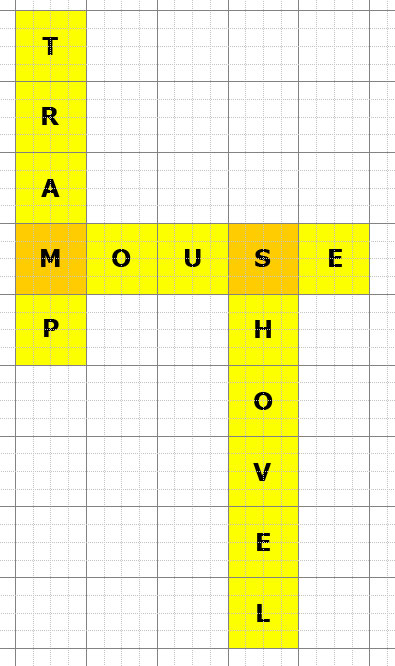
So here, a conditional checks if possibleSlots_intersected is empty. If it is not, then that means there are possible places for intersection. We'll use possibleSlots_intersected and the generateRandomNo() method to derive slot.
for (var i = 0; i < this.words.length; i++)
{
this.words[i].assigned = false;
var word = this.words[i].word;
var possibleSlots = [];
for (var x = 0; x < this.maxSize; x++)
{
for (var y = 0; y < this.maxSize; y++)
{
if (this.isWordSpaceAvailable(x, y, 0, word))
{
possibleSlots.push({x: x, y: y, dir: 0});
}
if (this.isWordSpaceAvailable(x, y, 1, word))
{
possibleSlots.push({x: x, y: y, dir: 1});
}
if (possibleSlots.length == 0) return;
}
}
var slotIndex = 0;
var slot;
var possibleSlots_intersected = possibleSlots.filter((s) => {return this.squares[s.x][s.y].letter != "";});
if (possibleSlots_intersected.length == 0)
{
}
else
{
slotIndex = this.generateRandomNo(possibleSlots_intersected.length);
slot = possibleSlots_intersected[slotIndex];
}
}
{
this.words[i].assigned = false;
var word = this.words[i].word;
var possibleSlots = [];
for (var x = 0; x < this.maxSize; x++)
{
for (var y = 0; y < this.maxSize; y++)
{
if (this.isWordSpaceAvailable(x, y, 0, word))
{
possibleSlots.push({x: x, y: y, dir: 0});
}
if (this.isWordSpaceAvailable(x, y, 1, word))
{
possibleSlots.push({x: x, y: y, dir: 1});
}
if (possibleSlots.length == 0) return;
}
}
var slotIndex = 0;
var slot;
var possibleSlots_intersected = possibleSlots.filter((s) => {return this.squares[s.x][s.y].letter != "";});
if (possibleSlots_intersected.length == 0)
{
}
else
{
slotIndex = this.generateRandomNo(possibleSlots_intersected.length);
slot = possibleSlots_intersected[slotIndex];
}
}
If there are no possible starting slots for intersection, we use possibleSlots instead to derive slot. And then we set that square's intersected property to true. Why, you might ask? It's a wee bit tricky, but trust me, it's necessary. I'll explain soon enough!
for (var i = 0; i < this.words.length; i++)
{
this.words[i].assigned = false;
var word = this.words[i].word;
var possibleSlots = [];
for (var x = 0; x < this.maxSize; x++)
{
for (var y = 0; y < this.maxSize; y++)
{
if (this.isWordSpaceAvailable(x, y, 0, word))
{
possibleSlots.push({x: x, y: y, dir: 0});
}
if (this.isWordSpaceAvailable(x, y, 1, word))
{
possibleSlots.push({x: x, y: y, dir: 1});
}
if (possibleSlots.length == 0) return;
}
}
var slotIndex = 0;
var slot;
var possibleSlots_intersected = possibleSlots.filter((s) => {return this.squares[s.x][s.y].letter != "";});
if (possibleSlots_intersected.length == 0)
{
slotIndex = this.generateRandomNo(possibleSlots.length);
slot = possibleSlots[slotIndex];
this.squares[slot.x][slot.y].intersected = true;
}
else
{
slotIndex = this.generateRandomNo(possibleSlots_intersected.length);
slot = possibleSlots_intersected[slotIndex];
}
}
{
this.words[i].assigned = false;
var word = this.words[i].word;
var possibleSlots = [];
for (var x = 0; x < this.maxSize; x++)
{
for (var y = 0; y < this.maxSize; y++)
{
if (this.isWordSpaceAvailable(x, y, 0, word))
{
possibleSlots.push({x: x, y: y, dir: 0});
}
if (this.isWordSpaceAvailable(x, y, 1, word))
{
possibleSlots.push({x: x, y: y, dir: 1});
}
if (possibleSlots.length == 0) return;
}
}
var slotIndex = 0;
var slot;
var possibleSlots_intersected = possibleSlots.filter((s) => {return this.squares[s.x][s.y].letter != "";});
if (possibleSlots_intersected.length == 0)
{
slotIndex = this.generateRandomNo(possibleSlots.length);
slot = possibleSlots[slotIndex];
this.squares[slot.x][slot.y].intersected = true;
}
else
{
slotIndex = this.generateRandomNo(possibleSlots_intersected.length);
slot = possibleSlots_intersected[slotIndex];
}
}
Now, use a For loop to iterate through every letter in the word. Declare letters as an array of all the elements in the word, using the split() method. Set a conditional for the dir property, and then set the assigned property to true.
for (var i = 0; i < this.words.length; i++)
{
this.words[i].assigned = false;
var word = this.words[i].word;
var possibleSlots = [];
for (var x = 0; x < this.maxSize; x++)
{
for (var y = 0; y < this.maxSize; y++)
{
if (this.isWordSpaceAvailable(x, y, 0, word))
{
possibleSlots.push({x: x, y: y, dir: 0});
}
if (this.isWordSpaceAvailable(x, y, 1, word))
{
possibleSlots.push({x: x, y: y, dir: 1});
}
if (possibleSlots.length == 0) return;
}
}
var slotIndex = 0;
var slot;
var possibleSlots_intersected = possibleSlots.filter((s) => {return this.squares[s.x][s.y].letter != "";});
if (possibleSlots_intersected.length == 0)
{
slotIndex = this.generateRandomNo(possibleSlots.length);
slot = possibleSlots[slotIndex];
this.squares[slot.x][slot.y].intersected = true;
}
else
{
slotIndex = this.generateRandomNo(possibleSlots_intersected.length);
slot = possibleSlots_intersected[slotIndex];
}
for (var j = 0; j < word.length; j++)
{
var letters = word.split("");
if (slot.dir == 0)
{
}
if (slot.dir == 1)
{
}
this.words[i].assigned = true;
}
}
{
this.words[i].assigned = false;
var word = this.words[i].word;
var possibleSlots = [];
for (var x = 0; x < this.maxSize; x++)
{
for (var y = 0; y < this.maxSize; y++)
{
if (this.isWordSpaceAvailable(x, y, 0, word))
{
possibleSlots.push({x: x, y: y, dir: 0});
}
if (this.isWordSpaceAvailable(x, y, 1, word))
{
possibleSlots.push({x: x, y: y, dir: 1});
}
if (possibleSlots.length == 0) return;
}
}
var slotIndex = 0;
var slot;
var possibleSlots_intersected = possibleSlots.filter((s) => {return this.squares[s.x][s.y].letter != "";});
if (possibleSlots_intersected.length == 0)
{
slotIndex = this.generateRandomNo(possibleSlots.length);
slot = possibleSlots[slotIndex];
this.squares[slot.x][slot.y].intersected = true;
}
else
{
slotIndex = this.generateRandomNo(possibleSlots_intersected.length);
slot = possibleSlots_intersected[slotIndex];
}
for (var j = 0; j < word.length; j++)
{
var letters = word.split("");
if (slot.dir == 0)
{
}
if (slot.dir == 1)
{
}
this.words[i].assigned = true;
}
}
What we're doing here is populating the squares array with the letters from the words. dir is important here; again, I'll explain why later. At the end of it, we'll also populate the grid, using jQuery, with the letter and the x and y coordinates.
for (var i = 0; i < this.words.length; i++)
{
this.words[i].assigned = false;
var word = this.words[i].word;
var possibleSlots = [];
for (var x = 0; x < this.maxSize; x++)
{
for (var y = 0; y < this.maxSize; y++)
{
if (this.isWordSpaceAvailable(x, y, 0, word))
{
possibleSlots.push({x: x, y: y, dir: 0});
}
if (this.isWordSpaceAvailable(x, y, 1, word))
{
possibleSlots.push({x: x, y: y, dir: 1});
}
if (possibleSlots.length == 0) return;
}
}
var slotIndex = 0;
var slot;
var possibleSlots_intersected = possibleSlots.filter((s) => {return this.squares[s.x][s.y].letter != "";});
if (possibleSlots_intersected.length == 0)
{
slotIndex = this.generateRandomNo(possibleSlots.length);
slot = possibleSlots[slotIndex];
this.squares[slot.x][slot.y].intersected = true;
}
else
{
slotIndex = this.generateRandomNo(possibleSlots_intersected.length);
slot = possibleSlots_intersected[slotIndex];
}
for (var j = 0; j < word.length; j++)
{
var letters = word.split("");
if (slot.dir == 0)
{
this.squares[slot.x + j][slot.y].letter = letters[j];
this.squares[slot.x + j][slot.y].correct = true;
this.squares[slot.x + j][slot.y].dir = slot.dir;
$(".letter[data-x=" + (slot.x + j) + "][data-y=" + (slot.y) + "]").html(letters[j]);
}
if (slot.dir == 1)
{
this.squares[slot.x][slot.y + j].letter = letters[j];
this.squares[slot.x][slot.y + j].correct = true;
this.squares[slot.x][slot.y + j].dir = slot.dir;
$(".letter[data-x=" + (slot.x) + "][data-y=" + (slot.y + j) + "]").html(letters[j]);
}
this.words[i].assigned = true;
}
}
{
this.words[i].assigned = false;
var word = this.words[i].word;
var possibleSlots = [];
for (var x = 0; x < this.maxSize; x++)
{
for (var y = 0; y < this.maxSize; y++)
{
if (this.isWordSpaceAvailable(x, y, 0, word))
{
possibleSlots.push({x: x, y: y, dir: 0});
}
if (this.isWordSpaceAvailable(x, y, 1, word))
{
possibleSlots.push({x: x, y: y, dir: 1});
}
if (possibleSlots.length == 0) return;
}
}
var slotIndex = 0;
var slot;
var possibleSlots_intersected = possibleSlots.filter((s) => {return this.squares[s.x][s.y].letter != "";});
if (possibleSlots_intersected.length == 0)
{
slotIndex = this.generateRandomNo(possibleSlots.length);
slot = possibleSlots[slotIndex];
this.squares[slot.x][slot.y].intersected = true;
}
else
{
slotIndex = this.generateRandomNo(possibleSlots_intersected.length);
slot = possibleSlots_intersected[slotIndex];
}
for (var j = 0; j < word.length; j++)
{
var letters = word.split("");
if (slot.dir == 0)
{
this.squares[slot.x + j][slot.y].letter = letters[j];
this.squares[slot.x + j][slot.y].correct = true;
this.squares[slot.x + j][slot.y].dir = slot.dir;
$(".letter[data-x=" + (slot.x + j) + "][data-y=" + (slot.y) + "]").html(letters[j]);
}
if (slot.dir == 1)
{
this.squares[slot.x][slot.y + j].letter = letters[j];
this.squares[slot.x][slot.y + j].correct = true;
this.squares[slot.x][slot.y + j].dir = slot.dir;
$(".letter[data-x=" + (slot.x) + "][data-y=" + (slot.y + j) + "]").html(letters[j]);
}
this.words[i].assigned = true;
}
}
And finally, we create the isWordSpaceAvailable() method to help determine if a given square is a suitable place to begin a word. Obviously, there are certain conditions to look out for. If dir is horizontal and the word is so long that starting the word near the end of the grid would cause the word to overrun the set boundaries, then obviously we don't want that. Ditto for vertical.
We begin by declaring letters as an array of all the letters in the parameter word.
populateGridWithWords: function()
{
for (var x = 0; x < this.maxSize; x++)
{
for (var y = 0; y < this.maxSize; y++)
{
this.squares[x][y].letter = "";
this.squares[x][y].correct = false;
this.squares[x][y].dir = undefined;
this.squares[x][y].intersected = false;
$(".letter[data-x=" + x + "][data-y=" + y + "]").html("");
}
}
for (var i = 0; i < this.words.length; i++)
{
this.words[i].assigned = false;
var word = this.words[i].word;
var possibleSlots = [];
for (var x = 0; x < this.maxSize; x++)
{
for (var y = 0; y < this.maxSize; y++)
{
if (this.isWordSpaceAvailable(x, y, 0, word))
{
possibleSlots.push({x: x, y: y, dir: 0});
}
if (this.isWordSpaceAvailable(x, y, 1, word))
{
possibleSlots.push({x: x, y: y, dir: 1});
}
if (possibleSlots.length == 0) return;
}
}
var slotIndex = 0;
var slot;
var possibleSlots_intersected = possibleSlots.filter((s) => {return this.squares[s.x][s.y].letter != "";});
if (possibleSlots_intersected.length == 0)
{
slotIndex = this.generateRandomNo(possibleSlots.length);
slot = possibleSlots[slotIndex];
this.squares[slot.x][slot.y].intersected = true;
}
else
{
slotIndex = this.generateRandomNo(possibleSlots_intersected.length);
slot = possibleSlots_intersected[slotIndex];
}
for (var j = 0; j < word.length; j++)
{
var letters = word.split("");
if (slot.dir == 0)
{
this.squares[slot.x + j][slot.y].letter = letters[j];
this.squares[slot.x + j][slot.y].correct = true;
this.squares[slot.x + j][slot.y].dir = slot.dir;
$(".letter[data-x=" + (slot.x + j) + "][data-y=" + (slot.y) + "]").html(letters[j]);
}
if (slot.dir == 1)
{
this.squares[slot.x][slot.y + j].letter = letters[j];
this.squares[slot.x][slot.y + j].correct = true;
this.squares[slot.x][slot.y + j].dir = slot.dir;
$(".letter[data-x=" + (slot.x) + "][data-y=" + (slot.y + j) + "]").html(letters[j]);
}
this.words[i].assigned = true;
}
}
},
isWordSpaceAvailable: function (x, y, dir, word)
{
var letters = word.split("");
},
generateRandomNo: function (max)
{
return Math.floor((Math.random() * (max)));
},
{
for (var x = 0; x < this.maxSize; x++)
{
for (var y = 0; y < this.maxSize; y++)
{
this.squares[x][y].letter = "";
this.squares[x][y].correct = false;
this.squares[x][y].dir = undefined;
this.squares[x][y].intersected = false;
$(".letter[data-x=" + x + "][data-y=" + y + "]").html("");
}
}
for (var i = 0; i < this.words.length; i++)
{
this.words[i].assigned = false;
var word = this.words[i].word;
var possibleSlots = [];
for (var x = 0; x < this.maxSize; x++)
{
for (var y = 0; y < this.maxSize; y++)
{
if (this.isWordSpaceAvailable(x, y, 0, word))
{
possibleSlots.push({x: x, y: y, dir: 0});
}
if (this.isWordSpaceAvailable(x, y, 1, word))
{
possibleSlots.push({x: x, y: y, dir: 1});
}
if (possibleSlots.length == 0) return;
}
}
var slotIndex = 0;
var slot;
var possibleSlots_intersected = possibleSlots.filter((s) => {return this.squares[s.x][s.y].letter != "";});
if (possibleSlots_intersected.length == 0)
{
slotIndex = this.generateRandomNo(possibleSlots.length);
slot = possibleSlots[slotIndex];
this.squares[slot.x][slot.y].intersected = true;
}
else
{
slotIndex = this.generateRandomNo(possibleSlots_intersected.length);
slot = possibleSlots_intersected[slotIndex];
}
for (var j = 0; j < word.length; j++)
{
var letters = word.split("");
if (slot.dir == 0)
{
this.squares[slot.x + j][slot.y].letter = letters[j];
this.squares[slot.x + j][slot.y].correct = true;
this.squares[slot.x + j][slot.y].dir = slot.dir;
$(".letter[data-x=" + (slot.x + j) + "][data-y=" + (slot.y) + "]").html(letters[j]);
}
if (slot.dir == 1)
{
this.squares[slot.x][slot.y + j].letter = letters[j];
this.squares[slot.x][slot.y + j].correct = true;
this.squares[slot.x][slot.y + j].dir = slot.dir;
$(".letter[data-x=" + (slot.x) + "][data-y=" + (slot.y + j) + "]").html(letters[j]);
}
this.words[i].assigned = true;
}
}
},
isWordSpaceAvailable: function (x, y, dir, word)
{
var letters = word.split("");
},
generateRandomNo: function (max)
{
return Math.floor((Math.random() * (max)));
},
We prepare conditional blocks for dir. In both cases, we return true at the end of the block.
isWordSpaceAvailable: function (x, y, dir, word)
{
var letters = word.split("");
if (dir == 0)
{
return true;
}
if (dir == 1)
{
return true;
}
},
{
var letters = word.split("");
if (dir == 0)
{
return true;
}
if (dir == 1)
{
return true;
}
},
For a horizontal case, if the length of the word plus the x coordinate would overrun maxSize, we return false.
isWordSpaceAvailable: function (x, y, dir, word)
{
var letters = word.split("");
if (dir == 0)
{
if ((x + letters.length) >= this.maxSize) return false;
return true;
}
if (dir == 1)
{
return true;
}
},
{
var letters = word.split("");
if (dir == 0)
{
if ((x + letters.length) >= this.maxSize) return false;
return true;
}
if (dir == 1)
{
return true;
}
},
Then we go through all the letters. If the direction has already been set and is the same as the current direction, we return false because we don't want the words to overlap by more than one character - unlikely, but entirely possible depending on the word selection.
isWordSpaceAvailable: function (x, y, dir, word)
{
var letters = word.split("");
if (dir == 0)
{
if ((x + letters.length) >= this.maxSize) return false;
for (var i = 0; i < letters.length; i++)
{
if (this.squares[x + i][y].dir == dir) return false;
}
return true;
}
if (dir == 1)
{
return true;
}
},
{
var letters = word.split("");
if (dir == 0)
{
if ((x + letters.length) >= this.maxSize) return false;
for (var i = 0; i < letters.length; i++)
{
if (this.squares[x + i][y].dir == dir) return false;
}
return true;
}
if (dir == 1)
{
return true;
}
},
Like in this case...

If the intersected property is true, we also return false. This is so that the word does not intersect an already intersected letter.
isWordSpaceAvailable: function (x, y, dir, word)
{
var letters = word.split("");
if (dir == 0)
{
if ((x + letters.length) >= this.maxSize) return false;
for (var i = 0; i < letters.length; i++)
{
if (this.squares[x + i][y].dir == dir) return false;
if (this.squares[x + i][y].intersected) return false;
}
return true;
}
if (dir == 1)
{
return true;
}
},
{
var letters = word.split("");
if (dir == 0)
{
if ((x + letters.length) >= this.maxSize) return false;
for (var i = 0; i < letters.length; i++)
{
if (this.squares[x + i][y].dir == dir) return false;
if (this.squares[x + i][y].intersected) return false;
}
return true;
}
if (dir == 1)
{
return true;
}
},
Basically, I'm trying to prevent a case like this...

And if the space is already occupied by a letter and that letter is not the same as the current letter, we also return false.
isWordSpaceAvailable: function (x, y, dir, word)
{
var letters = word.split("");
if (dir == 0)
{
if ((x + letters.length) >= this.maxSize) return false;
for (var i = 0; i < letters.length; i++)
{
if (this.squares[x + i][y].dir == dir) return false;
if (this.squares[x + i][y].intersected) return false;
if (this.squares[x + i][y].letter != "" && this.squares[x + i][y].letter != letters[i]) return false;
}
return true;
}
if (dir == 1)
{
return true;
}
},
{
var letters = word.split("");
if (dir == 0)
{
if ((x + letters.length) >= this.maxSize) return false;
for (var i = 0; i < letters.length; i++)
{
if (this.squares[x + i][y].dir == dir) return false;
if (this.squares[x + i][y].intersected) return false;
if (this.squares[x + i][y].letter != "" && this.squares[x + i][y].letter != letters[i]) return false;
}
return true;
}
if (dir == 1)
{
return true;
}
},
Now repeat this for a vertical direction.
isWordSpaceAvailable: function (x, y, dir, word)
{
var letters = word.split("");
if (dir == 0)
{
if ((x + letters.length) >= this.maxSize) return false;
for (var i = 0; i < letters.length; i++)
{
if (this.squares[x + i][y].dir == dir) return false;
if (this.squares[x + i][y].intersected) return false;
if (this.squares[x + i][y].letter != "" && this.squares[x + i][y].letter != letters[i]) return false;
}
return true;
}
if (dir == 1)
{
if ((y + letters.length) >= this.maxSize) return false;
for (var i = 0; i < letters.length; i++)
{
if (this.squares[x][y + i].dir == dir) return false;
if (this.squares[x][y + i].intersected) return false;
if (this.squares[x][y + i].letter != "" && this.squares[x][y + i].letter != letters[i]) return false;
}
return true;
}
},
{
var letters = word.split("");
if (dir == 0)
{
if ((x + letters.length) >= this.maxSize) return false;
for (var i = 0; i < letters.length; i++)
{
if (this.squares[x + i][y].dir == dir) return false;
if (this.squares[x + i][y].intersected) return false;
if (this.squares[x + i][y].letter != "" && this.squares[x + i][y].letter != letters[i]) return false;
}
return true;
}
if (dir == 1)
{
if ((y + letters.length) >= this.maxSize) return false;
for (var i = 0; i < letters.length; i++)
{
if (this.squares[x][y + i].dir == dir) return false;
if (this.squares[x][y + i].intersected) return false;
if (this.squares[x][y + i].letter != "" && this.squares[x][y + i].letter != letters[i]) return false;
}
return true;
}
},
There you go.

Phew! Now that was a lot to unpack. But we're far from done, folks...