Showing posts with label notepad. Show all posts

Tuesday, 26 March 2024

Separating Text Editors from IDEs

The acronym "IDE" stands for Integrated Development Environment. There is a little bit of confusion as to what IDEs are, leading to questions like "Is TextPad an IDE?" (Spoiler: The answer is No).

TextPad is a text editor. There are distinct differences between a text editor and an IDE, even though they may look similar to a layperson. Chief of which, a text editor is part of an IDE. An IDE comprises of many components, one of which is a code editor of some sort.

What Text Editors do

Text editors edit text. It could be a block of code, a poem about dinosaurs or a dissertation about why dolphins are such jerks. Think of your text editor as a drum. The thing you beat with a stick so it makes sounds? Yeah, I know, that sounds wrong. But anyway...

Now a text editor isn't exactly a code editor, but it's awfully close. A code editor edits code, which is basically text. It's essentially a specialized kind of text editor, highlighting code structures and syntax errors, autocomplete suggestions and maybe even beautifying it for human eyes.

Now if you think of your text editor as a drum, think of your code editor as a full drum set with cymbals.

Full drum set.

Technically, not all code is text, but for most high-level programming languages, they are. Sublime Text, for example, can edit code for PHP, HTML, Python and a host of other languages. Notepad will edit the text just fine, but won't highlight syntax. That's pretty much the difference between editing code and editing text. Most text editors can edit code in a pinch, and vice versa.

As a web developer, I've had to use text editors to edit HTML, JavaScript and CSS code. And generally didn't encounter many problems. You could still do that for code that needs to be compiled, such as Java or C#, but that would make the process of development way harder than it needs to be.

What IDEs do

IDEs consolidate common developer tools onto one interface, so this potentially eliminates the need to individually configure separate software packages. At the very least, an IDE provides a code editor and an environment for running the code.

Now if following the earlier analogies, think of your IDE as a rock band setup with drums, keyboard, bass guitar and drum set, all in one place!

A full rock band setup.

Some IDEs provide other features, such as:
- file versioning.
- deployment management for DevOps.
- workflow and project management features.
- build automation
- specialized interfaces for mobile development, such as Android Studio.

An example of an IDE would be Eclipse (for Java and Python, among others) and Visual Studio (which handles C#, HTML and so on). They are called IDEs because they also run the code in addition to editing it. They can debug the code and point out syntax and (some) logical errors.

In a Nutshell

Text editors basically process and format text. IDEs almost always include a text editor of some sort, but the function of an IDE goes beyond text editing.

Text you later,
T___T

Tuesday, 23 January 2024

Five Phases of Programming I Went Through

As tech evolves, so does the growth of every software developer. Every programmer's evolution varies to a large extent dependent on their stack, their industry experiences and their personality.

My own journey has been no less.

Today I would like to chronicle, in philosophical phases, my own development from way back in 1996 as a student.

1. 1996 to late 2000s

This was me in school. I was a neat freak about code, at least where indentation and spacing were concerned. I tended to put a lot of code on one line, not because I was trying to look clever, but because I was lazy. And I had tons of comments because my lecturers trained me that way. When I got out into professional society, no one reviewed my code, so whatever habits I had, both good and bad, continued well into the mid-2000s.

Being very tidy.

At this point, too, I felt like knowing more programming languages increased my tech cred. That's complete rubbish, of course, but I was young. I was still hungrily learning, though, and that's always a good thing regardless of the source of my motivation.

Most of my expertise revolved around querying data from a database and displaying it on a web page, and perhaps some extremely rudimentary JavaScript manipulation. Nothing very groundbreaking, but it did constitute the majority of most use cases presented to me.

2. Late 2000s to early 2010s

The next phase of my career development manifested itself as a slogfest. I had rediscovered my passion for writing code after several years of wasting my life away in Desktop Support. I prided myself on how much I worked, and how hard. I didn't think of myself as a clever worker. I thought of myself as a hard worker. In fact, grinding became the focus of my existence.

I measured myself by lines of code produced. I was consistent for the sake of being consistent instead of tailoring approaches to individual cases. I wasn't really into code libraries; there was a serious case of Not Invented Here going on, and I really wanted to create every gadget, every component, myself.

Rudimentary building.

Was that wise?

Not really. In fact, in hindsight, it sounds pretty damn stupid. But was that neccessary? I suspect so. It was another phase of my development. Whatever else followed after this, might not have come without getting through this first.

On the other hand, putting that much time into trying to create every component myself, really upped my coding game, simply via repetition and research.

3. Early 2010s to late 2010s

Around this time, I started getting comfortable with the concepts of frameworks and libraries. Sure, it was good to have the skills to create those frameworks and libraries, but realistically, that would simply have the effect of slowing me down when there were so many more exciting things to learn. I came to terms with the fact that I would never be as good as I really wanted to be; simply because my time on this earth is limited.

Getting more education around that point helped me pick up more languages and technologies. This was the Specialist Diploma in Mobile Apps Development. I stopped trying to do everything in Notepad (or a plain text editor) and picked up the tools to make myself current. Why put myself at a disadvantage? Some sense of misplaced pride in being a caveman? This was tech, and I needed to get with the program.

The caveman way.

This was the period I picked up a whole lot of frameworks and programming languages, experimented madly, and dipped my toe in everything exciting about web and mobile development just so I could have a taste. This was probably where I had the most fun. After letting go of the need to excel, and learn everything thoroughly, I started learning just enough to do whatever I envisioned. Sometimes it was less than what was taught in school, but often, it was more. I had to do my own research to be able to accomplish the things I wanted, and it improved me immeasurably.

I learned things just for the fun of it, instead of doing it because I felt I needed to.

4. Late 2010s to early 2020s

A strange period, to be sure. Most of what I learned was in the form of JavaScript frameworks and libraries, but they were very disparate. I learned JavaScript frameworks. At the same time, I picked up data visualization libraries, and animation libraries. Around this time, I learned SVGs as well. Loads of fun.

More advanced construction.

This part seems more like an extension of the earlier phase, except that it had become less about the different number of platforms, but more about the different kinds of functionality. I had reached the point where learning new programming languages was cool and all, but what I really wanted to do was learn to do new things. As opposed to learning to do the same things in new ways. Which is valuable as well, don't get me wrong, but I was eager to move on.

Since I was working with animation and processing-heavy frameworks, much of my efforts were geared towards improving efficiency, as opposed to just getting things to work.

Professionally, as I was doing work for the Singapore Government at that time, I gained a whole new appreciation for REST APIs.

5. Early 2020s

This was the period of my life where I threw out all the stuff I'd obsessed over before, or just felt bad about not doing enough - code extensibility, code cleanliness, tidiness and so on - in favor of expediency. Yes, plenty of developers would turn their noses up at this, but they aren't the ones paying my bills, so, y'know, fuck 'em with an If-else block.

Doesn't have to be pretty,
but it does have to work.

This materialized because I was now working for a non-tech company where my employers didn't care how clean and clever my code was. My KPI was to deliver requirements, and deliver them yesterday. Now, we can argue forever about whether this is right or wrong, but requirements are requirements. And if I have a problem getting paid to deliver what programming purists would call subpar code, I have the absolute discretion to bugger off and work somewhere else.

But I didn't. Because the rise of AI has ensured that no one gives a rat's ass about the quality of your code, or even just your code period, when they can just ask ChatGPT for it.

Also, I wound up writing significantly less code than I was used to. Most of my code connected to REST endpoints that interfaced with other systems that did the bulk of the work. A lot of it was out of my hands. I was more like a facilitator and vendor coordinator than I was a hands-on programmer. There no longer was any one single platform I could reply on. I used whatever I was provided that would do what my employers needed.

Conclusion

This was an awfully simplistic look at my evolution as a software developer through the last couple decades. There is, of course, a whole lot of nuance that did not make it into this listicle because I detest being a windbag. The evolution continues... or at least, I really hope it does. There's so much left to learn, so many ways one could evolve.

Your growing software dev,
T___T

Monday, 28 March 2016

Software Review: Sublime Text

Sublime Text is a tool created by Jon Skinner using Python. Sublime is used primarily by coders, the bulk of which are web developers who write scripts in HTML, JavaScript, CSS, PHP, Python and Scalar. At the time of this writing, Sublime is at version 2.0 with the next stable version, 3.0, up and coming. While the trial version is free for use indefinitely (with the odd message encouraging you to cough up for a license), the licensed version is a hefty 70 USD. Purchasing the license also entitles you to an upgrade to 3.0 when it comes out.

Buy now!

The Premise

On the surface, Sublime is a fairly lightweight text editing tool in the realm of Notepad ++, but via its extensibility through the use of numerous plugins, it can also be a decent IDE. I've been using Sublime over a year now, and have yet to use any plugins. Sublime, on its own, is more than adequate for my purposes.

The Aesthetics

The default color scheme, Monokai, is that of a soothing dark grey background with color-coded text. In that vein, it's similar to other tools such as VIM. When Skinner created Sublime, his main purpose was to ensure that the text never got cluttered by toolbars and whatnot, and you can see the results here. This is my standard operating layout, and if this isn't minimal enough, there's still the distraction-free option.

Distraction-free

My usual layout

Multiple-screen layout

The Experience

Sublime loads up fast. And has never crashed on me. Controls are responsive enough, and fairly intuitive.

The Interface

Plenty of standard text-editing tools such as search-and-replace, go to line, zoom in/out, autocomplete, and web snippets. These features are available via shortcut keys as well. If you're a Python nerd, you can even customize these features.

What I liked

Pressing Ctrl P brings up the Go To Anything feature, which takes a little getting used to, but grows on you like moss on lichen.
Go To Anything


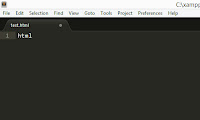
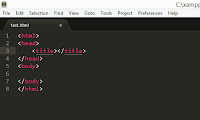
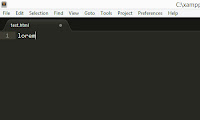
Web Snippets are shortcuts used to instantly produce standard code segments. While I can type any of these with my eyes closed, undeniably it's a great pleasure not to have to do it. Just showing two of these.
Type "html"...

And you get a standard HTML snippet!

Type "lorem"...

And you get lorem ipsum text.


The Mini-map gives you a bird's eye view of your code in its entirety, useful if you're a neat freak whose code is identifiable by indentations and placed in well-defined sections. So instead of scrolling painstakingly to the required line, zoom right in on the area.

Mini-map


Simplicity. The required learning curve for this application isn't very steep - if you just want to type code, you can hop right in and feel your way out as you go. Easier as compared to, say, Emacs.

Persisting windows. If I forget to save a file before closing Sublime, the file is still there when I next start it up, right where I left it, in all its unsaved glory.

What I didn't

Some of the autocomplete functions are downright irritating. When, for example, I highlight a row of text and hit the quote key, I expect the line of text to be replaced by quotations, not encircled by them. But this is a minor quibble and your mileage may vary.

Documentation seems woefully inadequate. On the bright side, you probably won't need it.

Also, if you're just using it as a text editor and aren't really interested in the bells and whistles, 70 USD is a heck of a high price to pay considering you can get many of these features for free on other software.

Conclusion

Sublime is a joy to use and is free for life if you don't mind the occasional guilt trip the trial version lays on you. Me? I intend to pay once I've raised the cash - dollar by dollar. The license is by user, not by machine, so you can port it anywhere you want!

My Rating

8.5 / 10


Try Sublime today. It's better than text.
T___T

Sunday, 1 February 2015

How I first learned PHP (Part 1/2)

The Year of the Goat approaches.

This is a special time for me. Not so much because it's the holiday season, but because it's a reminder of grimmer days where I would be dreading the coming of the Lunar New Year.

In fact, it had just turned 2010 when I found myself looking for a new job. The company I was working in had gone bust. I'd just been working the past ten months without pay, trying to finish the company product, an ambitiously-scoped MIS developed in classic ASP.

But before I continue...

The Short Version

I learned PHP from a book.

The Long Version

For the backstory and all, read on.

Being unemployed

It was no fun. While I hadn't been paid the past ten months, I had still been working, hoping to turn a corner. Now I was without a job and worse, without work. Other than send out resume after resume, I hadn't much to do to distract me from the growing anxiety. Just a month into it, and I was feeling more dead than alive. My temper was growing short. I was getting antsy. My parents and I were raising our voices at each other all the time, and at some point one of them remarked that I was really difficult to live with when I had nothing to do.

Then I landed a job.

It was in a fairly big company, and they were in need of someone with web development experience. The catch was, this was a technical support job. Yes, this had deja vu written all over it. But I was desperate enough to take it.

After a week, they told me to go.

I guess I hadn't done a good enough job of hiding my distaste for the desktop support portion of the job. I'd never been fired before. Boy, did that suck. But it did increase my determination to never again take up a desktop support job.

The problem was, I didn't want my folks to know. I was too goddamn old to have my parents worry about me. And I just couldn't handle another day of their well-meaning but frustrating attempts to help. My mother had a lot of useful advice. That is, advice that would have been useful back in the 90s when she was still part of the workforce. And as for my father, he kept trying to hook me up with some contact or other that he claimed would give him face and employ me. Yes Dad. I know you're a big shot businessman and your reach is wide. But your son isn't so fucking useless that he needs you to secure a job for him!

Compounding the problem was that the main item in my skillset, classic ASP, was on its last legs. People were asking for ASP.NET now. The other popular keyword that kept coming up at that time, was "PHP".

Well, I needed to keep up the appearances and make it look like I still had a job. And I needed to look into PHP. So what did I do? I put on my shirt and tie every day, wore my good shoes, and headed out in the morning as if there was still an office to report to. And hit the library, where I would take refuge till 5pm.


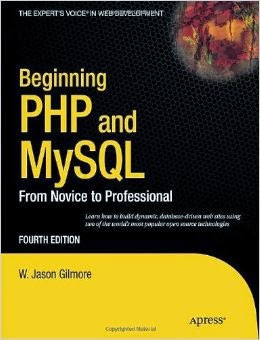
My first PHP textbook

The First Look at PHP

I picked up a few books, and spent some quality time looking through them. And my mind was blown. I had a foundation in C++, honed by proxy with frequent practice in JavaScript. The syntax was similar to these languages. Hell, it was almost identical. If I practiced the syntax diligently, I would have no trouble replicating what I already knew how to do in classic ASP. As I read on, I felt a sense of growing excitement. I could totally do this shit.

The next part, after all that reading, was doing. For this, I called in a favor. An ex-classmate ran his dad's company, Pan Greatways Technology. He kindly allowed me to occupy a small corner of his office daily and use his power supply and internet connection.

Where my comeback began.


There, I painstakingly set up my first WAMP stack, installing and tinkering with Apache, MySQL and PHP. My coding was done in Notepad. For my server, I was running a beat-up IBM Thinkpad.

It was madness. It was frustrating. I fucking loved it. My fate was back in my grubby little hands, and there is no feeling more liberating, and consequently intoxicating.

A week later, an opportunity arrived.

Next

How I landed my first PHP job.