Sunday, 1 March 2020

Web Tutorial: D3 Bar Chart (Part 1/4)

On the back of this web tutorial back in 2017, I did a little research into more modern ways to render charts. And presto, Data-Driven Documents, otherwise known as D3, popped up on my radar.

D3 is a charting and data visualization library that's fairly easy to get off the ground with. Today, we're going to render the animated Bar Chart using this library. We'll use pretty much the same data structure we used back then for Liverpool FC... but with some updates for 2020!

Also, D3 works better with SVG. A bar chart could quite easily be rendered using D3 and CSS but honestly, I'd recommend SVG any day of the week, if only to prime yourself for more complicated charts down the road.

Here, we have a basic HTML block. Let's set the default font.
<!DOCTYPE html>
<html>
    <head>
        <title>D3 Bar Chart</title>

        <style>
            body
            {
                font-size: 12px;
                font-family: arial;
            }    
        </style>
    </head>

    <body>

    </body>
</html>


Add in a link to the D3 JavaScript library. Also, for D3, an accepted convention is to have the script tag within the body tag.
<!DOCTYPE html>
<html>
    <head>
        <title>D3 Bar Chart</title>

        <style>
            body
            {
                font-size: 12px;
                font-family: arial;
            }    
        </style>

        <script src="https://d3js.org/d3.v3.min.js"></script>
    </head>

    <body>
        <script>

        </script>
    </body>
</html>


And then add a div with a class of barChartContainer, which will hold the entire thing.
<body>
    <div class="barChartContainer">

    </div>

    <script>

    </script>
</body>


In it, add two divs. One has an class of barDashboard, and the other, barChart.
<body>
    <div class="barChartContainer">
        <div class="barDashboard">

        </div>

        <div class="barChart">

        </div>
    </div>

    <script>

    </script>
</body>


In the first div, which is the dashboard, add two drop-down lists. Give them ids ddlYear and ddlStat. Don't give them any values yet!
<body>
    <div class="barChartContainer">
        <div class="barDashboard">
            <select id="ddlYear">

            </select>

            <select id="ddlStat">

            </select>
        </div>

        <div class="barChart">

        </div>
    </div>

    <script>

    </script>
</body>


Here's a preview of what you have...


Now, let's move on. The div that holds the bar chart will be made out of four SVGs. One is for the scale, and we will style it using the CSS class barScaleSvg.
<div class="barChart">
    <svg class="barScaleSvg">

    </svg>
</div>


The next one is for the data, and the class is barChartSvg.
<div class="barChart">
    <svg class="barScaleSvg">

    </svg>

    <svg class="barChartSvg">

    </svg>
</div>


Here we add a line break, making sure that it clears both sides of floats. You'll see why soon.
<div class="barChart">
    <svg class="barScaleSvg">

    </svg>

    <svg class="barChartSvg">

    </svg>

    <br style="clear:both"/>
</div>


Now we style the next SVG using CSS class barChartFiller. Because that's exactly what it is... filler. Nothing is going to go in there.
<div class="barChart">
    <svg class="barScaleSvg">

    </svg>

    <svg class="barChartSvg">

    </svg>

    <br style="clear:both"/>

    <svg class="barFillerSvg">

    </svg>
</div>


Finally, the last SVG using the CSS class barChartLegend. It will contain the names of the players.
<div class="barChart">
    <svg class="barScaleSvg">

    </svg>

    <svg class="barChartSvg">

    </svg>

    <br style="clear:both"/>

    <svg class="barFillerSvg">

    </svg>

    <svg class="barLegendSvg">

    </svg>
</div>


Let's do some styling!

The styling, by itself, makes no real difference to the final product. It's just to give you an idea of what your content placeholder SVGs look like now.

Let's style the barChartContainer CSS class to place everything middle of the screen...
body
{
    font-size: 12px;
    font-family: arial;
}

.barChartContainer
{
    margin: 0 auto 0 auto;
}


barDashboard takes up 100% width and is 2em in height. Use the text-align property to place everything in the middle. Give it a black outline.
body
{
    font-size: 12px;
    font-family: arial;
}

.barDashboard
{
    height: 2em;
    width: 100%;
    text-align: center;
}

.barChartContainer
{
    margin: 0 auto 0 auto;
}


barChart also has a black outline. Nothing else needs to be set.
body
{
    font-size: 12px;
    font-family: arial;
}

.barDashboard
{
    height: 2em;
    width: 100%;
    text-align: center;
}

.barChart
{
    outline: 1px solid #000000;
}

.barChartContainer
{
    margin: 0 auto 0 auto;
}


So far so good!


Now, let's style the placeholder SVGs. All of the SVGs will float left. For the scale and filler, we'll give a width of 5em to illustrate. The chart and legend will have a width of, say, 20em. As for heights, the scale and chart will be 20em tall, while the filler and legend will be 3em tall.
.barChartContainer
{
    margin: 0 auto 0 auto;
}

.barScaleSvg
{
    width: 5em;
    height: 20em;
    float: left;
}

.barChartSvg
{
    width: 20em;
    height: 20em;
    float: left;
}

.barFillerSvg
{
    width: 5em;
    height: 3em;
    float: left;
}

.barLegendSvg
{
    width: 20em;
    height: 3em;
    float: left;
}


Gve each of these SVGs a different background color, and set the opacity to 10%.
.barChartContainer
{
    margin: 0 auto 0 auto;
}

.barScaleSvg
{
    width: 5em;
    height: 20em;
    float: left;
    background-color: rgba(0, 255, 0, 0.1);
}

.barChartSvg
{
    width: 20em;
    height: 20em;
    float: left;
    background-color: rgba(0, 0, 255, 0.1);
}

.barFillerSvg
{
    width: 5em;
    height: 3em;
    float: left;
    background-color: rgba(0, 0, 0, 0.1);
}

.barLegendSvg
{
    width: 20em;
    height: 3em;
    float: left;
    background-color: rgba(255, 0, 0, 0.1);
}


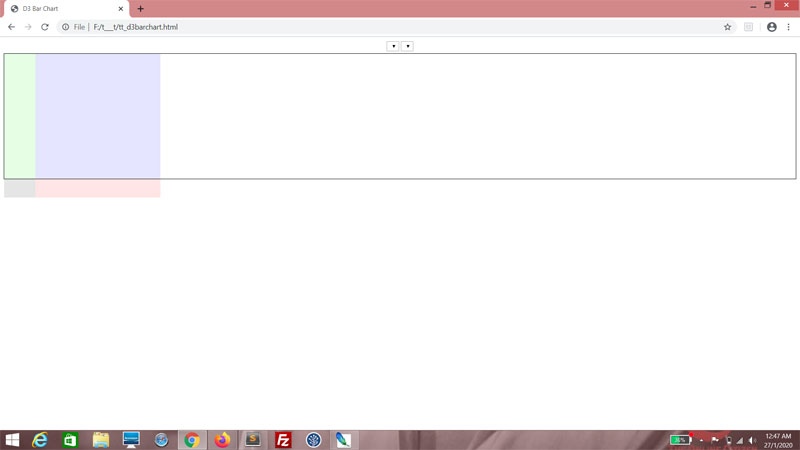
You should have a good idea of what your chart, sans all data, looks like now. That's really all there is to your HTML and CSS. We may make some adjustments to your CSS later, but that's about it.

The data

Right now, this is how the data looks like. If you need a recap of the data structure, hop on over to the original web tutorial here.
<script>
var graphData =
{
    "cols":
    [
        {
            "title": "Adam Lallana",
            "stats":
            [
                {"year": 2015, "goals": 7, "appearances": 49},
                {"year": 2016, "goals": 8, "appearances": 35},
                {"year": 2017, "goals": 0, "appearances": 15},
                {"year": 2018, "goals": 0, "appearances": 16}
            ]
        },
        {
            "title": "Sadio ManĂ©",
            "stats":
            [
                {"year": 2016, "goals": 13, "appearances": 29},
                {"year": 2017, "goals": 20, "appearances": 44},
                {"year": 2018, "goals": 26, "appearances": 50}
            ]
        },
        {
            "title": "Roberto Firminho",
            "stats":
            [
                {"year": 2015, "goals": 11, "appearances": 49},
                {"year": 2016, "goals": 12, "appearances": 41},
                {"year": 2017, "goals": 27, "appearances": 54},
                {"year": 2018, "goals": 16, "appearances": 48}
            ]
        },
        {
            "title": "Divock Origi",
            "stats":
            [
                {"year": 2015, "goals": 10, "appearances": 33},
                {"year": 2016, "goals": 11, "appearances": 43},
                {"year": 2017, "goals": 0, "appearances": 1},
                {"year": 2018, "goals": 7, "appearances": 21}
            ]
        },
        {
            "title": "Daniel Sturridge",
            "stats":
            [
                {"year": 2015, "goals": 13, "appearances": 25},
                {"year": 2016, "goals": 7, "appearances": 27},
                {"year": 2017, "goals": 3, "appearances": 14},
                {"year": 2018, "goals": 4, "appearances": 27}
            ]
        },
        {
            "title": "James Milner",
            "stats":
            [
                {"year": 2015, "goals": 7, "appearances": 45},
                {"year": 2016, "goals": 7, "appearances": 40},
                {"year": 2017, "goals": 1, "appearances": 47},
                {"year": 2018, "goals": 7, "appearances": 45}
            ]
        },
    ],
    "rows": [2015, 2016, 2017, 2018],
    "stats": ["goals", "appearances"]
};
</script>


You can see I've replaced all the players from the mid 2000s with players from the tail end of the 2010s. Some of these guys just started playing for Liverpool when the last web tutorial was written! I've also used stats from all competitions rather than just the local league. We'll get bigger numbers this way.

Filling the drop-down lists

Now we're getting to the meat of the matter - D3 functionality. D3 has a very neat way of processing data, which we will leverage on to fill the drop-down lists. The drop-down lists are empty right now and they should be filled with the values of the elements from the rows and stats arrays. Back then, we had to use For loops to parse the data... well, now we no longer have to!

Let's begin with the ddlYear drop-down list. First, declare a variable, ddlYear and use the d3 object's select() method to get the DOM element ddlYear. Now ddlYear is a D3-enabled object.
<script>
var graphData =
{
    "cols":
    [
        {
            "title": "Adam Lallana",
            "stats":
            [
                {"year": 2015, "goals": 7, "appearances": 49},
                {"year": 2016, "goals": 8, "appearances": 35},
                {"year": 2017, "goals": 0, "appearances": 15},
                {"year": 2018, "goals": 0, "appearances": 16}
            ]
        },
        {
            "title": "Sadio ManĂ©",
            "stats":
            [
                {"year": 2016, "goals": 13, "appearances": 29},
                {"year": 2017, "goals": 20, "appearances": 44},
                {"year": 2018, "goals": 26, "appearances": 50}
            ]
        },
        {
            "title": "Roberto Firminho",
            "stats":
            [
                {"year": 2015, "goals": 11, "appearances": 49},
                {"year": 2016, "goals": 12, "appearances": 41},
                {"year": 2017, "goals": 27, "appearances": 54},
                {"year": 2018, "goals": 16, "appearances": 48}
            ]
        },
        {
            "title": "Divock Origi",
            "stats":
            [
                {"year": 2015, "goals": 10, "appearances": 33},
                {"year": 2016, "goals": 11, "appearances": 43},
                {"year": 2017, "goals": 0, "appearances": 1},
                {"year": 2018, "goals": 7, "appearances": 21}
            ]
        },
        {
            "title": "Daniel Sturridge",
            "stats":
            [
                {"year": 2015, "goals": 13, "appearances": 25},
                {"year": 2016, "goals": 7, "appearances": 27},
                {"year": 2017, "goals": 3, "appearances": 14},
                {"year": 2018, "goals": 4, "appearances": 27}
            ]
        },
        {
            "title": "James Milner",
            "stats":
            [
                {"year": 2015, "goals": 7, "appearances": 45},
                {"year": 2016, "goals": 7, "appearances": 40},
                {"year": 2017, "goals": 1, "appearances": 47},
                {"year": 2018, "goals": 7, "appearances": 45}
            ]
        },
    ],
    "rows": [2015, 2016, 2017, 2018],
    "stats": ["goals", "appearances"]
};

var ddlYear = d3.select("#ddlYear");
</script>


We use the object's selectAll() method, and use it to select all option tags within the ddlYear object. Surprise - there aren't any! We're just using this selection as a placeholder for the option tags we are going to insert.
var ddlYear = d3.select("#ddlYear");

ddlYear.selectAll("option");


Using the method chaining that's modelled after jQuery syntax, we follow up by using the data() method. We pass the rows array of the graphData object as an argument, telling D3 that we want to use this set of data.
var ddlYear = d3.select("#ddlYear");

ddlYear.selectAll("option")
.data(graphData.rows);


The enter() method is next. This prepares ddlYear to add whatever new elements are needed.
var ddlYear = d3.select("#ddlYear");

ddlYear.selectAll("option")
.data(graphData.rows)
.enter();


This is followed up by the append() method, and since we want to append option tags, pass in "option" as an argument.
var ddlYear = d3.select("#ddlYear");

ddlYear.selectAll("option")
.data(graphData.rows)
.enter()
.append("option");


At this point, this is where we customize the option tags we're appending, with attributes. I want the first option to be selected by default, so I use the property() method, passing in "selected" as an argument. The second argument is a callback, for which I pass in arguments d and i, d representing the value of each element in the rows array and i representing the current index. Here, if i is 0, it returns true and false if not.
var ddlYear = d3.select("#ddlYear");

ddlYear.selectAll("option")
.data(graphData.rows)
.enter()
.append("option")
.property("selected", function(d, i)
{
    return i == 0;
});


I want to set the value of the option tag, so I use the attr() method and for the first argument, I pass in "value". For the second argument, I pass in a callback which returns me the value of d.
var ddlYear = d3.select("#ddlYear");

ddlYear.selectAll("option")
.data(graphData.rows)
.enter()
.append("option")
.property("selected", function(d, i)
{
    return i == 0;
})
.attr("value", function(d)
{
    return d;
});


The text() method is straightforward - it sets the text content in the element. Again, for the argument, we pass in a callback that returns the value of d, and we're done!
var ddlYear = d3.select("#ddlYear");

ddlYear.selectAll("option")
.data(graphData.rows)
.enter()
.append("option")
.property("selected", function(d, i)
{
    return i == 0;
})
.attr("value", function(d)
{
    return d;
})
.text(function(d)
{
    return d;
});


See, you now have a fully-populated drop-down list!


Do the equivalent for ddlStat.
var ddlYear = d3.select("#ddlYear");

ddlYear.selectAll("option")
.data(graphData.rows)
.enter()
.append("option")
.property("selected", function(d, i)
{
    return i == 0;
})
.attr("value", function(d)
{
    return d;
})
.text(function(d)
{
    return d;
});

var ddlStat = d3.select("#ddlStat");

ddlStat.selectAll("option")
.data(graphData.stats)
.enter()
.append("option")
.property("selected", function(d, i)
{
    return i == 0;
})
.attr("value", function(d)
{
    return d;
})
.text(function(d)
{
    return d;
});


Yep.


Next

Don't go away. We're going to do a lot more with what we've learned.

Wednesday, 26 February 2020

Five Good Questions To Ask Interviewers

During a job interview, candidates are often required to ask questions of the interviewer. The lack of intelligent questions, to the interviewer, indicates a lack of either interest or critical thinking.

And they're absolutely right.

Therefore, here are some questions to ask during a tech interview; indeed, any job interview. You may notice that all of these questions are pretty much the same questions that interviewers seem to love asking candidates. That's not a coincidence, and believe it or not, no, I'm not being facetious. Those are some pretty relevant questions a candidate needs to ask.

Also, if an interviewer is asking the candidate these questions, it stands to reason that they think these questions are important and as such, they shouldn't mind having these questions turned back on them. Turn-about is fair play, right?

1. Where do you see this company in five years?

It's a question best asked of someone in Management. Perhaps the CEO or COO. The question is also better phrased as "what is the general plan for this company in five years to ten years?"

This, obviously, is an inversion performed on the classic interview question "where do you see yourself in five years?" The only difference is, it's far more important for a company to be able to answer that question, than it is for an employee.

You see, it's not that vital for an employee to have a career plan. Plenty of programming jobs can be done quite ably by people who don't have a career plan. To some people, a job is simply just a job, and they'll look at you funny if you suggest that they ought to have some kind of plan in mind.

What's the direction?

But that's one employee. A company is made out of multiple employees. It's still feasible for all these employees to not have career plans (though I would not recommend it), but what if the company itself doesn't have a plan? What if the company has no idea what general direction it's heading towards? You can learn a lot about the company you may be joining, by learning more about its plans. Or lack thereof.

2. Why did the last employee leave?

This is an inversion of "why do you intend to leave your company?". It really depends on whether you're filling a vacancy. If so, it's a question that HR needs to answer. Try to couch it in more neutral language such as "What was the official reason my predecessor provided for leaving?"

The answer isn't the important thing here - the purpose of this question is to observe HR to see how she (pardon me, I've never encountered male HR for some reason) answers it. Is she evasive or defensive? Forthright? Reeking of politically correct bullshit? Or worse, is she somehow surprised that you would dare ask this question?

Why'd your predecessor leave?

This tells you the nature of HR in the workplace. Are they Management flunkies, or actual professional HR personnel? You'll want to be prepared either way.

Also, it's a penetrating question that shows your interviewer that you're already thinking about what it would be like to work there. It shows that you want to be aware of any potential pitfalls you may encounter in the workplace.

3. What are some of the challenges you face at the job?

This one is best posed to a potential co-worker, if one happens to be at the interview. If not, the Hiring Manager should have a fairly good idea as well. It's a inverted version of the question some interviewers may ask of you, to gauge your problem-solving ability.

What are the obstacles?

However, the purpose here is not to gauge the ability of your potential co-worker, but to find out what you will be dealing with at the workplace. The line of questioning may yield some interesting answers. Some companies deal in big data and their main challenges involve data visualization. Some have security issues. Some may encounter difficulties explaining concepts to non-technical people.

More importantly, it expresses a desire to be useful. By asking this question, it gives the impression that you're thinking about how best you can contribute. It's indirectly asking the company what you can do for them, instead of what they can do for you. In fact, if asked why you asked this question (not that I think anyone with a single working brain cell needs this to be explained), you should totally tell them this.

4. Why should I join this company?

Now this is a reversal of the classic question "Why should I hire you?" or "Tell me your greatest strength." With those questions, the interviewer wants you to sell yourself.

Asking that question back in turn may be fair, but it can also come off as unreasonably arrogant depending on how it's phrased. This can be asked of a Manager. "What are some of the biggest selling points of being employed by this company?" This gives them a chance to brag, and despite what they tell you, people love to brag.

Why should I join your team?

Now, if this is asked of a potential co-worker, consider asking this instead - "Personally, from your point of view, what are some of the best things about this company?" Not only are you asking him or her for a personal opinion, it also implies that you're interested in him or her as an individual. People take to that.

5. Why should I not join this company?

And of course, naturally, we'd have to explore the reverse of the last question - "Tell me your weaknesses." The purpose of this question, again, varies depending who is asking that question, and who is being asked. Interviewers who ask this question usually want to see if the candidate has both self-awareness and honesty. But when you ask the interviewer this question, you may want to phrase it like this - "What are some of the reasons I might not want to join this company?"

What's the catch?

Look, it's a no-bullshit question. Everyone is aware that nothing is perfect. Therefore, anyone asking this question of the interviewer is most likely sincerely trying to manage his or her own expectations. And honestly, only candidates who are somewhat serious (or at least trying to give that impression) about their application would ask this.

Also, asking this question gives you a chance to brag, in turn. For example, if the interviewer says something along the lines of "sometimes deadlines need to be met and there's OT", this is the perfect opportunity to shrug and give a "been there, done that" response.

All in all...

These are fair questions to ask, especially since interviewers consider them fair questions to ask you. Be respectful and professional, but ask those questions.

Any questions?
T___T

Friday, 21 February 2020

POFMA saves the day... kind of

It was with a touch of grim schadenfreude that I read the news that Facebook had, in its own words, been "compelled by law" to block the fake news peddler States Times Review (STR).

I've never been a huge proponent of the Protection from Online Falsehoods and Manipulation Act (POFMA). Back in 2019 when it was first introduced, I expressed concerns that it would give the Singapore Government too much discretionary power to censor. But I was also painfully conscious of the fact that as much as some Singaporeans demand full transparency and Freedom of Speech from the Government, they've also done precious little to show that they can handle those things with the responsibility and gravitas they deserve.

In the long run, without being exposed to such poisonous elements of society, how can Singaporeans learn to discern for themselves instead of outsourcing their thinking to the Government? Is that any way forward for a First World Nation?

Fast-forward almost a year later, amid the panic-causing outbreak of the Wuhan Coronavirus, newly christened COVID-19. A Facebook page States Times Review posted fake news on several different occasions. Here are some of its ludicrous claims:

The Government is unable to trace the source of infection for any of the infected COVID-19 cases in Singapore. Nonsense.

Singapore has run out of surgical masks. Minister Chan Chun Sing has debunked this clearly (and entertainingly) enough.

Seven countries have since banned travel to Singapore, citing lack of confidence in the Singapore government's public health measures. Lack of confidence? Oh, really?

(all these claims, and more, may be more thoroughly debunked on Factually.)

All this was designed to sow public panic and confusion, distrust towards the Government and undermine confidence in Singapore while drawing as many eyeballs to the website as possible.

The POFMA hammer.

The Singapore Government stepped in, wielding POFMA as a hammer, to strike at STR, ordering STR to issue correction notices to the false articles. When STR failed to comply, POFMA was again used, this time on Facebook itself, to block Facebook user access to STR. Now STR is an Online Declared Location, and may no longer be accessed within Singapore.

I may still have my reservations regarding POFMA... but it could not have happened to a more deserving site than STR. As a citizen of Singapore; indeed, as a human being, I find the opportunistic act of capitalizing on the fear of death amid a very real and very delicate situation, both irresponsible and morally repugnant.

Did the Singapore Government do the right thing?

What is the right thing, in this instance? Let things stand, and trust Singaporeans to be able to hold steady instead of being misled by charlatans? Or act swiftly to stifle malicious rumor-mongering that could spell disaster if fear spreads?

I know what I'd prefer. STR is not a site I visit often, if at all, for obvious reasons. Calling it a "joke" would be charity because satire actually has value. STR is not satire and has no place in a society that wants to be governed by reason. And therefore, in a perfect world, no one would pay that stinking heap of rubbish any mind, thus removing the necessity behind the Singapore Government's recent actions. In a perfect society, people would be free to choose, and they would choose to give STR the attention it deserves - none.

Time running out.

But this isn't a perfect world, or a perfect society. Far from it. And this is not a situation that allows for a generous margin of error. This is a situation which is dangerously fluid, where time is a luxury.

The Singapore Government did not do the "right" thing. They did the only thing they could, with whatever tools they had. I don't like it, but perhaps it's for the best.

Facebook's reaction

Facebook did not seem altogether too happy about this. In a statement to BBC, their spokesperson said the following.
"We believe orders like this are disproportionate and contradict the government's claim that POFMA would not be used as a censorship tool."

"We've repeatedly highlighted this law's potential for overreach and we're deeply concerned about the precedent this sets for the stifling of freedom of expression in Singapore."


Facebook doesn't have to like Singapore's laws - I'm not sure I'm entirely fond of them myself sometimes - but if Facebook wants to continue operating within Singapore, it is going to have to comply with those laws. There is no room for negotiation there. And if they're not willing to do so, they should feel free to adhere to those fancy principles of Freedom of Expression and forego the 5 million or so user accounts on this island. It's a pittance compared to the few billion they've already foregone in China.

Respect our laws.

I use Facebook without paying a cent. I'm on board with Facebook hitting me with advertisements, monitoring my conversations or tracking whatever I do on their platform. I consider it a fair trade. But I draw a hard, firm line at Facebook having the audacity to even suggest that our laws are wrong.

Whether they are or not, isn't the point. Facebook can shove its "deep concern" somewhere dark and hopefully painful. Facebook is a Social Media platform, and as much as I respect Facebook as a tech entity, the issue of Singapore's "freedom of expression" is something to be decided by Singaporeans, not Americans. Americans may be in love with their own brand of Democracy despite (or because of) the fact that it produced the relentless source of hilarity that is President Donald Trump. They may not have the imagination required to even comprehend how entire societies can choose not to live the way Americans do.

But that's their fucking problem.

Know your place, Facebook.

Just another slow (fake) news day,
T___T

Monday, 17 February 2020

App Review: Paper Wings

Chirpy, cheery and fun - these are just a few of the adjectives that can be used to describe Paper Wings, a mobile game from Fil Games that's billed as an environmentally-conscious time-filler.


Paper Wings is a basic left-and-right console game with very pretty effects centered around origami avians on origami landscapes; hence the name. Other than that, there's really nothing much else to say about it - gameplay is really that basic.

The Premise

You control a bird. The bird flies around, avoiding obstacles and collecting enough points to advance to the next level, where things get even more dangerous.


The Aesthetics

Paper Wings is a thing of beauty, and I don't say this lightly. Everything is rendered in brilliant color and surreal landscapes. And the truly awesome thing is the simplicity of the entire setup. For a game so basic, it certainly is well put-together.

The Experience

It's tranquil, its cute, and it's light-hearted gaming activity unless you take it too seriously. Paper Wings is as much about ecological awareness as it is about scoring points.

The Interface

Left, right. Tap and hold to rotate. Release to let the bird glide using momentum. Takes a while to get the hang of.

What I liked

I could spend all day raving about the sheer aesthetic beauty of this game. Suffice to say, Paper Wings has gorgeous backdrops and simple but breathtaking animation. The movement of the birds can be stiff, but that can easily be excused by the fact that they are supposed to be paper birds. However, the way they're able to glide through the screen is just magical in its implementation.


The sound effects - birds chirping and cawing, wings flapping, wind whooshing, water splashing - are masterfully done. It has an incredibly calming effect. There's even a challenge based upon sound effects! And speaking of that...

Challenges are creatively done. Some of them require you to explore the interface and discover winning combinations.


The variety of the birds on offer is mind-boggling. Once you accumulate a certain number of coins or achieve a certain number of tasks, you unlock a new bird. My personal favorite is the crow.

Little touches. The interface interacts with you in unexpected ways. It's really cute.

There's even plenty of ecological commentary within the app, along with how we can preserve avian wildlife. A mobile game with a climate conscience! Wow!

What I didn't


Emotional manipulation. The bird says it's missed you if you're gone long enough. Nice touch, I guess, but I really could do without the feels, dammit!

Video-watching is thankfully optional if you don't mind missing out on certain birds and replaying levels from scratch. Because their videos are pretty grating.

Having the entire level lost as soon as even one coin sinks into the water seems to me a bit too draconian. This pretty much means constant replaying of levels (and video-watching if you don't want to replay a level) if you get a less-than-perfect score.


There's a bonus associated with catching a coin immediately after it descends from the sky, but it's annoyingly inconsistent as to how it's implemented. Sometimes you need to catch it as soon as it appears, other times you can get away with a one-second delay.

Conclusion

This is a great app to have in your phone if you like a nice soothing distraction. Gameplay isn't groundbreaking exactly, but you'll get plenty of kicks out of this nonetheless. Paper Wings is a little more than your run-of-the-mill mobile game - it's a labor of love, and it shows.

My Rating

6.5 / 10

This game is totally fly!
T___T

Wednesday, 12 February 2020

Web Tutorial: Tic-tac-toe, Valentine's Day Edition (Part 2/2)

The current level of intelligence used in this JavaScript game is zero. The computer takes its turn with no strategy whatsoever, only using available squares and a random number as criteria. We can leverage on the existing code to determine strategic actions for the computer to take, rather than random ones.

In the game object, at the getFinalSquare() method. It should accept a parameter string, mark.
getRandomBlankSquare: function()
{
    var blanks = this.board.filter(function (x) {return x.value == ""});

    if (blanks.length == 0)
    {
        return null;
    }
    else
    {
        var rand = this.getRandomNumber(0, blanks.length - 1);
        return this.board.findIndex(function (x) {return x.square == blanks[rand].square});   
    }
},
getFinalSquare: function(mark)
{

},
nextTurn: function()
{
    this.turn =  (this.turn == "x" ? "o" : "x");
    user.myTurn();
},


It will return null by default; meaning, no strategic path was found. As in the getRandomBlankSquare() method, you first check for blank squares. If there are no blank squares, return null. If there are, also possibly return null.
getFinalSquare: function(mark)
{
    var blanks = this.board.filter(function (x) {return x.value == ""});

    if (blanks.length == 0)
    {
        return null;
    }
    else
    {
        return null;
    }
},


If there are blank squares, that means there is a possibility that a strategic path can be found. For this, we need to iterate through the game object's winPatterns array.
getFinalSquare: function(mark)
{
    var blanks = this.board.filter(function (x) {return x.value == ""});

    if (blanks.length == 0)
    {
        return null;
    }
    else
    {
        for (var i = 0; i < this.winPatterns.length; i++)
        {

        }

        return null;
    }
},


Within the For loop, define three variables; marked, filled - both set to 0 - and finalSquare, which is null by default.
getFinalSquare: function(mark)
{
    var blanks = this.board.filter(function (x) {return x.value == ""});

    if (blanks.length == 0)
    {
        return null;
    }
    else
    {
        for (var i = 0; i < this.winPatterns.length; i++)
        {
            var marked = 0;
            var filled = 0;
            var finalSquare = null;
        }

        return null;
    }
},


Iterate through each element of the winPatterns array. Because each element is in turn an array of three elements, remember? If the value is occupied by mark, increment marked. If the value is occupied (whether by mark or anything else), increment filled. If the value is blank, set finalSquare to the value of that square.
getFinalSquare: function(mark)
{
    var blanks = this.board.filter(function (x) {return x.value == ""});

    if (blanks.length == 0)
    {
        return null;
    }
    else
    {
        for (var i = 0; i < this.winPatterns.length; i++)
        {
            var marked = 0;
            var filled = 0;
            var finalSquare = null;

            for (j = 0; j < 3; j++)
            {
                if (this.winPatterns[i][j].value == mark) marked++;
                if (this.winPatterns[i][j].value != "") filled++;
                if (this.winPatterns[i][j].value == "") finalSquare = this.winPatterns[i][j].square;
            }
        }

        return null;
    }
},


Now outside of the inner For loop and in the main For loop, check if marked is 2 and filled is less than 3. That basically means that for that winPattern, two slots have been filled by the user's mark and one remains for victory. Once that's established, there's no need to search further - just return the index value of that square.

If no strategic paths are found at all, the method will return null.
getFinalSquare: function(mark)
{
    var blanks = this.board.filter(function (x) {return x.value == ""});

    if (blanks.length == 0)
    {
        return null;
    }
    else
    {
        for (var i = 0; i < this.winPatterns.length; i++)
        {
            var marked = 0;
            var filled = 0;
            var finalSquare = null;

            for (j = 0; j < 3; j++)
            {
                if (this.winPatterns[i][j].value == mark) marked++;
                if (this.winPatterns[i][j].value != "") filled++;
                if (this.winPatterns[i][j].value == "") finalSquare = this.winPatterns[i][j].square;
            }

            if (marked == 2 && filled < 3)
            {
                return this.board.findIndex(function (x) {return x.square == finalSquare});
            }
        }

        return null;
    }
},


Let's get back to the myTurn() method of the user object. We need to expand on this. Basically, before attempting to get a random blank square, the program must first check for a strategic move that can be made.

First, run the getFinalSquare() method using "x" as the argument. This searches for a "win" scenario where "x" would win the game. That's the first priority. If no "win" scenario exists, the next thing to do is try to stop user "o" from winning. So again, we run the getFinalSquare() method, but this time using "o" as an argument. And if there is no "win: scenario for "o" either, just use a random blank square.
setTimeout
(
    function()
    {
        var finalSquare = game.getFinalSquare("x");

        if (finalSquare == null)
        {
            finalSquare = game.getFinalSquare("o");

            if (finalSquare == null)
            {
                var randomBlankSquare = game.getRandomBlankSquare();

                if (randomBlankSquare == null)
                {
                    document.getElementById("user_" + game.turn + "_face").innerHTML = "&#9786";
                    document.getElementById("user_" + game.turn + "_text").innerHTML = "Looks like it's a draw.";
                    game.started = false;
                }
                else
                {
                    user.takeTurn(randomBlankSquare, "x");
                }
            }
        }
    },
    1000
)


Here, we set the Else blocks to take the appropriate turn if there are strategic paths to take.
setTimeout
(
    function()
    {
        var finalSquare = game.getFinalSquare("x");

        if (finalSquare == null)
        {
            finalSquare = game.getFinalSquare("o");

            if (finalSquare == null)
            {
                var randomBlankSquare = game.getRandomBlankSquare();

                if (randomBlankSquare == null)
                {
                    document.getElementById("user_" + game.turn + "_face").innerHTML = "&#9786";
                    document.getElementById("user_" + game.turn + "_text").innerHTML = "Looks like it's a draw.";
                    game.started = false;
                }
                else
                {
                    user.takeTurn(randomBlankSquare, "x");
                }
            }
            else
            {
                user.takeTurn(finalSquare, "x");
            }
        }
        else
        {
            user.takeTurn(finalSquare, "x");
        }
    },
    1000
)


Now try this! If you place your token in the center of the board hoping to get a diagonal row...


...this should happen!


And if you try to get a row while the computer is already on its way there...


...this happens!


Happy Valentine's Day, you crazy couples!

Celebrate love, romance, and all that shit. Just seize the day and enjoy the memories!

X my ♥,
T___T