Tuesday, 11 June 2019

Film Review: Silicon Valley Season 4

We're back for Silicon Valley Season 4, and I promise you this is one firecracker of an installment! Though I watched it with mixed feelings (you'll see why by the end of this review), it was a thrilling ride.


It's a Season that more than lives up to the standards set by the previous Seasons, and this is also the Season that Erlich exits the show.

Warning - spoilers ahead, plenty of profanity ahead...

...but surprisingly tame by Silicon Valley standards. Really. I've become used to worse. It's like the scriptwriters decided to tone down the vulgarity and up the number of plot twists.

Also, I don't own the screenshots.

The Premise

Pied Piper has pivoted to a new product after a time skip - video chat. Richard gets an idea for a much better use for his algorithm and leaves the company to pursue that vision while the others focus on making the video chat a success. Meanwhile, their old nemesis Gavin Belson is ousted by none other than Jack Barker, leaving our intrepid band of tech geeks to be their own worst enemies.

The ubiquity of Internet devices is going to play a very big part in this Season as Richard hits his stride...

The Characters

Thomas Middleditch (last seen in a small but precious role as Sam Coleman in Godzilla: King of the Monsters) as tech geek extraordinaire Richard Hendricks. When he's talking to Russ about his ideas for a new decentralized Internet, you can see the gradual change as he grows more confident, more assertive. It's marvelous to watch.

Richard also undergoes a change in character, straying down a darker path. It comes early in the Season when he rejects Big Head's offer to give him unauthorized access out of principle, but goes "fuck it" once Dinesh pisses him off (to be fair, CEO Dinesh has that effect on quite a few people).

"You know when I was CEO, I found that it was more about choosing the one wrong answer that you can live with."

Later, his actions - and self-justifications for those actions - grow more extreme and less ethical as desperation propels him to perpetuate acts he would otherwise never have even contemplated. It's a fascinating sight and Middleditch does credit to the skill this requires.

TJ Miller as Erlich Bachmann. An astute political animal who can immediately tell right off that Laurie Bream is about to get ousted just by simple observation at a baby shower, and great at reading sexual vibes from women. This Season is Miller's last, and the writers have decided to highlight Erlich's fading relevance to the team... by throwing setback after setback at Erlich. It makes for great TV and Miller handles it like a champ, eliciting laughs all round as Erlich handles each and every occurrence with hubris and bombast. In fact, that scene of Erlich sitting in his palapa as it burns down all around him, seems to refer to the smoking ruins of his dreams.


It's pretty sad that Miller has decided to leave after all he's contributed to the past few Seasons, but exit he does, and in rip-roaring fashion.

Zach Woods as Jared Dunn. This Season has opened my eyes as to just how phenomenal an actor Woods is. Sure, he doesn't have that movie-star look or physique, but damn, that man can act. Watching his face transform is a study unto itself. From the times Jared goes from loyal, nurturing milquetoast employee to enraged warrior in just one heartbeat... it's terrifying and glorious. There's that scene where he and Richard express their exuberance while investigating Peter Gregory's notes. There's that little sideplot where he poses as a frat bro douchebag Ed Chambers on the phone. And that heart-stopping moment in Hoolicon where his befuddlement at Richard is finally, after almost four Seasons, replaced by rage, not just disappointment.


Jared really comes into his own this Season. No doubts about it. Despite having no tech skills to speak of, he's become indispensable to the Pied Piper team. Not just in organization and business, but as their conscience. Richard's conscience in particular.

Kumail Nanjiani has an interesting turn as Dinesh Chugtai. He starts off being self-centered, awkward and insecure as we've seen him in the last few Seasons, but once he becomes CEO, the transformation is remarkable. As in, he turns drastically more arrogant and smarmy, undergoes a wardrobe change and occasionally gets really sinister in tone. We see the effect of power and authority on him, and it's both sad and fascinating. And because it's Dinesh, just damn funny. Kumail Nanjiani does a great job of making Dinesh unlikeable. He's all of that, and then gets cut back down to size within the next episode, and becomes the sweet vulnerable Dinesh we've come to know (and detest a lot less).

Martin Starr as Bertram Gilfoyle. Just about everyone gets character development this Season except for Gilfoyle. Martin Starr plays him with the same amount of deadpan snark and nihilism as always, and he seems to have become the constant in a sea of change.

Matt Ross plays Gavin Belson with as much venom, megalomania and vindictiveness as with the past few Seasons, and this time Gavin takes his pettiness and opportunism to a whole new low. Jack Barker is among his first victims, and all due to something innocuous. But Gavin finally does himself in when he attempts to screw Dinesh over.

Still, all said and done, Gavin Belson is not only a trained tech but also a brilliant businessman, and when he finally puts his pettiness aside, one can see hints of what he's truly capable of. The exit he makes midway to find himself is bereft of his usual pretensions (even if that exit is made using his personal jet) and one senses he's truly had an epiphany as to how his pettiness has been holding him back.

Stephen Tobolowsky as "Action" Jack Barker. This Season, his sneaky side comes out to play as he stabs Gavin in the back after a few episodes of kissing his ass. Tries too hard to be more successful than Gavin once he occupies the CEO seat, and ends up alienating Hoover. Toblowsky chews the scenery in the few scenes he's in, in the later episodes.

Josh Brener is the befuddled Nelson "Big Head" Bighetti. As usual, Josh Brener plays the dimwit well, perhaps a little too well. But now there's an interesting twist - whenever Big Head fails to read the mood in the room and asks some dumb questions, his observations hit really close to home. He's like the Court Jester who acts like a fool, but whose tomfoolery contains uncomfortable truths. Again, his habit of lucking out continues in this Season and he gets opportunities he otherwise would not get if he were a bit more savvy.

Big Head is the quintessential programming everyman. He is onscreen proof against the perception that people who can code, are smart. Seriously, his id is "password" and his password is "password"?

Amanda Crew as Monica Hall. She acts as the voice of reason here, as opposed to the manic ball of energy that is Russ Hannamen. We get to see her slippery side when she attempts to screw Ed Chen over. Though, this is a period of trials for Monica. Woman can't seem to catch a break right up until the middle of the Season.

Comedian Jimmy O. Yang as Jian Yang. His presence acts as a foil to Erlich's, now giving him verbal beatdowns as opposed to simply baleful glares.

Jake Broder as Dan Melcher. He's been missing since Season One, and the man twice-cuckolded by Erlich is soon to be cuckolded by... Richard. You got to feel a bit sorry for the guy there. He's a boring and klutzy dude, but that's not a crime deserving of that kind of punishment.

Phoebe Neidhardt as Mia, or "MI4". Does the psycho hacker bit really well. She's not even hamming it up and is pretty much this side of believable.

Chris Williams as Hoover. Loyal and eager to please. Unlike Denpok, his loyalty to Gavin Belson does not go away that easily and is even the cause of Pied Piper getting bailed out of trouble later on.

Matt McCoy makes a welcome appearance as Pete Monahan the attorney. Jared and Dinesh consult him on a legal matter, and the dead-serious manner in which he treats the case (and to be honest, it's a very serious matter) just makes it all the more hilarious. I last saw him in a minor role in True Detective Season 2, and it was jarring because that's not a comedy.

Leisha Hailey as Liz Tinsdale. Not overly pretty but very pleasant. Does a passable portrayal of a woman fed up with the structure of her life and craving a little danger.

Haley Joel Osment as Keenan Feldspar. The fat grown-up version of the little kid from The Sixth Sense sells the role as a tech entrepreneur who has the gift of selling. His enthusiasm is infectious even as he's selling dog shit tech. Osment does a fabulous job here bringing that character to life. That is one hell of a talented actor.

Tim Chiou as Ed Chen. Smug (like almost everyone in Silicon Valley) and jovial, and I couldn't help noticing, pretty well-built. Turns out to be even more slippery than Monica.

Suzanne Cryer as Laurie Bream. Laurie is pregnant this Season, and treats it as business as usual. In fact, her baffled expression when Monica congratulates her, really sells it. Laurie's less of an antagonist this Season and her main role is to help move plot points along.

Ben Feldman as Ron LaFlamme. They found a way to include my favorite Silicon Valley lawyer midway through the Season, and boy does he deliver!
 
Bernard White is Denpok, Gavin's spiritual advisor. Weaselly fellow who tries all means and ways to latch back on to Gavin. Comes up against Hoover, who uses practical tech and security to serve Gavin, as opposed to Denpok's new-agey scamminess.

Allan Miller as Stuart Burke, a crotchety old dude that, despite knowing jack-all about tech, manages to parlay that into patent blackmail.

Andy Daly is the unnamed doctor. He gets a bit less time this Season, but handles his role deftly as always with expertly-delivered good-natured verbal jabs at Richard..

Chris Diamantopoulos has a couple cameos as Russ Hannamen. Crass, loud and vulgar, gives Erlich a serious run for his money. And surprisingly insightful. He tells right away that Richard isn't into the whole video chat platform despite Richard doing his damn best to sound enthusiastic. He's certainly a sight for sore eyes, right from the first episode. It's especially hilarious, if juvenile, just how many terms he knows for the word "gay".

Graham Rogers as Bryce, Gavin's "Transfusion Associate". Surprise, he's actually one of the few who remember Jared's real name, Donald. Despite that, he's an opportunistic dick, a tech wannabe and his relationship with Gavin is more than a little bit creepy.

Bridey Elliott as Winnie. Richard's ex makes an appearance near the end of the Season and proves to contribute to his downfall. To be fair, it's mostly Richard sabotaging himself due to being almost as petty as Gavin Belson. Still, I don't like the character much and don't think she contributes a lot by herself, so her appearance is thankfully short.

Flula Borg as Joel, CEO of PeaceFare and Winnie's new boyfriend. Idealistic and well-intentioned, comes off as an all-round good guy. So Richard looks like a dick for trying to sabotage him.

Patrick O'Connor as Nelson Bighetti Sr, Big Head's dad. We don't see much of him, but there's nice interaction between him and his dim-witted son Big Head, and his antagonism towards Erlich.

Henry Phillips as John the server guy. We see him once, as a running gag at the end of the first episode. Damn, that level of deadpan is astonishing!

Emily Chang as herself. We only see her in a couple interview segments, but her inclusion adds a certain level of real-world presence in the show.

The Mood

Things are starting to heat up this time round, and the occurrences come at you fast and furious. Things happen and then revert in the course of one or two episodes, though ultimately a lot of these sideplots, as in the previous Seasons, actually do contribute to the main arc. There are crisis mode tech moments too. Ultimately, it's a lot of drama interspersed with comedy.

What I liked

This scene where Richard poses as an Uber driver to sell Pied Piper chat to a venture capitalist is already funny enough on its own due to how obviously forced the impromptu sales pitch sounds, but when the part comes for him to demo the Add Friends feature, Martin Starr's deadpan "hello... friend" delivery really seals it. You can just imagine Gilfoyle thinking, no, we're not friends.


Although many characters, especially the main ones, go through some interesting developments this Season, they are comfortingly consistent in the way they act. The changes aren't just sprung on the viewers - they're logically presented as the way those characters would become after undergoing three Seasons of whatever they had to go through.

The little game of one-upmanship between Hoover and Denpok was great. What made it sweeter was that these two are minor characters at best, and finally given the chance to really shine after so many Seasons.

The creepy music that plays when Richard goes to visit Gavin Belson at his home. Also, the entire scene of Richard and Gavin having an earnest moment about the potential of Decentralized Internet. Because at heart, Gavin Belson isn't just a ruthless corprorate suit - he's also a tech geek in his own right just like Richard. Bonus points for Richard drawing formulas on the very expansive forehead of Gavin's portrait!


Gilfoyle says this... while drinking a beer.
Jared: It's 10AM. Why is he drinking beer?
Gilfoyle: Because he sucks.


Seriously though, this is a great segment for our favorite Satanist geek. When Richard and Gavin join forces, Gilfoyle wants in but he's too proud to sell himself to them, so he resorts to snarking at their shortlist of tech candidates... hard. Richard, Jared and even Dinesh all see right through him! It's a moment that makes Gilfoyle startlingly human.


The episode with the Patent Troll, not least because it includes an appearance by Ron LaFlamme! But it does give insights to the opportunism in Silicon Valley, disgusting frat bro rituals and a heartwaring sight of Richard refusing to bow out of principle. And also, this episode ends with Gilfoyle hacking Jian Yang's smart fridge (and misspelling his name).


I'm in two minds about the scene where Richard puts a "pineapple" in Dinesh's backpack and tells him to hit the killswitch in the most densely populated area he can find. Dinesh being a Pakistani and all, this is a parody of a suicide bombing and is in extremely poor taste. And yet... it might just be so bad that it's good.

In the final episode, Jack Barker starts rambling on about the Cojoined Triangles of Success to a bunch of China factory employees and next moment we see that he's been taken hostage. These Chinese sure take no shit!

What I didn't

That open-door-to-men-using-the-urinal running gag was cute... but got tiresome quickly. Wasn't that great a joke to begin with and they could have just skipped it.


Generally, the frenetic pace of this Season. A lot happens within an episode. Sure, they somehow make this work, but I'm not sure I'm comfortable with the rate of twists in the story. Something starts to happen, and then it all comes undone by the next couple episodes, sometimes even within the current episode in which it happens. Though, if the show creators are trying to make a case for just how hectic tech life is in Silicon Valley, they're certainly succeeding.

The Mandarin spoken between Ed Chen and Jian Yang is horrible.

In fact, the entire thread about Jian Yang's See Food app seems pretty pointless except maybe to illustrate Erlich's decline. Though I like the fact that Jian Yang seems to be using Sublime Text Editor as a code platform while demoing the app.


Speaking of "pointless", so is the entire sideplot of Dinesh and Gilfoyle when their phones are accidentally merged with each other. Fisticuffs occur and even Jarrod is caught up in it... so unnecessary.

The one-night stand between Liz and Richard feels really sudden. The fallout is funny, but not entirely credible.

OK, what was the point of this little gag again? Gilfoyle having cat eyes. Fine. So what?


Conclusion

This is a really good installment of the Silicon Valley show, and I thoroughly enjoyed it. Though I enjoyed it way more than I did the preceding Seasons, I realize that this Season was so good only because of the foundation laid by the previous Seasons. The characters are consistent with how they've always been portrayed. Things move a little too fast for my liking, but ultimately this Season feels more weighty, more... substantial. There's still a lot of comedy, but now the drama quotient has been upped a great deal.

My Rating

9 / 10

4-ever yours,
T___T

Friday, 7 June 2019

Web Tutorial: The Liverpool Quiz (Part 3/3)

It's time for the most visual part of this web tutorial - layout and user experience. The quiz is quite functional as it is right now, but no one will ever accuse it of being pretty and user-friendly. Let's change that.

Set the background to a deep red, and give quizContainer a width of 600 pixels, then move it center of the screen.

css\styles.css
body
{
    background-color: #660000;
}

#quizContainer
{
    width: 600px;
    margin: 50px auto 0 auto;
}

.pnlMain, .pnlQuestions, .pnlResults
{
    display: none;
}


What a dramatic difference!


Now set font sizes and colors. I'm partial to Verdana myself... and white seems good if we're going to use that deep red as a background.

css\styles.css
.pnlMain, .pnlQuestions, .pnlResults
{
    width: 100%;
    font-family: verdana;
    font-size: 14px;
    color: #FFFFFF;
    display: none;
}


Better already.


Let's give the panels round corners and a translucent white border. And a padding of, say, 1em.

css\styles.css
.pnlMain, .pnlQuestions, .pnlResults
{
    width: 100%;
    font-family: verdana;
    font-size: 14px;
    color: #FFFFFF;
    padding: 1em;
    border-radius: 10px;
    border: 1px solid rgba(255, 255, 255, 0.5);
    display: none;
}


Nice!


Now let's give the main and results panels a larger amount of padding by setting the divs within, styled using content, a sizeable top and bottom margin, and center the text.

css\styles.css
.pnlMain.main, .pnlQuestions.questions, .pnlResults.results
{
    display: block;
}

.pnlMain .content, .pnlResults .content
{
    margin-top: 20%;
    margin-bottom: 20%;
    text-align: center;
}


Looking presentable.


We'll work on the buttons next. First, set all divs using the class buttons, to a 100% width and 3em height. Then for all buttons styled using btn, float them right. I've also given them rounded corners, white text, a scarlet background, padding and margins. And used a hover psudoselector to turn the background bright red if the user mouse the cursor over the button. Feel free to impose your own style.

css\styles.css
.pnlQuestions .content.current
{
    display: block;
}

.buttons
{
    width: 100%;
    height: 3em;
}

.btn
{
    float: right;
    width: 8em;
    border-radius: 5px;
    border: 0px solid #FFFFFF;
    padding: 0.5em;
    margin-left: 0.5em;
    font-weight: bold;
    color: #FFFFFF;
    background-color: #AA0000;
    cursor: pointer;
}

.btn:hover
{
    background-color: #FF0000;
}


Getting there, folks!


Let's move on to the questions section. Now you should see that the text isn't centered because we only centered text for the main and results panels. The main problem here is with the selectors. They don't really respond when moused over or clicked on. So let's first impose a hover pseudoselector on optionSelector, turning the border a deeper grey when the cursor moves over.

css\styles.css
.optionSelector
{
    width: 0.8em;
    height: 0.8em;
    border: 1px solid #AAAAAA;
    cursor: pointer;
    border-radius: 50%;
    float: left;
    background-color: transparent;
}

.optionSelector:hover
{
    border: 1px solid #999999;
}


Next, if the div is styled using both optionSelector and selected, change background color and border.

css\styles.css
.optionSelector:hover
{
    border: 1px solid #999999;
}

.optionSelector.selected
{
    background-color: #440000;
    border: 1px solid #000000;
}


In the HTML, add this template string. It's populated using the selected property of the current option object.

index.html
                        <div class="answers">
                            <div class="option" ng-repeat="option in question.options">
                                <div class="selector">
                                    <div class="optionSelector {{option.selected}}" ng-click="selectOption($parent.$index, $index)"></div>
                                </div>

                                <div class="text">
                                    <div class="optionText">{{option.text}}</div>
                                    <div class="optionExplanation {{isAnswered($parent.$index)}} {{getIndicator($parent.$index, $index)}}">{{question.explanation}}</div>
                                </div>
                            </div>
                        </div>


Now if you click on any of the options, you can tell right off!


But this isn't good enough. What we also need is an indicator to tell us if the answer is correct or wrong. Add a div here. Style it using optionIndicator, and add a template string using the getIndicator() function. Pass in the appropriate arguments. Also add in a template string using the selected property of the current option object.

index.html
                        <div class="answers">
                            <div class="option" ng-repeat="option in question.options">
                                <div class="selector">
                                    <div class="optionIndicator {{option.selected}} {{getIndicator($parent.$index, $index)}}"></div>
                                    <div class="optionSelector {{option.selected}}" ng-click="selectOption($parent.$index, $index)"></div>
                                </div>

                                <div class="text">
                                    <div class="optionText">{{option.text}}</div>
                                    <div class="optionExplanation {{isAnswered($parent.$index)}} {{getIndicator($parent.$index, $index)}}">{{question.explanation}}</div>
                                </div>
                            </div>
                        </div>


Write the optionIndicator CSS class. Use the before psudoselector to set content to an empty string by default.
css\styles.css
.btn:hover
{
    background-color: #FF0000;
}

.optionIndicator
{
    width: 1.5em;
    height: 1.5em;
    float: left;
}

.optionIndicator:before
{
    display: block;
    content: "";
    font-size: 1.5em;
}

.optionSelector
{
    width: 0.8em;
    height: 0.8em;
    border: 1px solid #AAAAAA;
    cursor: pointer;
    border-radius: 50%;
    float: left;
    background-color: transparent;
}


If the div is styled using optionIndicator and correct, the content is a bright green tick. If not, it's a bright red cross.

css\styles.css
.optionIndicator
{
    width: 1.5em;
    height: 1.5em;
    float: left;
}

.optionIndicator:before
{
    display: block;
    content: "";
    font-size: 1.5em;
}

.optionIndicator.selected.correct:before
{
    display: block;
    content: "\2713";
    color: #00FF00;
}

.optionIndicator.selected.wrong:before
{
    display: block;
    content: "\2717";
    color: #FF0000;
}


See that? So cool.


Let's clean stuff up by styling question, option, selector and text. questionText is styled as well, to set font size and such.

css\styles.css
.question
{
    width: 100%;
    height: 6em;   
}

.questionText
{
    width: 70%;
    float: left;
    font-size: 1.5em;
}

.option
{
    width: 100%;
    height: 3em;
}

.selector
{
    width: 3em;
    float: left;
}

.text
{
    width: 90%;
    float: left;
}

.optionIndicator
{
    width: 1.5em;
    height: 1.5em;
    float: left;
}


Coming along nicely!


Styling the timer

The timer is a little bare bones now, but we can beautify it. We're going to make it a brown circle with a translucent black background. Styling the paragraph tag within timer helps adjust the counter value a bit.

css\styles.css
.btn:hover
{
    background-color: #FF0000;
}

.timer
{
    width: 2em;
    height: 2em;
    font-size: 1.5em;
    font-weight: bold;
    text-align: center;
    border-radius: 50%;
    border: 3px solid #440000;
    background-color: rgba(0, 0, 0, 0.5);
    margin-top: -1.5em;
    margin-left: -1.5em;
}

.timer p
{
    margin-top: 0.25em;
}

.question
{
    width: 100%;
    height: 6em;   
}


Great!


Adding a progress indicator

It's better to do a quiz when you have an idea just how far you are along. Add template strings. currentQuestion needs to have 1 added because the count starts from 0.

index.html
                        <div class="question">
                            <div class="questionText">
                                {{question.text}}
                            </div>

                            <div class="questionProgress">
                                {{currentQuestion + 1}} of {{possible}}
                            </div>   
                        </div>


Some styling.

css\styles.css
.questionText
{
    width: 70%;
    float: left;
    font-size: 1.5em;
}

.questionProgress
{
    width: 30%;
    float: right;
    text-align: right;
}

.option
{
    width: 100%;
    height: 3em;
}


Yep, that's just what we're going for.


At this point, you may have noticed that the text needs more contrast. My bad. Style optionText and expand on the styling for optionExplanation. We'll make the text smaller and change the color to orange.

css\styles.css
.optionSelector.selected
{
    background-color: #440000;
    border: 1px solid #000000;
}

.optionText
{
    width: 100%;
    height: 1.5em;
    font-size: 0.9em;
}

.optionExplanation
{
    width: 80%;
    height: 2.5em;
    visibility: hidden;
    font-size: 0.7em;
    color: #FF4400;
}

Got that?


Back to the buttons...

Having each button say "Next" is well and good, but it would be better if the button says "Results" if it's the final question. To do that, modify the selectOption() function. Check if currentQuestion is less than the length of the questions array, minus 1. Essentially, that it's not the final question. If it's the final question, change proceed to "Results".

js\main.js
    $scope.selectOption =
    function (question, option)
    {
        if ($scope.isAnswered(question) != "answered")   
        {
            $scope.questions[question].options[option].selected = "selected";

            if (option == $scope.questions[question].answer)
            {
                $scope.result++;
            }

            if ($scope.currentQuestion < $scope.questions.length - 1)
            {
                $scope.proceed = "Next";
            }
            else
            {
                $scope.proceed = "Results";
            }
        }   
    };


Ah, it's the little things, amirite?


Also, since we've coded it in such a way that you can only go on to the next question after answering the current question, let's make it even more obvious via styling. Render btnNext in a darker color by default. Only use the standard colors if btnNext is also styled using answered.

css\styles.css
.btn:hover
{
    background-color: #FF0000;
}

#btnNext.btn
{
    color: #000000;
    background-color: #440000;
}

#btnNext.btn.answered
{
    color: #FFFFFF;
    background-color: #AA0000;
}

#btnNext.btn:hover
{
    background-color: #440000;
}

#btnNext.btn.answered:hover
{
    background-color: #FF0000;
}


Then add this template string to the btnNext button's class attribute, using the isAnswered() function with currentQuestion used as an argument.

index.html
                <div class="buttons">
                    <input type="button" id="btnNext" class="btn {{isAnswered(currentQuestion)}}" value="{{proceed}}" ng-click="nextQuestion()">
                    <input type="button" id="btnQuit" class="btn" value="Quit" ng-click="initQuiz()">
                </div>


There. Now it's more obvious that "Next" won't respond to clicks!


At the end

The message is a little sketchy on detail. We'll fix that. In the case of getting to the results panel, there are two ways to get there - either the timer runs out, of you complete the quiz. So we check if secodnsRemaining is greater than 0. In either case, change secondsRemainingMessage.

js\main.js
    $scope.getStage =
    function ()
    {
        if ($scope.currentQuestion == -1) return "main";

        if ($scope.currentQuestion == $scope.questions.length)
        {
            if ($scope.secondsRemaining > 0)
            {
                $scope.secondsRemainingMessage = "That was fast!";
            }
            else
            {
                $scope.secondsRemainingMessage = "Time's up!";
            }

            return "results";
        }

        return "questions";
    };


Then check the score. Wouldn't it be nice to have a message based on the score? So let's check result and see if the user scored more than 50%. Change resultsMessage based on that. Also change resultsGrade because we'll be using that soon.

js\main.js
    $scope.getStage =
    function ()
    {
        if ($scope.currentQuestion == -1) return "main";

        if ($scope.currentQuestion == $scope.questions.length)
        {
            if ($scope.secondsRemaining > 0)
            {
                $scope.secondsRemainingMessage = "That was fast!";
            }
            else
            {
                $scope.secondsRemainingMessage = "Time's up!";
            }

            if ($scope.result >= ($scope.possible / 2))
            {
                $scope.resultsMessage = "Well done!";
                $scope.resultsGrade = "good";
            }
            else
            {
                $scope.resultsMessage = "Do better next time!";
                $scope.resultsGrade = "poor";
            }

            return "results";
        }

        return "questions";
    };

Getting there!


Now for some pictures!

The layout is boring without them. I mean, this is a Liverpool FC Quiz, right? Add this to the styling for the panels. This basically fixes background images.

css\styles.css
.pnlMain, .pnlQuestions, .pnlResults
{
    width: 100%;
    font-family: verdana;
    font-size: 14px;
    color: #FFFFFF;
    padding: 1em;
    border-radius: 10px;
    border: 1px solid rgba(255, 255, 255, 0.5);
    background-size: cover;
    background-position: center center;
    background-repeat: no-repeat;
    display: none;
}


I'm gonna use this pic that I downloaded and doctored, and save it in the img folder. In it, it looks like Luis Garcia scored a goal or something.

main.jpg


And then let's embed the background in the HTML.

index.html
<div class="pnlMain {{getStage()}}" style="background-image: url(img/main.jpg)">

There it is...


There are a lot of pics I'm using for questions. I won't bother uploading them here. You can find them in the repository.

We do the same for the questions panel, only we embed a template string in the background image file name.

index.html
<div class="pnlQuestions {{getStage()}}" style="background-image: url(img/q{{currentQuestion}}.jpg)">


See what we did there? A question about Fernando Torres has a background picture of... Fernando Torres!


Now for the results panel. This one is slightly more interesting. I have two pics...

results_good.jpg

results_poor.jpg


And here I'll use resultsGrade in a template string for the embdedded background image.

index.html
<div class="pnlResults {{getStage()}}" style="background-image: url(img/results_{{resultsGrade}}.jpg)">


And here we see the results! In the "poor" result, we get a picture of Sadio Mane looking really dejected. In the "good" result, Virgil Van Djik is being mobbed by the team.


Final Football Note

I finished writing this web tutorial just days after Liverpool won their 6th UEFA Champions League trophy. Still positively buzzing, so forgive me if the material comes up short.

You'll Never Code Alone,
T___T
Wednesday, 5 June 2019

Web Tutorial: The Liverpool Quiz (Part 2/3)

In this part, we'll be mainly dealing application flow - from beginning, to questions, to results. Part of flow control will be handled with CSS.

Selective Invisibility

The main principle here is that this is a Single Page Application. That means that everything is invisible until it needs to be visible. So here, set the pnlMain, pnlQuestions and pnlResults classes to have the display property set to none. Refresh, and everything on your page should disappear!

css\styles.css
.pnlMain, .pnlQuestions, .pnlResults
{
    display: none;
}


Next, set this. If the div is styled using pnlMain and main, display is set to block. Same for pnlQuestions and questions, and pnlResults and results.

css\styles.css
.pnlMain, .pnlQuestions, .pnlResults
{
    display: none;
}

.pnlMain.main, .pnlQuestions.questions, .pnlResults.results
{
    display: block;
}


Then do this in the HTML. This ensures that each of these divs is also styled using whatever stage this app is in right now - "main", "questions" or "results". This is determined using the getStage() function.

index.html
            <div class="pnlMain {{getStage()}}">
                <div class="content">
                    <h1>Welcome to the Liverpool FC Quiz!</h1>
                    <p>Let's see how well you know your club.</p>
                </div>
               
                <div class="buttons">
                    <input type="button" id="btnBegin" class="btn" value="Begin">
                </div>
            </div>

            <div class="pnlQuestions {{getStage()}}">
                <div ng-repeat="question in questions">
                    <div class="content">
                        <div class="question">
                            <div class="questionText">
                                {{question.text}}
                            </div>

                            <div class="questionProgress">
                               
                            </div>   
                        </div>

                        <br style="clear:both">

                        <div class="answers">
                            <div class="option" ng-repeat="option in question.options">
                                <div class="selector">

                                </div>

                                <div class="text">
                                    <div class="optionText">{{option.text}}</div>
                                    <div class="optionExplanation">{{question.explanation}}</div>
                                </div>
                            </div>
                        </div>

                        <br style="clear:both">
                    </div>
                </div>

                <div class="buttons">
                    <input type="button" id="btnNext" class="btn" value="">
                    <input type="button" id="btnQuit" class="btn" value="Quit">
                </div>
            </div>

            <div class="pnlResults {{getStage()}}">
                <div class="content">
                    <h1>{{secondsRemainingMessage}}</h1>
                    <p>Your score is <b>{{result}}</b> out of <b>{{possible}}</b>.</p>
                    <p>{{resultsMessage}}</p>
                </div>

                <div class="buttons">
                    <input type="button" id="btnRestart" class="btn" value="Restart"
                </div>
            </div>


And then we write the getStage() function in the JavaScript.

js\main.js
    $scope.initQuiz =
    function()
    {   
        $scope.result = 0;
        $scope.currentQuestion = -1;
        $scope.secondsRemaining = 60;
        $scope.proceed = "Next";
        $scope.timer = $interval.cancel($scope.timer);
        $scope.timer = null;
    };

    $scope.getStage =
    function ()
    {

    };


If currentQuestion is -1, the default value, that means that we haven't begun the quiz, so the stage is "main".

js\main.js
    $scope.getStage =
    function ()
    {
        if ($scope.currentQuestion == -1) return "main";
    };


If currentQuestion equals the length of the questions array (because iterating through the questions causes currentQuestion to increment, something we'll cover later), the stage is "results". Naturally, if you're done answering all the questions, you'll see results, right?

Editor's Note: Some may question (very naturally) why I use the shorthand If block for the first case, and the curly-braced version for the second case. That's because for the second case, I'm planning to add more stuff later.

js\main.js
    $scope.getStage =
    function ()
    {
        if ($scope.currentQuestion == -1) return "main";

        if ($scope.currentQuestion == $scope.questions.length)
        {
            return "results";
        }
    };


And for everything else, the stage is "questions".

js\main.js
    $scope.getStage =
    function ()
    {
        if ($scope.currentQuestion == -1) return "main";

        if ($scope.currentQuestion == $scope.questions.length)
        {
            return "results";
        }

        return "questions";
    };


Since currentQuestion is -1, your stage is "main", and the page reflects that! All the other sections are invisible at this point because we set that in the CSS.


Let's program a button!

What we will do here is make the "Begin" button move on to the questions section. So set the behavior by using AngularJS's ng-click attribute. It will fire off the function nextQuestion().

index.html
                <div class="buttons">
                    <input type="button" id="btnBegin" class="btn" value="Begin" ng-click="nextQuestion()">
                </div>


Create the nextQuestion() function.

js\main.js
    $scope.initQuiz =
    function()
    {   
        $scope.result = 0;
        $scope.currentQuestion = -1;
        $scope.secondsRemaining = 60;
        $scope.proceed = "Next";
        $scope.timer = $interval.cancel($scope.timer);
        $scope.timer = null;
    };

    $scope.nextQuestion =
    function ()
    {

    };

    $scope.getStage =
    function ()
    {
        if ($scope.currentQuestion == -1) return "main";

        if ($scope.currentQuestion == $scope.questions.length)
        {
            return "results";
        }

        return "questions";
    };


Here, nextQuestion() increments the value of currentQuestion by 1. It's that simple... for now.

js\main.js
    $scope.nextQuestion =
    function ()
    {
        $scope.currentQuestion ++;   
    };


Refresh. Click the "Begin" button. This is what you should get - the page moves to questions! Of course, we don't want all questions to be visible at the same damn time, so...


...in the CSS, hide any elements styled using content within pnlQuestions.

css\styles.css
.pnlMain, .pnlQuestions, .pnlResults
{
    display: none;
}

.pnlMain.main, .pnlQuestions.questions, .pnlResults.results
{
    display: block;
}

.pnlQuestions .content
{
    display: none;
}


Refresh. Click the "Begin" button. Now that the questions are all hidden, you'll be left with the blank button and the "Quit" button. Don't worry, all this is going exactly to plan.


Now, un-hide stuff if it's styled using both content and current, within pnlQuestions.

css\styles.css
.pnlQuestions .content
{
    display: none;
}

.pnlQuestions .content.current
{
    display: block;
}


Remember this repeated block? Well, in the div styled as content, add this. Pass in $index as an argument for the isCurrentQuestion() function. $index is the position of the current element of questions.

index.html
            <div class="pnlQuestions {{getStage()}}">
                <div ng-repeat="question in questions">
                    <div class="content {{isCurrentQuestion($index)}}">
                        <div class="question">
                            <div class="questionText">
                                {{question.text}}
                            </div>

                            <div class="questionProgress">
                               
                            </div>   
                        </div>

                        <br style="clear:both">

                        <div class="answers">
                            <div class="option" ng-repeat="option in question.options">
                                <div class="selector">

                                </div>

                                <div class="text">
                                    <div class="optionText">{{option.text}}</div>
                                    <div class="optionExplanation">{{question.explanation}}</div>
                                </div>
                            </div>
                        </div>

                        <br style="clear:both">
                    </div>
                </div>

                <div class="buttons">
                    <input type="button" id="btnNext" class="btn" value="">
                    <input type="button" id="btnQuit" class="btn" value="Quit">
                </div>
            </div>


You guessed it, we'll be writing the isCurrentQuestion() function next. By default, return an empty string.

js\main.js
    $scope.initQuiz =
    function()
    {   
        $scope.result = 0;
        $scope.currentQuestion = -1;
        $scope.secondsRemaining = 60;
        $scope.proceed = "Next";
        $scope.timer = $interval.cancel($scope.timer);
        $scope.timer = null;
    };

    $scope.isCurrentQuestion =
    function (question)
    {
        return "";
    };

    $scope.nextQuestion =
    function ()
    {
        $scope.currentQuestion ++;   
    };


But if the value of question is the same as the value of currentQuestion, return "current".

js\main.js
    $scope.isCurrentQuestion =
    function (question)
    {
        if ($scope.currentQuestion == question) return "current";

        return "";
    };


Refresh. Click the "Begin" button. You'll see that only the first question in the questions array is displayed! That's because the initial value of currentQuestion was -1, and clicking on the "Begin" button incremented currentQuestion by 1, making it 0... which points to the first element of the questions array!


Now let's populate the functionality of the buttons. For the "Quit" button, set it to run the initQuiz() function.

index.html
                <div class="buttons">
                    <input type="button" id="btnNext" class="btn" value="">
                    <input type="button" id="btnQuit" class="btn" value="Quit" ng-click="initQuiz()">
                </div>


For the blank button, set it to run the nextQuestion() function. And also put in a template string (using the variable proceed)  as its value.

index.html
                <div class="buttons">
                    <input type="button" id="btnNext" class="btn" value="{{proceed}}" ng-click="nextQuestion()">
                    <input type="button" id="btnQuit" class="btn" value="Quit" ng-click="initQuiz()">
                </div>


Refresh. Click the "Begin" button. Now you'll see that the previously blank button now says "Next". If you click the "Quit" button, you should go back to the main section, because initQuiz() sets the value of currentQuestion to -1. If you click "Next", you should see the next question in the questions array, like so.

And if you keep clicking "Next", you should end up here! And that's it for general flow - from the landing page, to questions, to results.


Time to work on the questions

Or rather, work on providing the users the means to answer those questions. Go to the div styled using the CSS class answers. In the div styled using selector, insert a div. Style it using the optionSelector class.

index.html
                        <div class="answers">
                            <div class="option" ng-repeat="option in question.options">
                                <div class="selector">
                                    <div class="optionSelector"></div>
                                </div>

                                <div class="text">
                                    <div class="optionText">{{option.text}}</div>
                                    <div class="optionExplanation">{{question.explanation}}</div>
                                </div>
                            </div>
                        </div>


Time to write that class! The objective here is visibility, so I wouldn't sweat too much over how it looks. Change whatever you need here. I'm just going to go with a solid light grey border and make it round. Since it's supposed to be clickable, I'm setting the cursor property to pointer.

css\styles.css
.pnlQuestions .content.current
{
    display: block;
}

.optionSelector
{
    width: 0.8em;
    height: 0.8em;
    border: 1px solid #AAAAAA;
    cursor: pointer;
    border-radius: 50%;
    float: left;
    background-color: transparent;
}


There. Not too pretty, but let's not worry about it right now.


Before we continue, you may have noticed that the explanation text is on every line, which is both irritating and redundant. Let's fix that in the CSS.

css\styles.css
.optionSelector
{
    width: 0.8em;
    height: 0.8em;
    border: 1px solid #AAAAAA;
    cursor: pointer;
    border-radius: 50%;
    float: left;
    background-color: transparent;
}

.optionExplanation
{
    visibility: hidden;
}


Now they're gone.


And in that div, add this to the style attribute. The isAnswered() function and getIndicator() function will supply the other classes. For both these functions, pass in the current index of questions as an argument. For getIndicator(), also pass in the current index of options. Note that since options is nested within questions, the current index of questions is represented using $parent.index because questions is the parent. And the current index of options is merely $index.

index.html
                        <div class="answers">
                            <div class="option" ng-repeat="option in question.options">
                                <div class="selector">
                                    <div class="optionSelector"></div>
                                </div>

                                <div class="text">
                                    <div class="optionText">{{option.text}}</div>
                                    <div class="optionExplanation {{isAnswered($parent.$index)}} {{getIndicator($parent.$index, $index)}}">{{question.explanation}}</div>
                                </div>
                            </div>
                        </div>


Create these two functions.

js\main.js
    $scope.initQuiz =
    function()
    {   
        $scope.result = 0;
        $scope.currentQuestion = -1;
        $scope.secondsRemaining = 60;
        $scope.proceed = "Next";
        $scope.timer = $interval.cancel($scope.timer);
        $scope.timer = null;
    };

    $scope.getIndicator =
    function (question, option)
    {

    };

    $scope.isAnswered =
    function (question)
    {

    };

    $scope.isCurrentQuestion =
    function (question)
    {
        if ($scope.currentQuestion == question) return "current";

        return "";
    };


isAnswered() accepts a parameter, question, and returns an empty string by default.

js\main.js
    $scope.getIndicator =
    function (question, option)
    {

    };

    $scope.isAnswered =
    function (question)
    {
        return "";
    };


This If block basically ensures that question, which is the index of the current question, is in the correct range.

js\main.js
    $scope.getIndicator =
    function (question, option)
    {

    };

    $scope.isAnswered =
    function (question)
    {
        if (question > -1 && question < $scope.questions.length)
        {
       
        }

        return "";
    };


Then it iterates through the options array of the current element of questions. If any one of the elements' selected property is "selected", return "answered".

js\main.js
    $scope.getIndicator =
    function (question, option)
    {

    };

    $scope.isAnswered =
    function (question)
    {
        if (question > -1 && question < $scope.questions.length)
        {
            for (var i = 0; i < $scope.questions[question].options.length; i++)
            {
                if ($scope.questions[question].options[i].selected == "selected") return "answered";
            }           
        }

        return "";
    };


For getIndicator(), use question to get the appropriate element of the questions array. If the answer property is the same as option, return "correct"; otherwise, return "wrong". This function will be reused later.

js\main.js
    $scope.getIndicator =
    function (question, option)
    {
        if ($scope.questions[question].answer == option)
        {
            return "correct";
        }
        else
        {
            return "wrong";
        }
    };

    $scope.isAnswered =
    function (question)
    {
        if (question > -1 && question < $scope.questions.length)
        {
            for (var i = 0; i < $scope.questions[question].options.length; i++)
            {
                if ($scope.questions[question].options[i].selected == "selected") return "answered";
            }           
        }

        return "";
    };


One more thing to do - get user input. When someone clicks on one of the light grey circles, he is essentially choosing an option. So add the ng-click attribute and make it run the selectOption() function, passing in the current index of questions and the current index of options.

index.html
                        <div class="answers">
                            <div class="option" ng-repeat="option in question.options">
                                <div class="selector">
                                    <div class="optionSelector" ng-click="selectOption($parent.$index, $index)"></div>
                                </div>

                                <div class="text">
                                    <div class="optionText">{{option.text}}</div>
                                    <div class="optionExplanation {{isAnswered($parent.$index)}} {{getIndicator($parent.$index, $index)}}">{{question.explanation}}</div>
                                </div>
                            </div>
                        </div>


Create the selectOption() function. Like getIndicator(), it will accept parameters question and option.

js\main.js
    $scope.getIndicator =
    function (question, option)
    {
        if ($scope.questions[question].answer == option)
        {
            return "correct";
        }
        else
        {
            return "wrong";
        }
    };

    $scope.selectOption =
    function (question, option)
    {
   
    };

    $scope.isAnswered =
    function (question)
    {
        if (question > -1 && question < $scope.questions.length)
        {
            for (var i = 0; i < $scope.questions[question].options.length; i++)
            {
                if ($scope.questions[question].options[i].selected == "selected") return "answered";
            }           
        }

        return "";
    };


From here, we call the isAnswered() function, passing in question as an argument. If it is not answered, then we begin by grabbing the option selected (indicated by option) and setting the selected property to "selected".

js\main.js
    $scope.getIndicator =
    function (question, option)
    {
        if ($scope.questions[question].answer == option)
        {
            return "correct";
        }
        else
        {
            return "wrong";
        }
    };

    $scope.selectOption =
    function (question, option)
    {
        if ($scope.isAnswered(question) != "answered")   
        {
            $scope.questions[question].options[option].selected = "selected";
        }   
    };
   
    $scope.isAnswered =
    function (question)
    {
        if (question > -1 && question < $scope.questions.length)
        {
            for (var i = 0; i < $scope.questions[question].options.length; i++)
            {
                if ($scope.questions[question].options[i].selected == "selected") return "answered";
            }           
        }

        return "";
    };


And if option is equal to the answer property of the element of questions pointed to by question, increment result. This essentially means that if the user answered the question correctly, he gets one more point.

js\main.js
    $scope.getIndicator =
    function (question, option)
    {
        if ($scope.questions[question].answer == option)
        {
            return "correct";
        }
        else
        {
            return "wrong";
        }
    };

    $scope.selectOption =
    function (question, option)
    {
        if ($scope.isAnswered(question) != "answered")   
        {
            $scope.questions[question].options[option].selected = "selected";

            if (option == $scope.questions[question].answer)
            {
                $scope.result++;
            }
        }   
    };
   
    $scope.isAnswered =
    function (question)
    {
        if (question > -1 && question < $scope.questions.length)
        {
            for (var i = 0; i < $scope.questions[question].options.length; i++)
            {
                if ($scope.questions[question].options[i].selected == "selected") return "answered";
            }           
        }

        return "";
    };


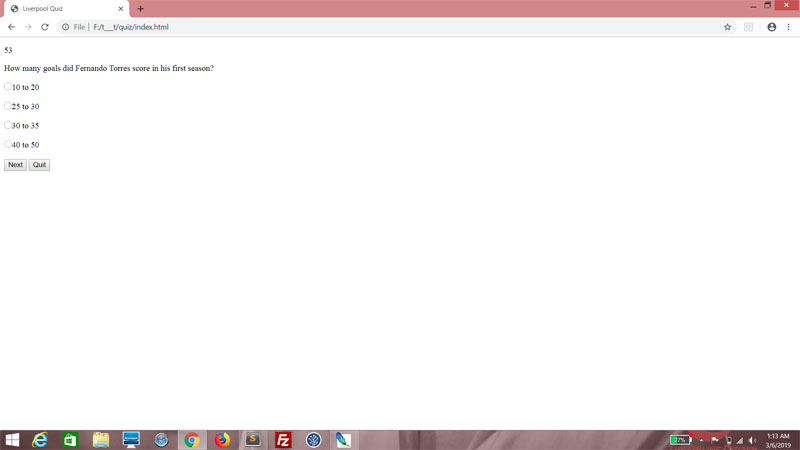
Try the quiz. Click on any one of the options in the first question. The explanation should appear under the correct option! Yes, Torres scored 30 to 35 goals in his maiden season at Liverpool.


Click "Next" and continue answering all the questions. When you get to the final panel, what happens? Yes, you get a message showing you how many answers you got right.


Of course, at this point, the "Restart" button is supposed to restart the quiz, so add the ng-click attribute and set it to run the initQuiz() function.

index.html
            <div class="pnlResults {{getStage()}}" style="background-image: url(img/results_{{resultsGrade}}.jpg)">
                <div class="content">
                    <h1>{{secondsRemainingMessage}}</h1>
                    <p>Your score is <b>{{result}}</b> out of <b>{{possible}}</b>.</p>
                    <p>{{resultsMessage}}</p>
                </div>

                <div class="buttons">
                    <input type="button" id="btnRestart" class="btn" value="Restart" ng-click="initQuiz()">
                </div>
            </div>


But there's a problem. When you click "Restart" and try to redo the quiz, you'll find that the explanation text is there in the questions (they should be hidden instead) and no matter what you answer, your score is always 0. That's because initQuiz() resets result to 0, but doesn't reset the questions to their unanswered state!

So, in the initQuiz() function, do this. Iterate through the questions array. Within that For loop, iterate through the options array. Set each selected property to an empty string.

js\main.js
    $scope.initQuiz =
    function()
    {   
        $scope.result = 0;
        $scope.currentQuestion = -1;
        $scope.secondsRemaining = 60;
        $scope.proceed = "Next";
        $scope.timer = $interval.cancel($scope.timer);
        $scope.timer = null;

        for (var i = 0; i < $scope.questions.length; i++)
        {
            for (var j = 0; j < $scope.questions[i].options.length; j++)
            {
                $scope.questions[i].options[j].selected = "";
            }           
        }
    };


Now where you click "Restart" at the end or "Quit" while answering the questions, the quiz behaves appropriately!

Setting up a timer

This part is optional, but loads of fun, so let's do it. In the questions panel, before the part where we iterate through the questions array, add a div and style it using timer. Within this, add a paragraph tag and a template string for secondsRemaining.

index.html
            <div class="pnlQuestions {{getStage()}}">
                <div class="timer">
                    <p>{{secondsRemaining}}</p>
                </div>
               
                <div ng-repeat="question in questions">
                    <div class="content {{isCurrentQuestion($index)}}">
                        <div class="question">
                            <div class="questionText">
                                {{question.text}}
                            </div>

                            <div class="questionProgress">
                               
                            </div>   
                        </div>

                        <br style="clear:both">

                        <div class="answers">
                            <div class="option" ng-repeat="option in question.options">
                                <div class="selector">
                                    <div class="optionSelector" ng-click="selectOption($parent.$index, $index)"></div>
                                </div>

                                <div class="text">
                                    <div class="optionText">{{option.text}}</div>
                                    <div class="optionExplanation {{isAnswered($parent.$index)}} {{getIndicator($parent.$index, $index)}}">{{question.explanation}}</div>
                                </div>
                            </div>
                        </div>

                        <br style="clear:both">
                    </div>
                </div>


Do you see "60" at the top? That's the number of seconds remaining, as defined by initQuiz(). Problem is, it doesn't change.


In the nextQuestion() function, add a conditional, checking if timer is null.

js\main.js
    $scope.nextQuestion =
    function ()
    {
        if ($scope.timer == null)
        {

        }

        $scope.currentQuestion ++;   
    };


If it is, then we set timer using the AngularJS object $interval. $interval basically acts like the setInterval() function here, specifying a callback and an interval in milliseconds.

js\main.js
    $scope.nextQuestion =
    function ()
    {
        if ($scope.timer == null)
        {
            $scope.timer = $interval
            (
                function()
                {

                },
                1000
            );
        }

        $scope.currentQuestion ++;   
    };


In the callback, decrement secondsRemaining.

js\main.js
    $scope.nextQuestion =
    function ()
    {
        if ($scope.timer == null)
        {
            $scope.timer = $interval
            (
                function()
                {
                    $scope.secondsRemaining--;
                },
                1000
            );
        }

        $scope.currentQuestion ++;   
    };


If secondsRemaining has fallen below 0, immediately end the quiz by setting currentQuestion to the length of the questions array, and cancel timer by running the cancel() method of the $interval object.

js\main.js
    $scope.nextQuestion =
    function ()
    {
        if ($scope.timer == null)
        {
            $scope.timer = $interval
            (
                function()
                {
                    $scope.secondsRemaining--;

                    if ($scope.secondsRemaining < 0)
                    {
                        $scope.currentQuestion = $scope.questions.length;
                        $scope.timer = $interval.cancel($scope.timer);
                    }
                },
                1000
            );
        }

        $scope.currentQuestion ++;   
    };


Now, modify the functon slightly. Make currentQuestion increment only if the current question has been answered (use the isAnswered() function here) or if currentQuestion is at -1 (meaning, the user is at the main section.). This effectively means that the user cannot proceed if the current question is not answered, but the "Next" button will still function normally at the main section.

js\main.js
    $scope.nextQuestion =
    function ()
    {
        if ($scope.timer == null)
        {
            $scope.timer = $interval
            (
                function()
                {
                    $scope.secondsRemaining--;

                    if ($scope.secondsRemaining < 0)
                    {
                        $scope.currentQuestion = $scope.questions.length;
                        $scope.timer = $interval.cancel($scope.timer);
                    }
                },
                1000
            );
        }

        if ($scope.isAnswered($scope.currentQuestion) == "answered" || $scope.currentQuestion == -1)
        {
            $scope.currentQuestion ++;   
        }
    };


Add one more conditional block. After incrementing, check if we're at the end of the questions array. If we are, cancel the timer.

js\main.js
    $scope.nextQuestion =
    function ()
    {
        if ($scope.timer == null)
        {
            $scope.timer = $interval
            (
                function()
                {
                    $scope.secondsRemaining--;

                    if ($scope.secondsRemaining < 0)
                    {
                        $scope.currentQuestion = $scope.questions.length;
                        $scope.timer = $interval.cancel($scope.timer);
                    }
                },
                1000
            );
        }

        if ($scope.isAnswered($scope.currentQuestion) == "answered" || $scope.currentQuestion == -1)
        {
            $scope.currentQuestion ++;   

            if ($scope.currentQuestion == $scope.questions.length)
            {
                $scope.timer = $interval.cancel($scope.timer);
            }
        }
    };


Time to test! The figure at the top should be decrementing every second, and when it reaches 0 before you have completed the quiz, it should go straight to results. If you complete the quiz, it should stop decrementing automatically.


Next

Layout, presentation, and all that jazz! I will show you how to make this quiz more user-friendly.