Showing posts with label AngularJS. Show all posts

Sunday, 3 December 2023

Ode to my Lenovo

Two weeks back, my trusty Lenovo Z51-70 laptop gave up the ghost. It was showing signs well before that; consistently dropping my network connection, lagging severely when saving files and most tellingly, a noticeable flicker on the monitor. Can't say it didn't give me fair warning when on Saturday, it refused to power on.

Now, that was a sentimental moment.

Rest well, my friend.

I first obtained this flat white beauty during a Christmas Sale in 2014, when I was about to begin a Specialist Diploma in Mobile Apps Development. While my company at the time had issued me a decent notebook, I didn't feel comfortable using company property for my personal enterprise. I had a personal laptop, but it was on its last legs. Thus, I went for an i5 Intel Core that would meet my programming needs.

2015 to 2017

2015 was the second semester of my Specialist Diploma in Mobile Apps Development. With Java being the operating language, I installed Eclipse and the Java Runtime Environment. I also had NodeJS installed, and wrote apps in jQuery Mobile to deploy onto the mobile phone. This would perhaps be the most serious and intensive period of using the Lenovo.

Mobile app development.

Somewhere along the way, in addition to my steady diet of HTML, CSS and JavaScript experimentation, I experimented with things QBasic, LESS and AngularJS. An odd mix, I know, but I was having fun.

MeteorJS came along for me in early 2017. The lessons I learned here would help me years later when I experimented with ReactJS.

2017 to 2019

This was the period of my life where I settled down into a regular nine-to-five. I still experimented on weekends, writing D3 and ReactJS code. It was also the time I picked up Ruby and Rails, for whatever reason.

Like a stallion.

The Lenovo handled it all like a champ. It was tireless, inexhaustible, like a stallion in its prime.

Around the latter half of this period, I started working on my ACTA. Whatever work I needed done, I did it on my trusty laptop.

At some point during this period, I also got married. Late nights at the console were no longer viable, not if I wanted to sleep in the same bed as my wife. Still, I squeezed in whatever time I could.

2019 to 2023

This was the year the COVID-19 pandemic hit, and marked one of the longest durations my wife and I were geographically separated. During this time, my work on the Lenovo intensified, with me trying out Highcharts and VueJS.

During this period, however, I had acquired a MacBook and was gradually transitioning away from my faithful Lenovo which was starting to show its years.

Getting pretty old.

It was also when I embarked on my yet another Specialist Diploma, this time in Data Analytics. The MacBook handled Python and Tableau, but only my Lenovo could run Spotfire and  Power BI. It creaked and groaned, but ultimately delivered.

Why is this particular laptop special?

Why do I feel so strongly about this fella? It's not the first laptop to die on me, after all. I've lived more than forty years. But the last nine years of my professional life have been pretty tumultuous, and also represented the bulk of my career advancement and tech education, spanning two Specialist Diplomas and a Higher Certificate. This Lenovo was with me through all of it. I played no games on it. All I did was write code, and run code. (Some of that code were games I wrote, but we're just splitting hairs at that point!)

Much of whatever important files I have are saved on the cloud - on Google Drive, GitHub and Trello. Thankfully, I can resume my work on a new machine with little trouble. But I'll always treasure my time with this machine.


Rest In PC,
T___T

Tuesday, 13 September 2022

Five Unpleasant Things About Working With Front-end Technology

In tech, there are several technologies at each layer of the stack. The nuances are usually not covered by tech hiring, and this is usually divided into front-end and back-end. Today, my intention is to examine the two, especially front-end technology. And here are five reasons why you might not want to make front-end technology your career.

1. Rapid evolution

There are several aspects to front-end technology. There's your standard HTML, CSS and JavaScript... and that alone can be a nightmare to keep up with. HTML, if you're up to speed with the most commonly used features of HTML5, not so much. For CSS, the preprocessor packages and CSS3 updates can be slightly more of a pain in the ass.

Multiplying like guppies

But JavaScript? If you elect to go down that rabbit hole, JavaScript is constantly evolving. The core language alone has been through update after update, The jQuery library as well. But all the front-end frameworks - ReactJS, AngularJS, VueJS, just to name a few - are also constantly going through evolution. And new frameworks seem to be coming out of the goddamn woodwork all the time!

And that's only the tech part. The design part is certainly nothing to sniff at. Learning fonts and color schemes is only the tip of the proverbial iceberg. Design patterns and anti-patterns evolve all the time. A typical website in the 90s will look markedly different ten years later, and another ten years after that.

This sounds fun if you're a hobbyist. When you do this shit for a living, not so much.

2. Uncontrollable environment

Front-end code runs on web browsers. Each of which comes with user-controllable functionality a front-end developer may not have catered for.

Yes, you read that right. User-controllable. Not developer-controllable.

Your typical web browser may come with a Dark Mode. There may almost definitely will be controls to increase or decrease font size. This is going to mess with all your layout specifications.

What about Dark Mode?!

Add in the fact that your users may screw with your carefully crafted interface by refreshing the browser insistently, pressing the Back button and using browser functions in all sorts of unruly ways. It's certainly not like a back-end interface where there are limits to input.

3. Testing nightmare

Mobile technology in the past decade has seen a proliferation of different screen sizes - tablets and phones - in addition to the standard screen sizes. In addition, there may be differences in how certain browsers render HTML, CSS and JavaScript. These differences have largely been eliminated with the demise of Internet Explorer, but some remain.

A plethora of different devices.

All of this adds up to an almost untenable amount of user interface testing for the optimal amount of exposure to the market. It is not an enviable position.

Front-end frameworks and libraries such as Twitter Bootstrap, jQuery and such, mitigate much of the insanity. But these issues have remained through the decade and will likely continue to grow the more mobile technology evolves.

4. Vague KPIs

In back-end technology, things are binary. Input is defined, and output is defined. The output is either correct, or it is not. It either is produced quickly enough, or it is not. Things either conform to security standards, or they do not.

Back-end input and
output is simpler.

Front-end technology has all that, true. It also encompasses a whole host of KPIs that are, for the most part, subjective in nature. User experience. Aesthetic beauty. Ease of use. These are guaranteed to vary from user to user and therefore, there is no way to obtain a perfect score.

Imagine being in a situation where you have to live with having less than total success. That is front-end technology.

5. Everyone has an opinion

This is somewhat related to the last point. In back-end technology, laypeople generally have better sense than to ever touch this, because they have little to no understanding of the stack and they have no tech qualifications.

Everyone and their dog.

In front-end technology, however, which is mostly visual, suddenly everybody and their dog has an opinion. Suddenly, everyone feels the need to chime in on how stuff should look and feel like. Nobody is shy about commenting because, well, you don't need tech qualifications to talk about something which is largely visual. It's subjective, so there are no wrong answers.

This makes your work a lot more difficult, when you have to take so much extra feedback into account. And when a sizeable portion of that feedback comes from laypeople, this makes things even more difficult because laypeople don't quite speak the same language techies do, and they may not have a good grasp of what technically makes sense and what doesn't.

In conclusion

Front-end technology is far, far from a bed of roses.

Still, if it still looks intriguing, let nothing deter you from your path. The important thing is not to go in blind, and be aware of all the pitfalls that await you.

Just being up front!
T___T

Thursday, 30 December 2021

How I Learned Various JavaScript Frameworks

JavaScript has been a staple of my professional life since the early 2000s. Today, JavaScript frameworks dot the tech landscape. And I have even dabbled in some of them. In recent years, I have picked up AngularJS, ReactJS and VueJS, in that order. Today, I would like to recount my learning process.

Most of my learning, at least with JavaScript frameworks, was done less out of immediate necessity, and more out of the curiosity that seems almost to be professional obligation for a web developer. And one of my most valuable takeaways from all this learning is that I've discovered it is extremely possible for me to learn. I have the requisite motivation, and the numerous resources on the web are very helpful, especially if one keeps at it.

Encountering the framework

All these frameworks were first brought to my attention either via the process of sourcing for new job opportunities, or actually working in a new job opportunity.

AngularJS and ReactJS were encountered in the same way - via job ads in LinkedIn. It's my practice to periodically monitor the local software industry and look out for better opportunities. In doing so, I noticed that these two terms just kept coming up in job ad skillset descriptions. AngularJS. ReactJS.

JavaScript frameworks.

I started with AngularJS first, even though it was on its way to becoming obsolete, because there were just so many eminently readable examples on the internet.

Later on, I delved into ReactJS. Part of the reason I did it was because I was challenged by an interviewer to pick it up. It had already been on my radar; now I had even greater reason to explore.

And even later on, I picked up VueJS en route to trying to pick up Laravel. It was something I was trying to learn for a new job; VueJS was peripheral to the goal. However, I had already learned AngularJS and ReactJS by then. Consequently, learning VueJS didn't feel like it would be such a huge deal.

Learning

With AngularJS and VueJS, it started from books. Learning AngularJS by Brad Dayley and Full-Stack Vue.js 2 and Laravel 5: Bring the frontend and backend together with Vue, Vuex, and Laravel by Anthony Core respectively. As you can see with VueJS, it was more about Laravel. For AnguarJS, I learned the concept of front-end brackets. This would be one of the foundational concepts of picking up ReactJS and VueJS.

Learning from books.

When it came to learning ReactJS, however, I fell back to my second go-to method: YouTube tutorials. Specifically, Level Up Tuts.


From there, I learned the concept of State Management and how it was used to effect changes to the front-end. It was markedly different from what I had covered with AngularJS.

However, later on when I tried to pick up VueJS, I found the going much easier. The front-end binding from AngularJS and the State Management from ReactJS I had previously learned, flattened the learning curve for me immensely. VueJS was pretty much a combination of all my favorite parts of ReactJS and AngularJS, with less of the annoying bits.

Projects

Once I'd started learning the ins and outs of these various frameworks, it was time to actually put that knowledge to use, no matter how minor.

For AngularJS, it began with an exceedingly simple BMI Calculator, where I used template strings and front-end data binding. Later on, I graduated to a Password Strength Validator, using AJAX. The final project I did with this was the Liverpool Quiz, where I proceeded to perform more fancy variations of front-end data binding.

With ReactJS, it was just a teeny bit more complicated. I did three projects the "non-professional" way - by remote-linking the ReactJS libraries in the code and just writing the components in the same page. These were very simple applications such as Lee Bee Wah Lau! and the British Insult Generator, Ada Lovelace Day Generator and later on the Easter Memory Game.

Various ReactJS projects.

However, after a short stint with a prospective employer, I graduated to using NodeJS to generate ReactJS code and then running tests on the applications I wrote, attempting to do things in a more professional way. The end result was The 12 Days of Christmas and the rather more useful Hangman game.

On to VueJS. The one and only application I have written so far is the VueJS Easter Puzzle, and all this really amounted to a nice distraction because it just wasn't complicated at all. Whatever I had already done in AngularJS and ReactJS just combined nicely to give me the end result.

Editor's Note: At the time of publication of this blogpost, the VueJS Tile Slider Game is up as well.

Final Thoughts

No one is ever done learning - not in life, and most certainly not in tech.

My current method seems to be - read up on the subject, get some hands-on practice, then cement the knowledge with coding projects. It's not perfect, but if you're stuck as to how to proceed, you could probably do worse!

{goodbyeMessage};
T___T

Thursday, 3 September 2020

Web Tutorial: AngularJS Password Strength Validator, Redux

Two years have passed since I last walked you through the AngularJS Password Strength Validator, and quite a few things have changed. For one, AngularJS isn't quite as hot as it used to be, and this particular version that was in use, is severely outdated. For another, the API that we were using for this was upgraded and no longer works quite the same way.

So today we will be revisiting this piece of code, and making some improvements!

The API

Remember how we set the code to make a dictionary check every time text was changed? Well, as it turns out, this was clumsy as hell due to being an asynchronous operation. Since I've upgraded my account over at Oxford Dictionaries and now need to pay whenever somebody uses my account to make that API call, it only makes sense not to be quite so generous with these calls.

For starters, let's remove the entire AJAX call from the processPassword() function. Leave the call to the getWords() function; that'll come in useful later.

js/main.js
$scope.processPassword=
function()
{
    if ($scope.enteredPassword.length == 0) return;

    if ($scope.enteredPassword.length < 8)
    {
        $scope.strengthCode = "weak";
        $scope.strengthMessage = "Password is too short. 8 characters or above recommended.";
        return;
    }

    var pts = 1;
    $scope.strengthMessage = "";

    if (/[~`!#$%\^&@*+=\-\[\]\\';,/{}|\\":<>\?]/g.test($scope.enteredPassword))
    {
        pts ++;
    }
    else
    {
        $scope.strengthMessage += "Try using special characters in your password.\n";
    }

    if (/[A-Z]/g.test($scope.enteredPassword))
    {
        pts ++;
    }
    else
    {
        $scope.strengthMessage += "Try using a mix of uppercase letter and lowercase letters.\n";
    }

    if (/[0-9]/g.test($scope.enteredPassword))
    {
        pts ++;
    }
    else
    {
        $scope.strengthMessage += "Try including numbers in your password.\n";
    }

  
    var possibleWords = getWords($scope.enteredPassword);
    /*
    if (possibleWords.length > 0)
    {
        var xmlhttp = new XMLHttpRequest();
                xmlhttp.onreadystatechange = function()
        {
                        if (this.readyState == 4 && this.status == 200)
            {console.log(this.responseText);
                var result = JSON.parse(this.responseText);
                if (result.wordsFound)
                {
                    pts --;
                    $scope.strengthMessage += "Avoid using dictionary words.\n";   
                    $scope.strengthCode = getCode(pts);
                    return;
                }
                        }
                };

        xmlhttp.open("POST", "validate.php", true);
        xmlhttp.setRequestHeader("Content-type", "application/x-www-form-urlencoded");
        xmlhttp.send("words=" +  JSON.stringify(possibleWords) + "&url=https://od-api.oxforddictionaries.com/api/v1/entries/en/");
    }
    else
    {
        $scope.strengthCode = getCode(pts);
        return;
    }
    */

    $scope.strengthCode = getCode(pts);
    return;
};


And then move the entire AJAX call to application scope. We'll call this new function checkDictionary(). Note that we'll still call getWords() here.

js/main.js
function getCode(pts)
{
    if (pts <= 0) return "weak";   
    if (pts == 1) return "moderate";   
    if (pts == 2) return "strong";   
    if (pts >= 3) return "excellent";
}

$scope.checkDictionary =
function()
{
    var possibleWords = getWords($scope.enteredPassword);

    var xmlhttp = new XMLHttpRequest();
    xmlhttp.onreadystatechange = function()
    {
        if (this.readyState == 4 && this.status == 200)
        {
            var result = JSON.parse(this.responseText);
            if (result.wordsFound)
            {
                pts --;
                $scope.strengthMessage += "Avoid using dictionary words.\n";   
                $scope.strengthCode = getCode(pts);
                return;
            }
        }
    };

    xmlhttp.open("POST", "validate.php", true);
    xmlhttp.setRequestHeader("Content-type", "application/x-www-form-urlencoded");
    xmlhttp.send("words=" +  JSON.stringify(possibleWords) + "&url=https://od-api.oxforddictionaries.com/api/v1/entries/en/");
}

$scope.processPassword =
function()
{


Remove these lines for now, won't need them. Also, change the API url.

js/main.js
$scope.checkDictionary =
function()
{
    var possibleWords = getWords($scope.enteredPassword);

    var xmlhttp = new XMLHttpRequest();
    xmlhttp.onreadystatechange = function()
    {
        if (this.readyState == 4 && this.status == 200)
        {
            var result = JSON.parse(this.responseText);
            if (result.wordsFound)
            {
                //pts --;
                //$scope.strengthMessage += "Avoid using dictionary words.\n";   
                //$scope.strengthCode = getCode(pts);
                //return;
            }
        }
    };

    xmlhttp.open("POST", "validate.php", true);
    xmlhttp.setRequestHeader("Content-type", "application/x-www-form-urlencoded");
    xmlhttp.send("words=" +  JSON.stringify(possibleWords) + "&url=https://od-api.oxforddictionaries.com:443/api/v2/entries/en-us/");
}


Now add a new scope variable, showDictionaryButton. By default, its value is false.

js/main.js
$scope.strengthCode = "";
$scope.strengthMessage = "";
$scope.enteredPassword = "";
$scope.showDictionaryButton = false;


Remember in processPassword() we removed the AJAX call but left the call to getWords()? Well, after that call, check if the length of possibleWords is more than 0; and set showDictionaryButton accordingly.

js/main.js
    var possibleWords = getWords($scope.enteredPassword);

    $scope.showDictionaryButton = (possibleWords.length > 0);

    $scope.strengthCode = getCode(pts);
    return;
};

$scope.strengthCode = "";
$scope.strengthMessage = "";
$scope.enteredPassword = "";
$scope.showDictionaryButton = false;


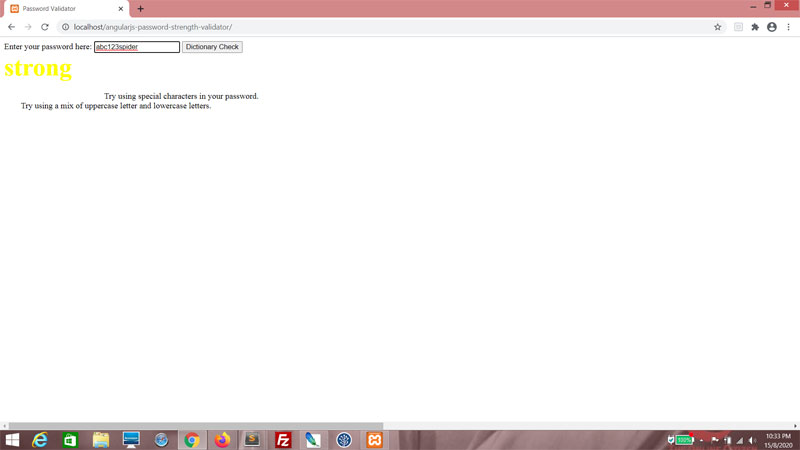
Now in the front-end, add a button. When clicked. it calls checkDictionary().
index.html
<input type="text" id="txtPassword" ng-change="processPassword()" ng-model="enteredPassword">
<button ng-click="checkDictionary()">Dictionary Check</button>


But wait! Unless showDictionaryButton is true, we want to disable it. Because showDictionaryButton is true only if there are possible words, remember? So we want to enable this button only if there are words to check.
<button ng-disabled="!showDictionaryButton" ng-click="checkDictionary()">Dictionary Check</button>


So now we have a disabled button. Yay. But the code should still work.


Let's test this with input!


If you enter a series of five letters or more, the button should be enabled.


Back to the JavaScript, let's correct this Regular Expression. I somehow forgot to cater for underscores. Imagine that.
js/main.js
if (/[~`!#$%\_\^&@*+=\-\[\]\\';,/{}|\\":<>\?]/g.test($scope.enteredPassword))
{
    pts ++;
}
else
{
    $scope.strengthMessage += "Try using special characters in your password.\n";
}


Now let's go to the back-end code. This thing was hideously inefficient because it insisted on going through the entire list of words provided even though we only needed to check that at least one of these words was found via the API. We'll also improve it by returning the word found.

Add the variables response and word.

validate.php
$url = $_POST["url"];
$words = json_decode($_POST["words"]);
$wordsFound = false;
$wordToValidate = "";
$response = "";
$word = "";

for ($i = 0; $i < sizeof($words); $i++)
{
    $wordToValidate = $words[$i];
    $curl = curl_init();
    curl_setopt($curl, CURLOPT_SSL_VERIFYHOST, 0);
    curl_setopt($curl, CURLOPT_SSL_VERIFYPEER, 0);

    curl_setopt_array($curl, array(
    CURLOPT_URL => $url . $wordToValidate,
    CURLOPT_RETURNTRANSFER => true,
    CURLOPT_TIMEOUT => 30,
    CURLOPT_HTTP_VERSION => CURL_HTTP_VERSION_1_1,
    CURLOPT_CUSTOMREQUEST => "GET",
    CURLOPT_HTTPHEADER => array(
    "app_id: 958ab193",
    "app_key: 60d5994148ce1699defd2194dd9c25b9"
    ),
    ));

    $response = curl_exec($curl);

    if (strpos($response, "404") === false) $wordsFound = true;

    curl_close($curl);
}

$result = array("wordsFound" =>$wordsFound);
echo json_encode($result);


Remove this entire If block. Because it's simplistic and just not very good.

validate.php
$response = curl_exec($curl);

//if (strpos($response, "404") === false) $wordsFound = true;

curl_close($curl);


Instead, run response through the json_decode() function and then attach the result to res.

validate.php
$response = curl_exec($curl);

//if (strpos($response, "404") === false) $wordsFound = true;

$res = json_decode($response);

curl_close($curl);


Check if res has the "id" key using the array_key_exists() function.

validate.php
$response = curl_exec($curl);

//if (strpos($response, "404") === false) $wordsFound = true;

$res = json_decode($response);

if (array_key_exists("id", $res))
{

}

curl_close($curl);


If so, set wordsFound to true and word to the value of the id key in res.

validate.php
$response = curl_exec($curl);

//if (strpos($response, "404") === false) $wordsFound = true;

$res = json_decode($response);

if (array_key_exists("id", $res))
{
    $wordsFound = true;
    $word = $res->id;
}

curl_close($curl);


And finally, use the break statement to end the For loop processing. You've already found one word and that was all we really wanted, right?

validate.php
if (array_key_exists("id", $res))
{
    $wordsFound = true;
    $word = $res->id;
    break;
}


At the end of it, we want to return the word as well.

validate.php
$result = array("wordsFound" => $wordsFound, "word" => $word);
echo json_encode($result);


Now back to the AJAX call, we're expecting both wordsFound and word. So if wordsFound is true, use the alert() function to display the word. And if not, just say no words were found.

js/main.js
$scope.checkDictionary =
function()
{
    var possibleWords = getWords($scope.enteredPassword);

    var xmlhttp = new XMLHttpRequest();
    xmlhttp.onreadystatechange = function()
    {
        if (this.readyState == 4 && this.status == 200)
        {
            var result = JSON.parse(this.responseText);
            if (result.wordsFound)
            {
                //pts --;
                //$scope.strengthMessage += "Avoid using dictionary words.\n";   
                //$scope.strengthCode = getCode(pts);
                //return;

                if (result.wordsFound)
                {
                    alert("'" + result.word + "' found in dictionary!");
                }
                else
                {
                    alert("No word found!");
                }
            }
        }
    };

    xmlhttp.open("POST", "validate.php", true);
    xmlhttp.setRequestHeader("Content-type", "application/x-www-form-urlencoded");
    xmlhttp.send("words=" +  JSON.stringify(possibleWords) + "&url=https://od-api.oxforddictionaries.com:443/api/v2/entries/en-us/");
}


Don't forget to set showDictionaryButton here. We want to disable the button as the API is being called, so that the user can't keep clicking and making a flurry of API calls (and costing me money for no good reason).

js/main.js
$scope.checkDictionary =
function()
{
    var possibleWords = getWords($scope.enteredPassword);

    $scope.showDictionaryButton = false;

    var xmlhttp = new XMLHttpRequest();
    xmlhttp.onreadystatechange = function()
    {
        if (this.readyState == 4 && this.status == 200)
        {
            var result = JSON.parse(this.responseText);
            if (result.wordsFound)
            {
                //pts --;
                //$scope.strengthMessage += "Avoid using dictionary words.\n";   
                //$scope.strengthCode = getCode(pts);
                //return;

                if (result.wordsFound)
                {
                    alert("'" + result.word + "' found in dictionary!");
                }
                else
                {
                    alert("No word found!");
                }
            }
        }
    };

    xmlhttp.open("POST", "validate.php", true);
    xmlhttp.setRequestHeader("Content-type", "application/x-www-form-urlencoded");
    xmlhttp.send("words=" +  JSON.stringify(possibleWords) + "&url=https://od-api.oxforddictionaries.com:443/api/v2/entries/en-us/");
}


Enter a series of five letters or more. The button should be enabled. Then click the button.


Search was successful!


And if we do this...


Search was not successful!


Thanks for reading!

I don't recommend doing back to this version of AngularJS, of course. But the point today was to update the API and improve the code. The framework used is really secondary.

May your search not be in vain,
T___T

Sunday, 6 October 2019

TeochewThunder: Year Five (Part 2/2)

It was a dismal year for readership, to tell the truth. I suspect this was in part largely due to the shutting down of Google Plus, which contributed maybe 10% of my usual hits. While the year started out reasonably well, readership went down after Chinese New Year, and hasn't picked up appreciably since.

Getting kinda lonely here, guys.

Luckily I'm not doing this for the attention, because that would suck.

Strangely, I think the quality of my work has gone up; though without readership stats to back up that assertion, it's an empty boast at best.

There were some things I could have written about. The year sure wasn't short on tech news. I could have written about Cloudflare and their decision to abandon 8Chan, the same way I wrote about a similar decision taken by their CEO Matthew Prince back in 2017. I even started ruminating over the new Code of Conduct at Linux and sabbatical of Linus Torvalds, before abandoning that train of thought altogether. The thing is, I'm sick to death of the USA and the never-ending online presence of their identity politics. Conservatives? Liberals? Fuck all of them. They should sort their shit out and I'm certainly not giving them any more air-time than I need to. My little pieces on Patreon and Twitter earlier this year was as far as I cared to go.

Sure, writing about stuff like that attracts the attention of even non-techies. But I shouldn't lose sight of what this blog is for.

The biggest hit of 2019...

One blogpost stood out among all the others when I did some investigation - the two-parter Women Can Code, Get Used To It! This had the second biggest number of hits in the entire history of TeochewThunder, almost matching the current record-holder, 2018's Ten Principles of Adult Learning Applied to Software Development. I suspect a huge part of its popularity was because I shared this with several female friends, not all of whom are from technical disciplines, and they pretty much did the rest by re-sharing.

Gorgeous geek girls?

Interestingly, the second part of Women Can Code, Get Used To It! was far more popular than the first. I guess people were more interested in my declaration that tech is not a gender-specific profession, rather than what I felt was more interesting - examples of pretty ladies that don't conform to the geek girl stereotype.

On further review

It appears that a web tutorial from 2017 has suddenly gotten a lot of attention - way more attention than I think it deserves. It was basically a BMI Calculator written in AngularJS, and the first ever AngularJS tutorial on this blog. Again, yes, don't look a gift horse in the mouth... but damn if it isn't suspicious.

Future Plans

The road map for this blog features a lot more reviews that I never had time to write - books, apps and my ongoing writeups about the TV series Silicon Valley, which, sadly, looks about to end its run soon.

I'm also trying to keep to the basics, because I've always been all about the basics. There's a lot to cover. Fun or boring, they all have a place on this blog. 2020 looks promising. There's so much to write about, and the list looks to be growing all the time.

Thunderously,
T___T

Thursday, 3 October 2019

TeochewThunder: Year Five (Part 1/2)

This October marks the fifth year since TeochewThunder was started, and what a journey it has been so far. There's been plenty to write about, and I'm not running out of material anytime soon. Although there have been times I just didn't feel like writing. Blogging is an exercise in discipline. It forces me to keep exploring; keep my eyes, ears and mind open for more related topics, and most importantly, it keeps me honing my craft. It's a veritable ocean out there and I'm a shark; if I ever stop, that's it for me.

Can't stop!


Still, compared to hectic madness that was 2018, this year was a breeze. Being married and all, I can't devote as much time to this enterprise as I'm used to, but sometimes it's all about time management.

It also gives me a sense of purpose. Because work can drive me nuts... and when I get home, I need something to remind myself that I still love this shit. Something fun. Something productive.

Tutorials

2019 is the year I return to my roots - instantly browser-executable HTML, CSS and JavaScript, but with additional front-end niceties like jQuery UI, AngularJS and ReactJS thrown in. My style of coding has changed slightly. I'm now particular about spacing and indentation (fine, more particular than before) and when I do get the chance, my preferred style skews towards Object-oriented Programming. Happily, I still find time to do a little PHP, Ruby and QBasic.

Nothing really significant has changed otherwise; I'm still the nerd who codes outside of office hours and derives more pleasure than is reasonable from it. This results in at least one web tutorial a month, and I plan to maintain that standard.

Reviews

There have been a lot of reviews in TeochewThunder this year. Almost every month, there's been a review of some sort or other, and happily, they have been somewhat evenly spread out between film, app and fiction reviews. Reviews are easy to write, usually, and I've discovered a newfound enthusiasm for it. Also, many of these are backdated. While I collect the screenshots and all, I don't always have time to write all these reviews.

This blog is about more than tech reviews! And I have to be careful not to turn this into a review blog.

Miscellaneous Features

Spot The Bug. I manage about three of these a year, and to this day, I have not broken that streak.

Ropework analogies. One a year seems reasonable. Again, I've managed to keep that up, though this year's seemed a little trite. No matter, all part of the journey.

Listicles. These are fun to make; however they're also a lot of work. They used to be a good way to group related ideas into one blogpost so I wouldn't have to overlap too much when discussing similar ideas next time.

Work on teochewthunder dot com

Things have gotten a wee bit more expensive since 2018, what with me paying for hosting. Still, considering the benefits that this resource brings me, it's a small price to pay.

I get a domain name and a portfolio for prospective employers. It isn't great, but it's a heck of a lot better than nothing, which incidentally is what many developers have other than a resume and a lot of bravado. I don't really understand why other web devs don't invest in a domain name and hosting, especially when they're technically more skilled than I am and have a lot more to showcase. But it works in my favor and you know what they say about looking a gift horse in the mouth.

And it has worked. I attended interviews this year and the interviewers all mentioned the amount of code I've put online, along with my tech blogging. Sure, they don't always say it's good, but still. It's a body of work that has spanned years and it's being noticed by the audience for which it was intended.

All in all...

I sometimes struggle with not writing too much, especially when I have points that I want to make. But part of effective writing is restraint, and it's something that many people, not just me, could use more of.

Cutting away all that fat.


Every overly wordy Social Media post or article I come across annoys the living beejeezus out of me and I try very hard not to fall into that trap. These days, more time is spent trimming the fat than actually writing.

Next

Check out some of the stats on this blog!

Friday, 7 June 2019

Web Tutorial: The Liverpool Quiz (Part 3/3)

It's time for the most visual part of this web tutorial - layout and user experience. The quiz is quite functional as it is right now, but no one will ever accuse it of being pretty and user-friendly. Let's change that.

Set the background to a deep red, and give quizContainer a width of 600 pixels, then move it center of the screen.

css\styles.css
body
{
    background-color: #660000;
}

#quizContainer
{
    width: 600px;
    margin: 50px auto 0 auto;
}

.pnlMain, .pnlQuestions, .pnlResults
{
    display: none;
}


What a dramatic difference!


Now set font sizes and colors. I'm partial to Verdana myself... and white seems good if we're going to use that deep red as a background.

css\styles.css
.pnlMain, .pnlQuestions, .pnlResults
{
    width: 100%;
    font-family: verdana;
    font-size: 14px;
    color: #FFFFFF;
    display: none;
}


Better already.


Let's give the panels round corners and a translucent white border. And a padding of, say, 1em.

css\styles.css
.pnlMain, .pnlQuestions, .pnlResults
{
    width: 100%;
    font-family: verdana;
    font-size: 14px;
    color: #FFFFFF;
    padding: 1em;
    border-radius: 10px;
    border: 1px solid rgba(255, 255, 255, 0.5);
    display: none;
}


Nice!


Now let's give the main and results panels a larger amount of padding by setting the divs within, styled using content, a sizeable top and bottom margin, and center the text.

css\styles.css
.pnlMain.main, .pnlQuestions.questions, .pnlResults.results
{
    display: block;
}

.pnlMain .content, .pnlResults .content
{
    margin-top: 20%;
    margin-bottom: 20%;
    text-align: center;
}


Looking presentable.


We'll work on the buttons next. First, set all divs using the class buttons, to a 100% width and 3em height. Then for all buttons styled using btn, float them right. I've also given them rounded corners, white text, a scarlet background, padding and margins. And used a hover psudoselector to turn the background bright red if the user mouse the cursor over the button. Feel free to impose your own style.

css\styles.css
.pnlQuestions .content.current
{
    display: block;
}

.buttons
{
    width: 100%;
    height: 3em;
}

.btn
{
    float: right;
    width: 8em;
    border-radius: 5px;
    border: 0px solid #FFFFFF;
    padding: 0.5em;
    margin-left: 0.5em;
    font-weight: bold;
    color: #FFFFFF;
    background-color: #AA0000;
    cursor: pointer;
}

.btn:hover
{
    background-color: #FF0000;
}


Getting there, folks!


Let's move on to the questions section. Now you should see that the text isn't centered because we only centered text for the main and results panels. The main problem here is with the selectors. They don't really respond when moused over or clicked on. So let's first impose a hover pseudoselector on optionSelector, turning the border a deeper grey when the cursor moves over.

css\styles.css
.optionSelector
{
    width: 0.8em;
    height: 0.8em;
    border: 1px solid #AAAAAA;
    cursor: pointer;
    border-radius: 50%;
    float: left;
    background-color: transparent;
}

.optionSelector:hover
{
    border: 1px solid #999999;
}


Next, if the div is styled using both optionSelector and selected, change background color and border.

css\styles.css
.optionSelector:hover
{
    border: 1px solid #999999;
}

.optionSelector.selected
{
    background-color: #440000;
    border: 1px solid #000000;
}


In the HTML, add this template string. It's populated using the selected property of the current option object.

index.html
                        <div class="answers">
                            <div class="option" ng-repeat="option in question.options">
                                <div class="selector">
                                    <div class="optionSelector {{option.selected}}" ng-click="selectOption($parent.$index, $index)"></div>
                                </div>

                                <div class="text">
                                    <div class="optionText">{{option.text}}</div>
                                    <div class="optionExplanation {{isAnswered($parent.$index)}} {{getIndicator($parent.$index, $index)}}">{{question.explanation}}</div>
                                </div>
                            </div>
                        </div>


Now if you click on any of the options, you can tell right off!


But this isn't good enough. What we also need is an indicator to tell us if the answer is correct or wrong. Add a div here. Style it using optionIndicator, and add a template string using the getIndicator() function. Pass in the appropriate arguments. Also add in a template string using the selected property of the current option object.

index.html
                        <div class="answers">
                            <div class="option" ng-repeat="option in question.options">
                                <div class="selector">
                                    <div class="optionIndicator {{option.selected}} {{getIndicator($parent.$index, $index)}}"></div>
                                    <div class="optionSelector {{option.selected}}" ng-click="selectOption($parent.$index, $index)"></div>
                                </div>

                                <div class="text">
                                    <div class="optionText">{{option.text}}</div>
                                    <div class="optionExplanation {{isAnswered($parent.$index)}} {{getIndicator($parent.$index, $index)}}">{{question.explanation}}</div>
                                </div>
                            </div>
                        </div>


Write the optionIndicator CSS class. Use the before psudoselector to set content to an empty string by default.
css\styles.css
.btn:hover
{
    background-color: #FF0000;
}

.optionIndicator
{
    width: 1.5em;
    height: 1.5em;
    float: left;
}

.optionIndicator:before
{
    display: block;
    content: "";
    font-size: 1.5em;
}

.optionSelector
{
    width: 0.8em;
    height: 0.8em;
    border: 1px solid #AAAAAA;
    cursor: pointer;
    border-radius: 50%;
    float: left;
    background-color: transparent;
}


If the div is styled using optionIndicator and correct, the content is a bright green tick. If not, it's a bright red cross.

css\styles.css
.optionIndicator
{
    width: 1.5em;
    height: 1.5em;
    float: left;
}

.optionIndicator:before
{
    display: block;
    content: "";
    font-size: 1.5em;
}

.optionIndicator.selected.correct:before
{
    display: block;
    content: "\2713";
    color: #00FF00;
}

.optionIndicator.selected.wrong:before
{
    display: block;
    content: "\2717";
    color: #FF0000;
}


See that? So cool.


Let's clean stuff up by styling question, option, selector and text. questionText is styled as well, to set font size and such.

css\styles.css
.question
{
    width: 100%;
    height: 6em;   
}

.questionText
{
    width: 70%;
    float: left;
    font-size: 1.5em;
}

.option
{
    width: 100%;
    height: 3em;
}

.selector
{
    width: 3em;
    float: left;
}

.text
{
    width: 90%;
    float: left;
}

.optionIndicator
{
    width: 1.5em;
    height: 1.5em;
    float: left;
}


Coming along nicely!


Styling the timer

The timer is a little bare bones now, but we can beautify it. We're going to make it a brown circle with a translucent black background. Styling the paragraph tag within timer helps adjust the counter value a bit.

css\styles.css
.btn:hover
{
    background-color: #FF0000;
}

.timer
{
    width: 2em;
    height: 2em;
    font-size: 1.5em;
    font-weight: bold;
    text-align: center;
    border-radius: 50%;
    border: 3px solid #440000;
    background-color: rgba(0, 0, 0, 0.5);
    margin-top: -1.5em;
    margin-left: -1.5em;
}

.timer p
{
    margin-top: 0.25em;
}

.question
{
    width: 100%;
    height: 6em;   
}


Great!


Adding a progress indicator

It's better to do a quiz when you have an idea just how far you are along. Add template strings. currentQuestion needs to have 1 added because the count starts from 0.

index.html
                        <div class="question">
                            <div class="questionText">
                                {{question.text}}
                            </div>

                            <div class="questionProgress">
                                {{currentQuestion + 1}} of {{possible}}
                            </div>   
                        </div>


Some styling.

css\styles.css
.questionText
{
    width: 70%;
    float: left;
    font-size: 1.5em;
}

.questionProgress
{
    width: 30%;
    float: right;
    text-align: right;
}

.option
{
    width: 100%;
    height: 3em;
}


Yep, that's just what we're going for.


At this point, you may have noticed that the text needs more contrast. My bad. Style optionText and expand on the styling for optionExplanation. We'll make the text smaller and change the color to orange.

css\styles.css
.optionSelector.selected
{
    background-color: #440000;
    border: 1px solid #000000;
}

.optionText
{
    width: 100%;
    height: 1.5em;
    font-size: 0.9em;
}

.optionExplanation
{
    width: 80%;
    height: 2.5em;
    visibility: hidden;
    font-size: 0.7em;
    color: #FF4400;
}

Got that?


Back to the buttons...

Having each button say "Next" is well and good, but it would be better if the button says "Results" if it's the final question. To do that, modify the selectOption() function. Check if currentQuestion is less than the length of the questions array, minus 1. Essentially, that it's not the final question. If it's the final question, change proceed to "Results".

js\main.js
    $scope.selectOption =
    function (question, option)
    {
        if ($scope.isAnswered(question) != "answered")   
        {
            $scope.questions[question].options[option].selected = "selected";

            if (option == $scope.questions[question].answer)
            {
                $scope.result++;
            }

            if ($scope.currentQuestion < $scope.questions.length - 1)
            {
                $scope.proceed = "Next";
            }
            else
            {
                $scope.proceed = "Results";
            }
        }   
    };


Ah, it's the little things, amirite?


Also, since we've coded it in such a way that you can only go on to the next question after answering the current question, let's make it even more obvious via styling. Render btnNext in a darker color by default. Only use the standard colors if btnNext is also styled using answered.

css\styles.css
.btn:hover
{
    background-color: #FF0000;
}

#btnNext.btn
{
    color: #000000;
    background-color: #440000;
}

#btnNext.btn.answered
{
    color: #FFFFFF;
    background-color: #AA0000;
}

#btnNext.btn:hover
{
    background-color: #440000;
}

#btnNext.btn.answered:hover
{
    background-color: #FF0000;
}


Then add this template string to the btnNext button's class attribute, using the isAnswered() function with currentQuestion used as an argument.

index.html
                <div class="buttons">
                    <input type="button" id="btnNext" class="btn {{isAnswered(currentQuestion)}}" value="{{proceed}}" ng-click="nextQuestion()">
                    <input type="button" id="btnQuit" class="btn" value="Quit" ng-click="initQuiz()">
                </div>


There. Now it's more obvious that "Next" won't respond to clicks!


At the end

The message is a little sketchy on detail. We'll fix that. In the case of getting to the results panel, there are two ways to get there - either the timer runs out, of you complete the quiz. So we check if secodnsRemaining is greater than 0. In either case, change secondsRemainingMessage.

js\main.js
    $scope.getStage =
    function ()
    {
        if ($scope.currentQuestion == -1) return "main";

        if ($scope.currentQuestion == $scope.questions.length)
        {
            if ($scope.secondsRemaining > 0)
            {
                $scope.secondsRemainingMessage = "That was fast!";
            }
            else
            {
                $scope.secondsRemainingMessage = "Time's up!";
            }

            return "results";
        }

        return "questions";
    };


Then check the score. Wouldn't it be nice to have a message based on the score? So let's check result and see if the user scored more than 50%. Change resultsMessage based on that. Also change resultsGrade because we'll be using that soon.

js\main.js
    $scope.getStage =
    function ()
    {
        if ($scope.currentQuestion == -1) return "main";

        if ($scope.currentQuestion == $scope.questions.length)
        {
            if ($scope.secondsRemaining > 0)
            {
                $scope.secondsRemainingMessage = "That was fast!";
            }
            else
            {
                $scope.secondsRemainingMessage = "Time's up!";
            }

            if ($scope.result >= ($scope.possible / 2))
            {
                $scope.resultsMessage = "Well done!";
                $scope.resultsGrade = "good";
            }
            else
            {
                $scope.resultsMessage = "Do better next time!";
                $scope.resultsGrade = "poor";
            }

            return "results";
        }

        return "questions";
    };

Getting there!


Now for some pictures!

The layout is boring without them. I mean, this is a Liverpool FC Quiz, right? Add this to the styling for the panels. This basically fixes background images.

css\styles.css
.pnlMain, .pnlQuestions, .pnlResults
{
    width: 100%;
    font-family: verdana;
    font-size: 14px;
    color: #FFFFFF;
    padding: 1em;
    border-radius: 10px;
    border: 1px solid rgba(255, 255, 255, 0.5);
    background-size: cover;
    background-position: center center;
    background-repeat: no-repeat;
    display: none;
}


I'm gonna use this pic that I downloaded and doctored, and save it in the img folder. In it, it looks like Luis Garcia scored a goal or something.

main.jpg


And then let's embed the background in the HTML.

index.html
<div class="pnlMain {{getStage()}}" style="background-image: url(img/main.jpg)">

There it is...


There are a lot of pics I'm using for questions. I won't bother uploading them here. You can find them in the repository.

We do the same for the questions panel, only we embed a template string in the background image file name.

index.html
<div class="pnlQuestions {{getStage()}}" style="background-image: url(img/q{{currentQuestion}}.jpg)">


See what we did there? A question about Fernando Torres has a background picture of... Fernando Torres!


Now for the results panel. This one is slightly more interesting. I have two pics...

results_good.jpg

results_poor.jpg


And here I'll use resultsGrade in a template string for the embdedded background image.

index.html
<div class="pnlResults {{getStage()}}" style="background-image: url(img/results_{{resultsGrade}}.jpg)">


And here we see the results! In the "poor" result, we get a picture of Sadio Mane looking really dejected. In the "good" result, Virgil Van Djik is being mobbed by the team.


Final Football Note

I finished writing this web tutorial just days after Liverpool won their 6th UEFA Champions League trophy. Still positively buzzing, so forgive me if the material comes up short.

You'll Never Code Alone,
T___T