Showing posts with label testing. Show all posts

Monday, 1 June 2026

Bolt CEO's dangerous logic for axing his entire HR Team

It's been a couple weeks since I last heard the news that the entire HR Team at Bolt was fired by CEO Ryan Breslow.

Now I'm not a fan of HR, and I like to warn people that mistaking HR as your friend is a mistake they should make only once, if at all. Hell, "nobody at work is your friend" is a good principle to have, and HR should probably head that list.


But anyone expecting me to join the pile-on and gloat about "HR finally getting a taste of their own medicine"? Sorry lads, I'm going to have to disappoint you today. This is a dodgy move at best.

What happened

Bolt was valued at around $11 billion in 2022 when Breslow stepped away, and lost up to 90% of its valuation by 2026. Breslow returned to make sweeping changes, starting with removing about 30% of staff, including the HR function.

Breslow was on record glibly saying the following.
"We had an HR team, right? And that HR team was creating problems that didn't exist. And those problems disappeared when I let them go."

Don't know about you, but this simultaneously caused me amusement and discomfort. It reminded me of a joke I used to make as a smoker.
"I've been smoking for years, but when I read about all the different toxins I've been inhaling into my body, I got so disturbed that I stopped reading."

Turn that racket off!

I mean, would you turn off the fire alarm just because it made a loud distracting sound every time there was a fire? Or remove the brakes on your car to make it incapable of slowing down?

Yes, that's the TeochewThunder equivalent of sticking your head in the sand.

Another disturbing idea

Breslow was also quoted as saying, sounding somewhat conciliatory.
"Those HR professionals have really important insights when you're in a peacetime at a larger company. But we're a remote company, it's not like - a lot of the potential issues that you would have in a workplace don't really exist because you're not in the same room as somebody."

Did our boy just say we don't really need HR if we're remote? Maybe not, but it sounded an awful lot like it. And in case that's the takeaway anyone gets from this, I'm going to shut it down right now.

HR problems don't exist only if people are in the same room together. Remote workers still have to get paid, appraised and onboarded. They still interact with other workers, even online. Company leadership may still, in their zeal, make errors in judgement they need to be warned about. And in certain cases, HR problems get more intense precisely because it's remote. Workplace bullying, for example. I've encountered wankers who became even bigger wankers simply because being remote meant they weren't in immediate danger of being bitch-slapped for talking shit taken to task for being impolite. Come now, we all know someone like that.

What did he just
say to me?!

The only way remote work lessens the need for HR would be if HR's only function was just to look pretty and ask how everyone's day was. And that's not how it works. Not even a little bit.

So no... HR does not become less relevant because the company structure is remote. Sometimes, in those cases, HR becomes more relevant.

The real danger

Let's give Breslow the benefit of the doubt. Let's say HR was really creating problems where there were none, or making issues out of non-issues. Mountains out of molehills. Playing office politics, or worse, identity politics. Overreaching like they were cosplaying Dhalsim in Street Fighter.

Maybe. And even then, saying "they made problems so I got rid of them, problem solved" is a dangerous path to go down.

The point is, what often looks like non-issues slowing things down unnecessarily, are actual problems that laypersons just aren't equipped to handle. And let me be clear; this is not about defending HR.

Not interested in
defending HR.

What if it was an entire team of software developers who were fired because business people started thinking that software devs and their trifling concerns were slowing shit down? We've got LLMs that can generate code now, so business people don't actually need techies to write code.

However, business people are not software engineers, and being able to produce code doesn't magically make them so. Business people have largely the same concerns as software developers - aesthetics, functionality, compliance, security, maintainability - but ask a business person and software developer to rank all these in order of importance, and their answers would look very different. Go ahead, ask business people what they'd do if you told them implementing unit tests would add another week to deployment time at minimum. I'm not saying that all business people would give you an answer that would have you internally questioning your life choices, but the fact is that business and tech people have very different priorities. That tends to introduce resistance into the decision-making process.

What if people started thinking that, armed with LLMs, they could just replace software engineers and get rid of that resistance? Y'all know it's a matter of time someone starts going down this road, if they haven't already. I've seen business people make apps using LLMs, with sometimes comical results. But let's not pretend that eventually replacing techies isn't on the cards.

Au Revoir, Bolt HR!

Still think the firing the entire HR team isn't a big deal? You're right, it's probably not. But the reasoning - that's something we need to look at.

Time for me to Bolt,
T___T

Monday, 7 July 2025

A Good-bad-ugly Analysis of Vibe Coding

The term "Vibe Coding" came out around February of this year (credited to Andrej Karpathy, co-founder at OpenAI), to describe the phenomenon of people using generative Artificial Intelligence to write code without going about it the "traditional" way. The general way Vibe Coding works is, one feeds in a series of prompts containing requirements to the AI, and the AI produces an application which the user then, again with the AI's help, continues to refine.

Only vibes needed to write
code.

And that's Vibe Coding. None of the traditional processes, thinking things through, making sure the logic is watertight... not at first, anyway. The idea here is to spin up something quickly and then include these things as we go along. See the emphasis on the word "quickly"? That's because this is going to be a rather important consideration.

I will commit to saying that AI will not produce better software. AI will produce exactly the same error-prone, bug-ridden, rickety code that it was undoubtedly trained on... but at a blindingly fast pace.

I actually tried Vibe Coding with OpenAI's ChatGPT and (to a lesser extent) Microsoft's Copilot, and the results were... interesting.

The Good

You use natural English, which then gets interpreted by the AI who will then leverage upon its knowledge of code, to spin up a quick prototype for you. Creating an application is no longer the province of software developers who have spent years plying their trade. You no longer need to have the know-how or technical expertise. You no longer need to be qualified.

When I was Vibe Coding with ChatGPT, I revelled in the fact that I no longer needed to write code if I didn't feel like it, and deal with my own typos. No, all I needed to do was give some big-picture instructions to ChatGPT, then copy and paste code wholesale to the code base without thinking too much about it.

Quick building with
no expertise.

When it comes to developing rapid prototypes without the need for proper technical training, this method of coding is second to none. What the users do is indulge in a fantasy where they are actual qualified engineers, and create software simply by describing what they want. Jensen Huang's stated dream of everyone being a programmer inches closer to reality. Without training in logic or tech, you create by feel. By vibes. Hence, "Vibe Coding".

Also, without due process. None of the usual procedures that developers use to create the product before actually writing the code. The flowcharting of the software product's information flow. The whiteboarding. The test-driven development. No, what the user does here is declare intent to the AI, and the AI creates the closest approximation from all the code that it has been trained on, with customizations that may fit in with the user's requirements.

And that was what I did. I gave ChatGPT instructions - some specific, some less so, and let it cook. I was careful not to give it too much to do at once. The process had to be very incremental. Less mistakes seemed to be produced this way.

The Bad

As one may suspect, it was not all smooth-sailing. Some of it was my fault. I fell into the trap of treating ChatGPT like an actual human being instead of being explicit. Thus, I was sometimes vague, and when I got frustrated, I turned to sarcasm.

Which certainly didn't help my case.

ChatGPT did stuff I didn't expect. In some cases, it constantly broke things by making changes I never asked for, because it thought it was being helpful.

Breaking stuff.

When I was vague and things still turned out the way I hoped they would, however, it only served to tell me that it wasn't because AI was particularly gifted in this area. It was more due to the fact that my requirements were actually pretty standard and it had been trained on these types of requests prior to me, over and over.

I have no reason to think that the experiences of others would differ too much from mine. Human beings are made of flesh and blood, and can be annoyingly vague.

There were others in the team who Vibe Coded as well, making more progress than they would ever have had with their limited technical foundation. Yet, the code was problematic. It was full of security and logical holes. The code that I created using Vibe Coding didn't - but that was because I knew the correct instructions to give. I knew to ask about CSRF protection and SQL Injection. I knew when to use slugs instead of database ids in the URL.

In the absence of this, someone who wasn't technically-trained wouldn't know enough to ask the right questions, and AI might not necessarily volunteer the information.

The Downright Ugly

Vibe Coding automates much of the tedious, repetitive and altogether unexciting parts of software development. Tests, scaffolding, validation. Stuff that has been done to death. Unfortunately, it's through these exercises that software developers learn. And young devs who haven't done these things to death, stand to miss out on some great learning opportunities.

AI is an obsequious
apple polisher.

I've also noticed that AI is just a little too agreeable. ChatGPT acts like it has a wife and seven kids at home to feed, and it's terrified that it'll get fired if it so much as steps on my oh-so-precious feelings. ChatGPT didn't push back when I made typos or got something wrong. And this is problematic because developers find a lot of value in being told when they're doing something stupid inadvisable. As opposed to having their butts constantly shined by AI.

Being told "You're absolutely right" or "Sharp observation!" in every other exchange does nothing but promote complacency. Plus, it's just tiresome. That's not the way to learn.

Conclusion... for now

Do I think Vibe Coding is a good thing? Yes, and no. It's all context.

As a software developer, I feel professionally obligated to say that this "Vibe Coding" trend is rubbish and you should all be ashamed. Then again, the would-be gatekeepers of programming, I suspect, would be all-too-happy to sneer at someone as mediocre as myself because I don't engage in certain approved practices. So, they can go kick rocks.

Go kick rocks!

From the POV of a layperson or even the perspective of a pragmatist, things aren't so cut-and-dry. I have no duty towards promoting "good code"; my goals are business goals and the viability of "Vibe Coding" should be viewed through that lens.

Whatever your stand is, really depends how far you want to think ahead. How far should one think ahead, anyway? More food for thought, for another day.

There's also the possibility that I'm just not doing it right. Cut me some slack now, it's not like there's an established user manual for that shit. We're all just figuring it out as we go along.

Good vibes all around!
T___T

Monday, 30 September 2024

Web Tutorial: ReactJS Liar's Dice (Part 4/4)

We've gone through a bit of gamplay. Now it's time to handle winning and losing.

It doesn't take a single win or loss to decide a stage. The stage is only won or lost when either player or oppoenent's intoxication level is 0, and said level is reduced by losing rounds.

So first, let's add winning and losing to the phrases. "win" and "lose" are for individual rounds. "stagewin" and "stagelose" are for entire stages.

src/utils/GetPhrases.js
{ personality: 1, phraseName: "openup", lang: "en", value: "Can you show me your dice?"},
{ personality: 1, phraseName: "openup", lang: "cn", value: "能开给我看吗?"},
{ personality: 1, phraseName: "openup", lang: "en", value: "I think we should open up!"},
{ personality: 1, phraseName: "openup", lang: "cn", value: "我想我们开吧!"},
{ personality: 1, phraseName: "win", lang: "en", value: "Looks like I've won! Please have a drink."},
{ personality: 1, phraseName: "win", lang: "cn", value: "看来我赢了! 请喝酒!"},
{ personality: 1, phraseName: "win", lang: "en", value: "I was lucky!"},
{ personality: 1, phraseName: "win", lang: "cn", value: "侥幸而已!"},
{ personality: 1, phraseName: "lose", lang: "en", value: "Does this mean I lose?"},
{ personality: 1, phraseName: "lose", lang: "cn", value: "我这算是输了吗?"},
{ personality: 1, phraseName: "lose", lang: "en", value: "Please be gentle! I'll drink."},
{ personality: 1, phraseName: "lose", lang: "cn", value: "温柔点! 我喝."},
{ personality: 1, phraseName: "stagewin", lang: "en", value: "I can't believe I won!"},
{ personality: 1, phraseName: "stagewin", lang: "cn", value: "我赢了! 难以相信!"},
{ personality: 1, phraseName: "stagewin", lang: "en", value: "Thank you for going easy on me!"},
{ personality: 1, phraseName: "stagewin", lang: "cn", value: "多谢手下留情!"},
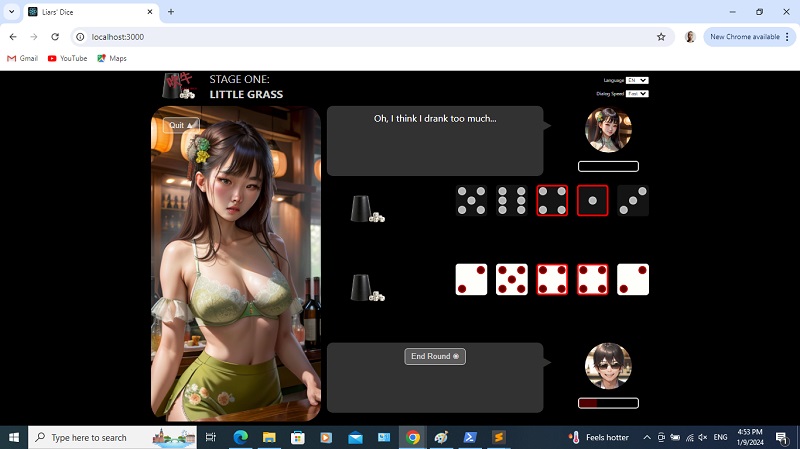
{ personality: 1, phraseName: "stagelose", lang: "en", value: "Oh, I think I drank too much..."},
{ personality: 1, phraseName: "stagelose", lang: "cn", value: "哦我喝多了..."},
{ personality: 1, phraseName: "stagelose", lang: "en", value: "You're too good at this! I can't beat you."},
{ personality: 1, phraseName: "stagelose", lang: "cn", value: "你太厉害了! 我赢不了你."}


You'l notice that right now, the round can go on forever regardless of who wins or loses, because we have not yet handed win conditions with the checkWin() function. So let's do that. We begin by declaring variable diceQty as 0.

src/components/Game/Game.js
const checkWin = function(isPlayerOpen, currentGuessQty, currentGuessDice) {
  var diceQty = 0;
};


Then we use a For loop to go through both the opponentDice and playerDice arrays. For every dice value that is 1 or matches currentGuessDice, we increment diceQty.

src/components/Game/Game.js
const checkWin = function(isPlayerOpen, currentGuessQty, currentGuessDice) {
  var diceQty = 0;
  for (var i = 0; i < 5; i++) {
    if (opponentDice[i] === 1 || opponentDice[i] === currentGuessDice) diceQty++;
    if (playerDice[i] === 1 || playerDice[i] === currentGuessDice) diceQty++;
  }

};


Declare correctGuess - it's true or false depending on whether diceQty is greater or equal to currentGuessQty.

src/components/Game/Game.js
const checkWin = function(isPlayerOpen, currentGuessQty, currentGuessDice) {
  var diceQty = 0;
  for (var i = 0; i < 5; i++) {
    if (opponentDice[i] === 1 || opponentDice[i] === currentGuessDice) diceQty++;
    if (playerDice[i] === 1 || playerDice[i] === currentGuessDice) diceQty++;
  }

  var correctGuess = (diceQty >= currentGuessQty);
};


We then declare playerWin and assume it is true. It will be false if the opening up was called by the player (thus, isplayerOpen being true) and it's a correct guess, or if it was the opponent who called for opening up and the guess turned out to be wrong.

src/components/Game/Game.js
const checkWin = function(isPlayerOpen, currentGuessQty, currentGuessDice) {
  var diceQty = 0;
  for (var i = 0; i < 5; i++) {
    if (opponentDice[i] === 1 || opponentDice[i] === currentGuessDice) diceQty++;
    if (playerDice[i] === 1 || playerDice[i] === currentGuessDice) diceQty++;
  }

  var correctGuess = (diceQty >= currentGuessQty);

  var playerWin = true;
  if (isPlayerOpen && correctGuess) playerWin = false;
  if (!isPlayerOpen && !correctGuess) playerWin = false;

};


We then handle the cases for if the payer won or lost. If the player won, we set opponentDialog using the phrase we created earlier, and reduce the opponentIntoxication value (because the opponent takes a drink). The minimum is 0, so we need to check for that first.

src/components/Game/Game.js
const checkWin = function(isPlayerOpen, currentGuessQty, currentGuessDice) {
  var diceQty = 0;
  for (var i = 0; i < 5; i++) {
    if (opponentDice[i] === 1 || opponentDice[i] === currentGuessDice) diceQty++;
    if (playerDice[i] === 1 || playerDice[i] === currentGuessDice) diceQty++;
  }

  var correctGuess = (diceQty >= currentGuessQty);

  var playerWin = true;
  if (isPlayerOpen && correctGuess) playerWin = false;
  if (!isPlayerOpen && !correctGuess) playerWin = false;

  if (playerWin) {
    setOpponentDialog(GetPhrases(stage, "lose", lang));
    var intoxication = opponentIntoxication - (35 - (stage * 5));
    if (intoxication < 0) intoxication = 0;
    setOpponentIntoxication(intoxication);

    if (intoxication === 0) setOpponentDialog(GetPhrases(stage, "stagelose", lang));
  } else {

  }

};


And if the payer loses, we do the same, but with differences in opponentDialog. And this time, it's payerIntoxication that gets reduced.

src/components/Game/Game.js
const checkWin = function(isPlayerOpen, currentGuessQty, currentGuessDice) {
  var diceQty = 0;
  for (var i = 0; i < 5; i++) {
    if (opponentDice[i] === 1 || opponentDice[i] === currentGuessDice) diceQty++;
    if (playerDice[i] === 1 || playerDice[i] === currentGuessDice) diceQty++;
  }

  var correctGuess = (diceQty >= currentGuessQty);

  var playerWin = true;
  if (isPlayerOpen && correctGuess) playerWin = false;
  if (!isPlayerOpen && !correctGuess) playerWin = false;

  if (playerWin) {
    setOpponentDialog(GetPhrases(stage, "lose", lang));
    var intoxication = opponentIntoxication - (35 - (stage * 5));
    if (intoxication < 0) intoxication = 0;
    setOpponentIntoxication(intoxication);

    if (intoxication === 0) setOpponentDialog(GetPhrases(stage, "stagelose", lang));
  } else {
    setOpponentDialog(GetPhrases(stage, "win", lang));
    var intoxication = playerIntoxication - 35;
    if (intoxication < 0) intoxication = 0;
    setPlayerIntoxication(intoxication);

    if (intoxication === 0) setOpponentDialog(GetPhrases(stage, "stagewin", lang));

  }
};


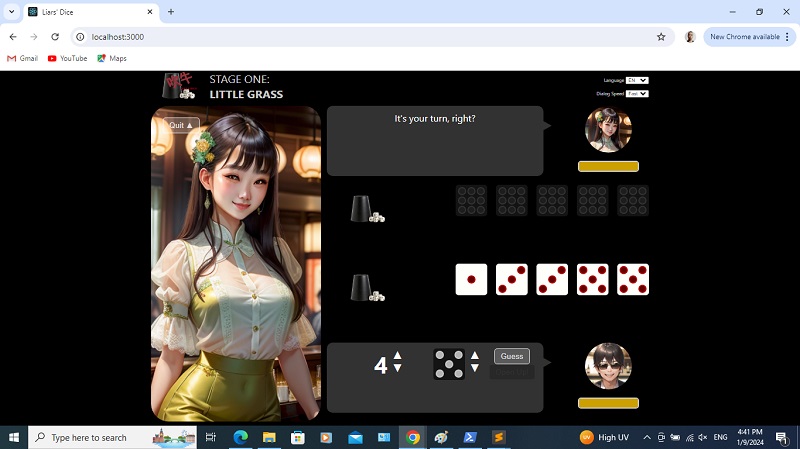
Try again! We start by guessing four fives.


Opponent opens up, and it looks like the player loses. See? The intoxication bar goes down and changes color. Click End Round and Start New Round.


Guess four fours.


Opponent raises it to six fours.


Click Open Up, and it looks like the opponent loses. See her meter bar!


And loses another round.


And another. See the stripping going on?


Finally, one more loss and the meter reaches 0.


Before we continue, you really should add in the phrases for all five stages in the GetPhrases utility. The code is here.

Now, if you click End Round, you should get this (because stage gets incremented at this point). Rinse and repeat, till you clear all five stages! If, at any time he player's intoxication meter reaches 0, we go right back to that stage's Intro screen.


Final screen!

If you clear all five stages, the value of stage becomes 6. We'll handle it this way, inside the If block we created early in this web tutorial. If stage is 6, we will return a div with the id of Champion.

src/components/Game/Game.js
if (stage === 6) {
  return (
    <div id="Champion">

    </div>        
  );

}


We have a h1 tag with a label we derive from calling GetLabels(). And a button styled using btnFinalQuit and actionButton, that runs the quit() function.

src/components/Game/Game.js
if (stage === 6) {
  return (
    <div id="Champion">
      <h1>{ GetLabels("final", lang) }</h1>
      <p>
        <button className="btnFinalQuit actionButton"  onClick={ ()=>{ quit(); } }>{ GetLabels("quit", lang) } &#9650;</button>
      </p>
    </div>        
  );
}


The label is as so...

src/utils/GetLabels.js
{ labelName: "8dice", lang: "en", value: "Eight"},
{ labelName: "8dice", lang: "cn", value: "八个"},
{ labelName: "9dice", lang: "en", value: "Nine"},
{ labelName: "9dice", lang: "cn", value: "九个"},
{ labelName: "10dice", lang: "en", value: "Ten"},
{ labelName: "10dice", lang: "cn", value: "十个"},  
{ labelName: "final", lang: "en", value: "YOU ARE THE CHAMPION!"},
{ labelName: "final", lang: "cn", value: "你是冠军!"}


We want Champion to take up full width with a limited height.

src/components/Game/Game.css
.btnStartStage {
  margin: 50px auto 0 auto;
}

.btnQuit {
  margin: 20px auto 0 20px;
}

#Champion {
  width: 100%;
  height: 200px;
  float: left;
  text-align: center;
  font-size: 3em;
}


Like btnStartStage, btnFinalQuit is centered, so let it share the same styling.

src/components/Game/Game.css
.btnStartStage, .btnFinalQuit {
  margin: 50px auto 0 auto;
}


There's that button and message.


Time to showcase all the defeated opponents! Let's start with just one. We have a div styled using the final CSS class.

src/components/Game/Game.js
if (stage === 6) {
  return (
    <div id="Champion">
      <h1>{ GetLabels("final", lang) }</h1>
      <p>
        <button className="btnFinalQuit actionButton"  onClick={ ()=>{ quit(); } }>{ GetLabels("quit", lang) } &#9650;</button>
      </p>

      <div className="final">

      </div>

    </div>        
  );
}


Then we add a div inside it. It will be styled using profile and  the CSS class string returned by calling GetOpponentImage(). In that function, we pass in 1 and 0 because we want the image for the first stage opponent but at 0 intoxication.

src/components/Game/Game.js
if (stage === 6) {
  return (
    <div id="Champion">
      <h1>{ GetLabels("final", lang) }</h1>
      <p>
        <button className="btnFinalQuit actionButton"  onClick={ ()=>{ quit(); } }>{ GetLabels("quit", lang) } &#9650;</button>
      </p>

      <div className="final">
        <div className={ "profile " + GetOpponentImage(1, 0) }></div>
      </div>
    </div>        
  );
}


Then we have another div styled using the words CSS class. In it, inside a span tag styled using opponentName, we gave the opponent's name and then after a break, we add in a phrase.

src/components/Game/Game.js
if (stage === 6) {
  return (
    <div id="Champion">
      <h1>{ GetLabels("final", lang) }</h1>
      <p>
        <button className="btnFinalQuit actionButton"  onClick={ ()=>{ quit(); } }>{ GetLabels("quit", lang) } &#9650;</button>
      </p>

      <div className="final">
        <div className={ "profile " + GetOpponentImage(1, 0) }></div>
        <div className="words"><span className="opponentName">{ GetLabels("opponent1", lang) }</span><br />"{ GetPhrases(1, "stagelose", lang) }"</div>
      </div>
    </div>        
  );
}


The CSS is as follows. final will have only 20% width because there are going to be 5 of them. And it will be floated left. Any element styled using profile inside final, will have round corners and have a defined height and width.. The background is set to use one image without repeating. And finally, any element styled using words inside final, will have the properties as shown. Not a big deal, just more aesthetics. We don't need to specify the styling of opponentName; we already defined it in App.css earlier, so we're just reusing it now.

src/components/Game/Game.css
#Champion {
  width: 100%;
  height: 200px;
  float: left;
  text-align: center;
  font-size: 3em;
}

.final {
  width: 20%;
  float: left;
}

.final .profile {
  width: 150px;
  height: 150px;
  border-radius: 50%;
  background-size: cover;
  background-position: center top;
  background-repeat: no-repeat;
}

.final .words {
  padding: 1em;
  font-size: 0.5em;
}


See that?


Now let's fill in the rest!

src/components/Game/Game.js
if (stage === 6) {
  return (
    <div id="Champion">
      <h1>{ GetLabels("final", lang) }</h1>
      <p>
        <button className="btnFinalQuit actionButton"  onClick={ ()=>{ quit(); } }>{ GetLabels("quit", lang) } &#9650;</button>
      </p>

      <div className="final">
        <div className={ "profile " + GetOpponentImage(1, 0) }></div>
        <div className="words"><span className="opponentName">{ GetLabels("opponent1", lang) }</span><br />"{ GetPhrases(1, "stagelose", lang) }"</div>
      </div>

      <div className="final">
        <div className={ "profile " + GetOpponentImage(2, 0) }></div>
        <div className="words"><span className="opponentName">{ GetLabels("opponent2", lang) }</span><br />"{ GetPhrases(2, "stagelose", lang) }"</div>
      </div>

      <div className="final">
        <div className={ "profile " + GetOpponentImage(3, 0) }></div>
        <div className="words"><span className="opponentName">{ GetLabels("opponent3", lang) }</span><br />"{ GetPhrases(3, "stagelose", lang) }"</div>
      </div>

      <div className="final">
        <div className={ "profile " + GetOpponentImage(4, 0) }></div>
        <div className="words"><span className="opponentName">{ GetLabels("opponent4", lang) }</span><br />"{ GetPhrases(4, "stagelose", lang) }"</div>
      </div>

      <div className="final">
        <div className={ "profile " + GetOpponentImage(5, 0) }></div>
        <div className="words"><span className="opponentName">{ GetLabels("opponent5", lang) }</span><br />"{ GetPhrases(5, "stagelose", lang) }"</div>
      </div>

    </div>        
  );
}


Beautiful!


That's it! Time to write tests!

I'll be honest - this app wasn't all that well-written. I certainly didn't write it in a way that was easy to test. That's on me. Still, there are some basic ones we can write, and run.

For the main one, we an check for these elements.

src/App.test.js
import React from "react";
import { render, screen } from "@testing-library/react";
import App from "./App";

describe("App", () => {
  it("renders important elements", () => {
    render(<App />);
    expect(screen.getByTestId("start-button")).toBeInTheDocument();
    expect(screen.getByTestId("dashboard-language")).toBeInTheDocument();
    expect(screen.getByTestId("dashboard-dialogspeed")).toBeInTheDocument();
  });
});


Of course, since we're using the getByTestId() method, we'll need to add the appropriate attributes.

src/App.js
<button data-testid="start-button" onClick={ ()=>{ start(); }} className="actionButton" >{ GetLabels("start", lang) } &#9658;</button>


src/App.js
<label id="DashboardLanguage">
  { GetLabels("language", lang) } 
  <select data-testid="dashboard-language" onChange={ (e)=>{ setLang(e.currentTarget.value); }}>
    <option value="cn">CN</option>
    <option value="en">EN</option>
  </select>
</label>

<label id="DashboardDialogSpeed">
  { GetLabels("dialogSpeed", lang) } 
  <select data-testid="dashboard-dialogspeed" onChange={ (e)=>{ setDialogSpeed(e.currentTarget.value); }}>
    <option value="500">{ GetLabels("fast", lang) }</option>
    <option value="1000">{ GetLabels("medium", lang) }</option>
    <option value="1500">{ GetLabels("slow", lang) }</option>
  </select>
</label>


For the Game component, we'll need to import all this.

src/components/Game/Game.test.js
import React from "react";
import { render, screen } from "@testing-library/react";
import Game from "./Game";

import GetLabels from "../../utils/GetLabels";


We declare some variables that will act as parameters for the elements we'll be testing. These are the values that would normally be passed down from App.

src/components/Game/Game.test.js
import React from "react";
import { render, screen } from "@testing-library/react";
import Game from "./Game";

import GetLabels from "../../utils/GetLabels";

let lang = "en";
let dialogSpeed = 500;

let stage;
let setStage = (val)=> {
  stage = val;
};

let stageStarted;
let setStageStarted = (val)=> {
  stageStarted = val;
};


We first ensure that certain elements are not present when stage is 0.

src/components/Game/Game.test.js
let lang = "en";
let dialogSpeed = 500;

let stage;
let setStage = (val)=> {
  stage = val;
};

let stageStarted;
let setStageStarted = (val)=> {
  stageStarted = val;
};

describe("Game", () => {
  setStage(0);
  setStageStarted(false);

  it("renders nothing for stage 0", () => {
    render(
      <Game
        lang = { lang }
        dialogSpeed = { dialogSpeed }
        stage={ stage }
        setStage = { setStage }
        stageStarted={ stageStarted }
        setStageStarted = { setStageStarted }
      />
    );
    expect(screen.queryByTestId("game-main")).toBeNull();
  });
});


Again we have to set testing-id for the Main div. Not really something I would normally recommend.

src/components/Game/Game.js
<div id="Main" testing-id="game-main">


Then we will look for the text "YOU ARE THE CHAMPION!" when stage is 6 and the language is "en".

src/components/Game/Game.test.js
describe("Game", () => {
  setStage(0);
  setStageStarted(false);

  it("renders nothing for stage 0", () => {
    render(
      <Game
        lang = { lang }
        dialogSpeed = { dialogSpeed }
        stage={ stage }
        setStage = { setStage }
        stageStarted={ stageStarted }
        setStageStarted = { setStageStarted }
      />
    );
    expect(screen.queryByTestId("game-main")).toBeNull();
  });
});

describe("Game", () => {
  setStage(6);
  setStageStarted(true);

  it("renders champion div for stage 6", () => {
    render(
      <Game
        lang = { lang }
        dialogSpeed = { dialogSpeed }
        stage={ stage }
        setStage = { setStage }
        stageStarted={ stageStarted }
        setStageStarted = { setStageStarted }
      />
    );

    expect(screen.queryByText("YOU ARE THE CHAMPION!")).toBeInTheDocument();
  });
});


Finally, the Dice component, arguably the easiest one to test. These are all you'll need to import.

src/components/Dice/Dice.test.js

import React from "react";
import { render, screen } from "@testing-library/react";
import Dice from "./Dice";


If val is 6, the number of elements in the array returned by queryAllByTitle() with  "dot val1" in the argument, will naturally be 6. We programmed it to be in the title ourselves!

src/components/Dice/Dice.test.js
import React from "react";
import { render, screen } from "@testing-library/react";
import Dice from "./Dice";

describe("Dice", () => {
  it("renders dice for 6", () => {
    render(
      <Dice
        dice = "6"
        diceIndex = "0"
        classPrefix = "opponentDice"
        highlight = { false }
        show = { true }
      />
    );

    expect(screen.queryAllByTitle("dot val1").length).toBe(6);
  });
});


Similarly for val1!

src/components/Dice/Dice.test.js
describe("Dice", () => {
  it("renders dice for 6", () => {
    render(
      <Dice
        dice = "6"
        diceIndex = "0"
        classPrefix = "opponentDice"
        highlight = { false }
        show = { true }
      />
    );

    expect(screen.queryAllByTitle("dot val1").length).toBe(6);
  });
});

describe("Dice", () => {
  it("renders dice for 1", () => {
    render(
      <Dice
        dice = "1"
        diceIndex = "0"
        classPrefix = "opponentDice"
        highlight = { false }
        show = { true }
      />
    );

    expect(screen.queryAllByTitle("dot val1").length).toBe(1);
  });
});


Now we test for if show is false. When that's the case, no matter the value of val, the result is always 0.

src/components/Dice/Dice.test.js
describe("Dice", () => {
  it("renders dice for 1", () => {
    render(
      <Dice
        dice = "1"
        diceIndex = "0"
        classPrefix = "opponentDice"
        highlight = { false }
        show = { true }
      />
    );

    expect(screen.queryAllByTitle("dot val1").length).toBe(1);
  });
});

describe("Dice", () => {
  it("renders dice for 1 but not revealed", () => {
    render(
      <Dice
        dice = "1"
        diceIndex = "0"
        classPrefix = "opponentDice"
        highlight = { false }
        show = { false }
      />
    );

    expect(screen.queryAllByTitle("dot val1").length).toBe(0);
  });
});


We enter "npm test" in the CLI, and there it is!


Thanks for sticking with me!

Wasn't this fun? Well, it certainly was my idea of fun. Probably explains why I've been doing this for so many years.

Dice, dice, baby!
T___T

Saturday, 3 August 2024

The day Microsoft stood still for CrowdStrike

It's unclear exactly when the term "BSOD" entered the public consciousness. More than a decade ago when I was working as desktop support, I knew the term to mean "Blue Screen Of Death", alluding to Microsoft's infamous default screen which warns users of a system crash. Thus, it was a little strange to see the term "BSOD" being bandied around the last couple week.


Suffice to say, the term "BSOD" has found its way into several conversations over the course of the past few weeks as Microsoft systems around the world crashed in a cacophony of azure-colored screens. The outage was caused by cybersecurity vendor CrowdStrike, as a consequence of their security program Falcon pushing a faulty update to the Microsoft branch. Once the update was downloaded and installed by roughly 8 million machines worldwide, it resulted in those systems crashing.

The fix, according to CrowdStrike, was to reboot the machines in Safe Mode, remove the file, and then reboot the machines in Normal Mode. Nothing fancy if you've ever worked in desktop support, but perhaps a little out of the grasp of the average end-user. The desktop support personnel of these affected companies would have been on high alert especially during the initial weekend. 

Damage

It's all very well to say "8 million machines crashed", but it would be far more illuminating to know ˆ those machines were doing and ˆ they were deployed. For the most part, home users who had no compelling reason to install CrowdStrike's Falcon program, were spared the outage. It should also be noted that China, having long moved on from the days where a significant portion of the country was using Windows, was unaffected (to my knowledge thus far) by this outage.

For significantly larger corporations in USA and Canada, large swathes of Europe, and India; however, this was a different story.  Airline queues were jam-packed as systems went down. Healthcare and emergency services were similarly impacted as hospital IT systems using Microsoft 365 crashed. And banks - easily the biggest item on the list. Minutes of lost service could translate to millions of dollars in transactions gone, potentially, and in terms of these outages, we're talking days

This was seen a lot.

The irony here, of course, is that CrowdStrike was employed by these companies for the express purpose of guarding against malicious attacks much like this outage. Though this is one case where we should attribute the cause to incompetence rather than malice.

CrowdStrike's error was a null pointer exception, if the Internet is to be believed. These are fairly common; not really high-level stuff. From testing procedures, deployment practices and just good old due diligence, the number of potential shortfalls in any of these areas could have resulted in the faulty update being pushed.

Silly comments

Social Media has been rife with glee from Apple fans gloating that we should all stop using Microsoft products because this was the greatest outage in history, and that Apple has never been affected to this scale. That's ridiculous when you consider that the conditions that led to these outages - cybersecurity threats, third-party cybersecurity vendors, faulty software updates - would be present in all modern operating systems regardless.

Use Apple products
instead!

Covert to MacOS to avoid outages? Absurd.

Such deranged comments are ultimately the province of mere fanboys allowing emotion rather than logic to guide the words that come out of their mouths. I'm inclined to be forgiving here; I'd be less understanding if those words came from actual tech professionals.

Finally...

It's early days yet. The fallout is still being felt around the world, though much of the initial damage has been, hopefully, resolved. Still, this is not something we'll all be forgetting anytime soon.

Over and outage,
T___T

Sunday, 7 July 2024

Great Expectations and how to manage them

Ever have this problem with expectations? Unreasonable, illogical expectations, to be exact.

It's almost inevitable if you are a developer working for non-tech people. Having little to no experience with the process of software development, they have no idea what constitutes a reasonable expectation, and let their imagination fill in the blanks. With amusing, and sometimes nightmarish, results. An (admittedly extreme) example would be the employer assuming you can fix the microwave simply because you know how to write software.

Fix this!

That's not to say experienced tech people don't have unreasonable expectations either. Their expectations tend to be a little less fanciful, but no less impractical when it comes right down to it. An example would be the employer expecting you, as an employee, to match his devotion to the company he created.

Then there are the in-betweeners. The ones who know a bit of programming, just enough to be problematic, but aren't exactly technical. Because they know how to code, they have expectations of how quickly code can be churned out. Unfortunately, they do not have experience with the less fun aspects of software development, such as best practices, testing and optimization. Therefore those expectations, too, can be divorced from reality.

People are like animals, in the sense that they need to be trained. Some might argue that humans have intelligence superior to animals. Well, that's great. That just makes it easier to train them. Make no mistake; where you are concerned, how people treat you is ultimately how you train them to treat you.

This kind of training tends to take two forms.

Don't give them what they want

And by that, I also mean stop being so obliging. When you satisfy an unreasonable request, it sets a new bar for expectations. And then it becomes the norm. This ultimately means that you're setting yourself up for increasing and unnecessary hardship.

If you get texts at night long after you're supposed to be off for the day, do not respond until the next day. Or at least, don't respond every single time. Or make them wait. Either way, make them expect that if they contact you at a certain time, they're not going to get a response right away, if at all.

If you're tasked to do something that is radically out of your job scope, make them expect you to fail. Sometimes spectacularly.

I've been known to work on weekends and public holidays. However, if my employers explicitly tell me that they expect me to use my weekends for work, I make damn sure I'll be doing something else during the weekend. It's the principle of the thing. It's not that I have a problem with working on weekends; I just have a problem with it being my employer's expectation. And, as an employee, I consider it my ethical responsibility to disabuse my employers, either in word or deed, of such expectations.

Gone fishing.

If the expectation is impossible, don't bust your ass trying to do it. Make sure you do the job that you're paid to do, and then maybe work on the impossible requirement. This sets the tone; you fulfil your professional obligations - no two ways about it, that's your first and foremost priority - and prevents expectations from getting too high. Once people see that they're not going to get what they asked for, but they are absolutely getting what they paid for, expectations get realigned. This, of course, assumes that you're dealing with reasonable people. In the corporate world, you don't always have that luxury. An alarming percentage of the time, you might end up looking for a new job.

Also, can't stress this enough, communication. Don't just say "yes" and then not do it - that's passive-aggressive bullshit and you should hold yourself to higher standards. Let them know it can't be done, why it can't be done, and what would have to give in order for you to carry it out.

Give them exactly what they want

Or what they say they want. People tend to tell you what they want without thinking it through. In order to be helpful, we should at least give them fair warning that what they want comes with a whole lot of caveats. And if that doesn't work, give them a preview of what fulfilling their wishes looks like.

And if that's still not enough, let them have it.

Now, just to be clear, I'm not advocating Malicious Compliance. It's one of the top fantasies of the average disgruntled employee (and understandably so!) but we're professionals. And as professionals, it is our duty to point out the pitfalls and advise accordingly. However, while we may be professionals, we're not superheroes. We can't save people from themselves. Thus, if an ill-advised route is insisted upon, short of it being illegal, give them what they want, and let the cards fall where they may.

They insist on not encrypting passwords and storing them in cleartext? Hey, go for it. But make sure the decision is reversible.

They insist on adding a new software feature that would compromise the functionality of existing features? Knock yourself out. Again, make sure you have a backup.

But if you go this route, document your objections. Obsessively. There may come a day when you need it. Also, plan your exit. People generally don't like being reminded of their failure, and your continued presence may be just such a reminder.

Here's a personal example. There was a time Mom had this unfortunate habit of calling me, and when I was otherwise occupied and didn't pick up, she would leave a string of missed calls on my phone. And then when I finally called her back, I would get an earful for not calling back right away. The kicker was, the body of her message was never anything that required immediate attention, such as an emergency. Like the house being on fire, or someone being sent to the hospital. No, the message would be something alone the lines of reminding me that Dad's birthday was next week, or asking if my refrigerator had any space for some extra apples she had picked up.

Missed calls.

Now, I love apples, but that's neither here nor there. I had to get her off this expectation that I had to be instantly responsive at all times regardless of the situation. The next time she called, I was walking alongside a busy road, and I had an idea. I picked up, and let her hear the blaring horns of irate road-users. She asked what the hell was going on there, and I innocently replied that I'd been in the process of crossing the road, and inquired what was the matter. In effect, I had given her a preview of just what could happen if she got what she wanted.

I wouldn't go so far as to say she never called me on my phone again, but each time she called, she had to weigh the contents of her message against the possibility of me getting run over by traffic just because I mindlessly picked up the phone as she demanded. The result was that she got into the habit of leaving messages on WhatsApp instead. You may think I'm a real asshole for scaring my own mother like that, but there was no lie in anything I did. There was a real possibility of something horrible happening if she got her way, and this was not a message that could be effectively delivered by me just telling her, since Asian parents, y'know, tend not to take their kids seriously.

On the flip side...

All this only works if you're competent at what you do, and you deliver what you're actually paid to do. It doesn't mean that just because you're bad at what you do, unreasonable requests become any less unreasonable. But being good at your actual job would help your case a lot more.

Expecting your response,
T___T

Tuesday, 13 September 2022

Five Unpleasant Things About Working With Front-end Technology

In tech, there are several technologies at each layer of the stack. The nuances are usually not covered by tech hiring, and this is usually divided into front-end and back-end. Today, my intention is to examine the two, especially front-end technology. And here are five reasons why you might not want to make front-end technology your career.

1. Rapid evolution

There are several aspects to front-end technology. There's your standard HTML, CSS and JavaScript... and that alone can be a nightmare to keep up with. HTML, if you're up to speed with the most commonly used features of HTML5, not so much. For CSS, the preprocessor packages and CSS3 updates can be slightly more of a pain in the ass.

Multiplying like guppies

But JavaScript? If you elect to go down that rabbit hole, JavaScript is constantly evolving. The core language alone has been through update after update, The jQuery library as well. But all the front-end frameworks - ReactJS, AngularJS, VueJS, just to name a few - are also constantly going through evolution. And new frameworks seem to be coming out of the goddamn woodwork all the time!

And that's only the tech part. The design part is certainly nothing to sniff at. Learning fonts and color schemes is only the tip of the proverbial iceberg. Design patterns and anti-patterns evolve all the time. A typical website in the 90s will look markedly different ten years later, and another ten years after that.

This sounds fun if you're a hobbyist. When you do this shit for a living, not so much.

2. Uncontrollable environment

Front-end code runs on web browsers. Each of which comes with user-controllable functionality a front-end developer may not have catered for.

Yes, you read that right. User-controllable. Not developer-controllable.

Your typical web browser may come with a Dark Mode. There may almost definitely will be controls to increase or decrease font size. This is going to mess with all your layout specifications.

What about Dark Mode?!

Add in the fact that your users may screw with your carefully crafted interface by refreshing the browser insistently, pressing the Back button and using browser functions in all sorts of unruly ways. It's certainly not like a back-end interface where there are limits to input.

3. Testing nightmare

Mobile technology in the past decade has seen a proliferation of different screen sizes - tablets and phones - in addition to the standard screen sizes. In addition, there may be differences in how certain browsers render HTML, CSS and JavaScript. These differences have largely been eliminated with the demise of Internet Explorer, but some remain.

A plethora of different devices.

All of this adds up to an almost untenable amount of user interface testing for the optimal amount of exposure to the market. It is not an enviable position.

Front-end frameworks and libraries such as Twitter Bootstrap, jQuery and such, mitigate much of the insanity. But these issues have remained through the decade and will likely continue to grow the more mobile technology evolves.

4. Vague KPIs

In back-end technology, things are binary. Input is defined, and output is defined. The output is either correct, or it is not. It either is produced quickly enough, or it is not. Things either conform to security standards, or they do not.

Back-end input and
output is simpler.

Front-end technology has all that, true. It also encompasses a whole host of KPIs that are, for the most part, subjective in nature. User experience. Aesthetic beauty. Ease of use. These are guaranteed to vary from user to user and therefore, there is no way to obtain a perfect score.

Imagine being in a situation where you have to live with having less than total success. That is front-end technology.

5. Everyone has an opinion

This is somewhat related to the last point. In back-end technology, laypeople generally have better sense than to ever touch this, because they have little to no understanding of the stack and they have no tech qualifications.

Everyone and their dog.

In front-end technology, however, which is mostly visual, suddenly everybody and their dog has an opinion. Suddenly, everyone feels the need to chime in on how stuff should look and feel like. Nobody is shy about commenting because, well, you don't need tech qualifications to talk about something which is largely visual. It's subjective, so there are no wrong answers.

This makes your work a lot more difficult, when you have to take so much extra feedback into account. And when a sizeable portion of that feedback comes from laypeople, this makes things even more difficult because laypeople don't quite speak the same language techies do, and they may not have a good grasp of what technically makes sense and what doesn't.

In conclusion

Front-end technology is far, far from a bed of roses.

Still, if it still looks intriguing, let nothing deter you from your path. The important thing is not to go in blind, and be aware of all the pitfalls that await you.

Just being up front!
T___T

Wednesday, 24 March 2021

Web Tutorial: ReactJS Hangman (Part 4/4)

Welcome back!

There's a whole lot of automated interface testing to be done here. There are four components to be tested - App, HangedMan, Computer and Player. While the entire app on its own is workable, we may have to enter some test-id attributes at certain parts to facilitate testing.

Testing App

We first create this file. Some standard testing libraries will need to be imported, as well as the App component. App is pretty straightforward; not that much testing required.

src/App.test.js
import React from "react";
import { render, screen } from "@testing-library/react";
import App from "./App";


The main test for this is a rendering test, where the word "Loading" should appear, due to the app loading the API for retrieving the word list.

src/App.test.js

import React from "react";
import { render, screen } from "@testing-library/react";
import App from "./App";

describe("App", () => {
    it('renders', () => {
        render(<App />);
        expect(screen.queryByText('Loading...')).toBeInTheDocument();
    });
});


Testing HangedMan

This one will be a little more complicated. We begin by creating the file which will do the same imports.

src/components/HangedMan/HangedMan.test.js
import React from "react";
import { render, screen } from "@testing-library/react";
import HangedMan from "./HangedMan";


Declare stage. This variable will be important because we'll need it to test the ways the hanged man will appear at different stages of the app. Remember how we tested in Part 2 of this web tutorial? Well, this will be an automated version of that.

src/components/HangedMan/HangedMan.test.js

import React from "react";
import { render, screen } from "@testing-library/react";
import HangedMan from "./HangedMan";

let stage;


This will describe the HangedMan suite of tests.
src/components/HangedMan/HangedMan.test.js
import React from "react";
import { render, screen } from "@testing-library/react";
import HangedMan from "./HangedMan";

let stage;

describe("HangedMan", () => {

});


Now this first test will test for the value of 0 for stage.

src/components/HangedMan/HangedMan.test.js
describe("HangedMan", () => {
    it("should render with no hanged man parts according to stage 0", () => {
       
    });

});


Here, we set stage to 0 and render HangedMan with that value.

src/components/HangedMan/HangedMan.test.js
describe("HangedMan", () => {
    it("should render with no hanged man parts according to stage 0", () => {
        stage = 0;

        render(
            <HangedMan
                stage={ stage }
            />
        );
       
    });
});


And then we grab all the testing ids from the various SVG tags making up the hanged man. All of them should have hidden as part of their CSS class. Because stage is 0. But this won't work because the testing ids have not been set yet, so...

src/components/HangedMan/HangedMan.test.js
describe("HangedMan", () => {
    it("should render with no hanged man parts according to stage 0", () => {
        stage = 0;

        render(
            <HangedMan
                stage={ stage }
            />
        );

        expect(screen.queryByTestId("hangedMan_head").classList.contains("hidden")).toBe(true);
        expect(screen.queryByTestId("hangedMan_leftArm").classList.contains("hidden")).toBe(true);
        expect(screen.queryByTestId("hangedMan_rightArm").classList.contains("hidden")).toBe(true);
        expect(screen.queryByTestId("hangedMan_torso").classList.contains("hidden")).toBe(true);
        expect(screen.queryByTestId("hangedMan_leftLeg").classList.contains("hidden")).toBe(true);
        expect(screen.queryByTestId("hangedMan_rightLeg").classList.contains("hidden")).toBe(true);
        expect(screen.queryByTestId("txtGameOver").classList.contains("hidden")).toBe(true);   
     
    });
});


...let's add those in.

src/components/HangedMan/HangedMan.js

<g className={ props.stage >= 6 ? 'swing' : '' }>
    <line
        className="rope"
        x1="300"
        y1="20"
        x2="300"
        y2="60"
    ></line>

    <circle
        className={props.stage >= 1 ? 'man' : 'man hidden'}
        cx="300"
        cy="80"
        r="20"
        data-testid="hangedMan_head"
    ></circle>

    <line
        className={props.stage >= 2 ? 'man' : 'man hidden'}
        x1="300"
        y1="100"
        x2="280"
        y2="160"
        data-testid="hangedMan_leftArm"
    ></line>

    <line
        className={props.stage >= 3 ? 'man' : 'man hidden'}
        x1="300"
        y1="100"
        x2="320"
        y2="160"
        data-testid="hangedMan_rightArm"
    ></line>

    <line
        className={props.stage >= 4 ? 'man' : 'man hidden'}
        x1="300"
        y1="100"
        x2="300"
        y2="180"
        data-testid="hangedMan_torso"
    ></line>

    <line
        className={props.stage >= 5 ? 'man' : 'man hidden'}
        x1="300"
        y1="180"
        x2="280"
        y2="250"
        data-testid="hangedMan_leftLeg"
    ></line>

    <line
        className={props.stage >= 6 ? 'man' : 'man hidden'}
        x1="300"
        y1="180"
        x2="320"
        y2="250"
        data-testid="hangedMan_rightLeg"
    ></line>
</g>

<text
    x="350"
    y="100"
    className={props.stage >= 6 ? 'gameover' : 'gameover hidden'}
    data-testid="txtGameOver"
>
    <tspan x="350" y="100">GAME</tspan>
    <tspan x="350" y="145">OVER</tspan>
</text>


The rest of these tests are basically the same - just with a different value for stage. And those elements that have false where expected, will vary according to that value. For instance, if stage is 1, then only the head will not have the class hidden.

src/components/HangedMan/HangedMan.test.js
describe("HangedMan", () => {
    it("should render with no hanged man parts according to stage 0", () => {
        stage = 0;

        render(
            <HangedMan
                stage={ stage }
            />
        );

        expect(screen.queryByTestId("hangedMan_head").classList.contains("hidden")).toBe(true);
        expect(screen.queryByTestId("hangedMan_leftArm").classList.contains("hidden")).toBe(true);
        expect(screen.queryByTestId("hangedMan_rightArm").classList.contains("hidden")).toBe(true);
        expect(screen.queryByTestId("hangedMan_torso").classList.contains("hidden")).toBe(true);
        expect(screen.queryByTestId("hangedMan_leftLeg").classList.contains("hidden")).toBe(true);
        expect(screen.queryByTestId("hangedMan_rightLeg").classList.contains("hidden")).toBe(true);
        expect(screen.queryByTestId("txtGameOver").classList.contains("hidden")).toBe(true);        
    });

    it("should render with only head according to stage 1", () => {
        stage = 1;

        render(
            <HangedMan
                stage={ stage }
            />
        );

        expect(screen.queryByTestId("hangedMan_head").classList.contains("hidden")).toBe(false);
        expect(screen.queryByTestId("hangedMan_leftArm").classList.contains("hidden")).toBe(true);
        expect(screen.queryByTestId("hangedMan_rightArm").classList.contains("hidden")).toBe(true);
        expect(screen.queryByTestId("hangedMan_torso").classList.contains("hidden")).toBe(true);
        expect(screen.queryByTestId("hangedMan_leftLeg").classList.contains("hidden")).toBe(true);
        expect(screen.queryByTestId("hangedMan_rightLeg").classList.contains("hidden")).toBe(true);
        expect(screen.queryByTestId("txtGameOver").classList.contains("hidden")).toBe(true);        
    });

    it("should render with only head and left arm according to stage 2", () => {
        stage = 2;

        render(
            <HangedMan
                stage={ stage }
            />
        );

        expect(screen.queryByTestId("hangedMan_head").classList.contains("hidden")).toBe(false);
        expect(screen.queryByTestId("hangedMan_leftArm").classList.contains("hidden")).toBe(false);
        expect(screen.queryByTestId("hangedMan_rightArm").classList.contains("hidden")).toBe(true);
        expect(screen.queryByTestId("hangedMan_torso").classList.contains("hidden")).toBe(true);
        expect(screen.queryByTestId("hangedMan_leftLeg").classList.contains("hidden")).toBe(true);
        expect(screen.queryByTestId("hangedMan_rightLeg").classList.contains("hidden")).toBe(true);
        expect(screen.queryByTestId("txtGameOver").classList.contains("hidden")).toBe(true);        
    });

    it("should render with only head, left arm and right arm according to stage 3", () => {
        stage = 3;

        render(
            <HangedMan
                stage={ stage }
            />
        );

        expect(screen.queryByTestId("hangedMan_head").classList.contains("hidden")).toBe(false);
        expect(screen.queryByTestId("hangedMan_leftArm").classList.contains("hidden")).toBe(false);
        expect(screen.queryByTestId("hangedMan_rightArm").classList.contains("hidden")).toBe(false);
        expect(screen.queryByTestId("hangedMan_torso").classList.contains("hidden")).toBe(true);
        expect(screen.queryByTestId("hangedMan_leftLeg").classList.contains("hidden")).toBe(true);
        expect(screen.queryByTestId("hangedMan_rightLeg").classList.contains("hidden")).toBe(true);
        expect(screen.queryByTestId("txtGameOver").classList.contains("hidden")).toBe(true);        
    });

    it("should render with only head, left arm, right arm and torso according to stage 4", () => {
        stage = 4;

        render(
            <HangedMan
                stage={ stage }
            />
        );

        expect(screen.queryByTestId("hangedMan_head").classList.contains("hidden")).toBe(false);
        expect(screen.queryByTestId("hangedMan_leftArm").classList.contains("hidden")).toBe(false);
        expect(screen.queryByTestId("hangedMan_rightArm").classList.contains("hidden")).toBe(false);
        expect(screen.queryByTestId("hangedMan_torso").classList.contains("hidden")).toBe(false);
        expect(screen.queryByTestId("hangedMan_leftLeg").classList.contains("hidden")).toBe(true);
        expect(screen.queryByTestId("hangedMan_rightLeg").classList.contains("hidden")).toBe(true);
        expect(screen.queryByTestId("txtGameOver").classList.contains("hidden")).toBe(true);                
    });

    it("should render with only head, left arm, right arm, torso and left leg according to stage 5", () => {
        stage = 5;

        render(
            <HangedMan
                stage={ stage }
            />
        );

        expect(screen.queryByTestId("hangedMan_head").classList.contains("hidden")).toBe(false);
        expect(screen.queryByTestId("hangedMan_leftArm").classList.contains("hidden")).toBe(false);
        expect(screen.queryByTestId("hangedMan_rightArm").classList.contains("hidden")).toBe(false);
        expect(screen.queryByTestId("hangedMan_torso").classList.contains("hidden")).toBe(false);
        expect(screen.queryByTestId("hangedMan_leftLeg").classList.contains("hidden")).toBe(false);
        expect(screen.queryByTestId("hangedMan_rightLeg").classList.contains("hidden")).toBe(true);
        expect(screen.queryByTestId("txtGameOver").classList.contains("hidden")).toBe(true);        
    });

    it("should render with full hanged man and game over text according to stage 6", () => {
        stage = 6;

        render(
            <HangedMan
                stage={ stage }
            />
        );

        expect(screen.queryByTestId("hangedMan_head").classList.contains("hidden")).toBe(false);
        expect(screen.queryByTestId("hangedMan_leftArm").classList.contains("hidden")).toBe(false);
        expect(screen.queryByTestId("hangedMan_rightArm").classList.contains("hidden")).toBe(false);
        expect(screen.queryByTestId("hangedMan_torso").classList.contains("hidden")).toBe(false);
        expect(screen.queryByTestId("hangedMan_leftLeg").classList.contains("hidden")).toBe(false);
        expect(screen.queryByTestId("hangedMan_rightLeg").classList.contains("hidden")).toBe(false);
        expect(screen.queryByTestId("txtGameOver").classList.contains("hidden")).toBe(false);
    });

});


That was actually pretty easy. Let's move on to something slightly more complex.

Testing Computer

Yep you guessed it. Create the file in the appropriate directory and import the files required.

src/components/Computer/Computer.test.js
import React from "react";
import { render, screen } from "@testing-library/react";
import Computer from "./Computer";


Declare guessedLetters and mysteryWord. Those are our testing variables.

src/components/Computer/Computer.test.js
import React from "react";
import { render, screen } from "@testing-library/react";
import Computer from "./Computer";

let guessedLetters;
let mysteryWord;


Again, we describe the test group for this.

src/components/Computer/Computer.test.js
import React from "react";
import { render, screen } from "@testing-library/react";
import Computer from "./Computer";

let guessedLetters;
let mysteryWord;

describe("Computer", () => {

});


There is only one test. And here, we test that the display component shows the letters correctly.

src/components/Computer/Computer.test.js
describe("Computer", () => {
    it("should render with Computer display component when game in progress", () => {

    });

});


So here, we set "friend" as the mystery word, and declare that the letters "i" and "e" have been guessed. Then we render Computer and pass in these values.

src/components/Computer/Computer.test.js

describe("Computer", () => {
    it("should render with Computer display component when game in progress", () => {
        mysteryWord = "friend";
        guessedLetters = ["i", "e"];

        render(
            <Computer
                mysteryWord={ mysteryWord }
                guessedLetters={ guessedLetters }
            />
        );

    });
});


Now we check the screen for all elements containing these exact letters making up "friend". Since "i" and "e" have been guessed, only these two should be visible.

src/components/Computer/Computer.test.js
describe("Computer", () => {
    it("should render with Computer display component when game in progress", () => {
        mysteryWord = "friend";
        guessedLetters = ["i", "e"];

        render(
            <Computer
                mysteryWord={ mysteryWord }
                guessedLetters={ guessedLetters }
            />
        );

        expect(screen.queryByText("f")).not.toBeInTheDocument();
        expect(screen.queryByText("r")).not.toBeInTheDocument();
        expect(screen.queryByText("i")).toBeInTheDocument();
        expect(screen.queryByText("e")).toBeInTheDocument();
        expect(screen.queryByText("n")).not.toBeInTheDocument();
        expect(screen.queryByText("d")).not.toBeInTheDocument();

    });
});


Testing Player

Now this is a big one. That's where all the user input is.

Create the file and do the imports. In this case, we also import userEvent because we'll be testing using simulated button clicks and text inputs.

src/components/Player/Player.test.js
import React from "react";
import { render, screen } from "@testing-library/react";
import userEvent from "@testing-library/user-event";
import Player from "./Player";


Declare error, isPending and mysteryWord. Those are testing variables.

src/components/Player/Player.test.js
import React from "react";
import { render, screen } from "@testing-library/react";
import userEvent from "@testing-library/user-event";
import Player from "./Player";

let error;
let isPending;
let mysteryWord;


Also declare guessedLetters and create a simple mutator, setGuessedLetters(). Do the same for stage and setStage(). Declare setMessageAndContext() but we won't bother to put anything in it because we won't be testing that output. In fact, we won't be using setMessageAndContext() except to pass it down to the Player component in props.

src/components/Player/Player.test.js
import React from "react";
import { render, screen } from "@testing-library/react";
import userEvent from "@testing-library/user-event";
import Player from "./Player";

let guessedLetters;
let setGuessedLetters = (arr)=> {
    guessedLetters = arr;
};

let stage;
let setStage = (num)=> {
    stage = num;
};

let setMessageAndContext = (x)=> {

};


let error;
let isPending;
let mysteryWord;


We also set window.alert as a kind of dummy placeholder so that if it's ever called by any of our simulated events, no errors will be thrown. Remember one of our event handlers runs an alert() function?

src/components/Player/Player.test.js
let error;
let isPending;
let mysteryWord;

window.alert = ()=> {};


And finally, we begin the test suite. There are going to be quite a few tests.

src/components/Player/Player.test.js
let error;
let isPending;
let mysteryWord;

window.alert = ()=> {};

describe("Player", () => {

});


The first test ensures that the correct button is shown when the game has not started. So we set error to undefined, isPending to false, set mysteryWord to a random word and stage is set to -1. We can set stage directly instead of using a mutator, but since we already went to the trouble of defining the mutator, what the heck, right?

src/components/Player/Player.test.js
describe("Player", () => {
    it("should render with Begin button when game not started", () => {
        error = undefined;
        isPending = false;
        mysteryWord = "evergreen";
        setStage(-1);
    });

});


Then render Player with the appropriate arguments.

src/components/Player/Player.test.js
describe("Player", () => {
    it("should render with Begin button when game not started", () => {
        error = undefined;
        isPending = false;
        mysteryWord = "evergreen";
        setStage(-1);

        render(
            <Player
                stage={ stage }
                setStage={ setStage }
                mysteryWord={ mysteryWord }
                guessedLetters={ guessedLetters }
                setGuessedLetters={ setGuessedLetters }
                setMessageAndContext={ setMessageAndContext }
                error={ error }
                isPending={ isPending }
            />
        );

    });
});


After that, we should check if there is any element with "Begin" is in the document.

src/components/Player/Player.test.js
describe("Player", () => {
    it("should render with Begin button when game not started", () => {
        error = undefined;
        isPending = false;
        mysteryWord = "evergreen";
        setStage(-1);

        render(
            <Player
                stage={ stage }
                setStage={ setStage }
                mysteryWord={ mysteryWord }
                guessedLetters={ guessedLetters }
                setGuessedLetters={ setGuessedLetters }
                setMessageAndContext={ setMessageAndContext }
                error={ error }
                isPending={ isPending }
            />
        );

        expect(screen.queryByText("Begin")).toBeInTheDocument();
    });
});


Similar logic is deployed for the "Replay" button. This time, stage is set to 6.
src/components/Player/Player.test.js
describe("Player", () => {
    it("should render with Begin button when game not started", () => {
        error = undefined;
        isPending = false;
        mysteryWord = "evergreen";
        setStage(-1);

        render(
            <Player
                stage={ stage }
                setStage={ setStage }
                mysteryWord={ mysteryWord }
                guessedLetters={ guessedLetters }
                setGuessedLetters={ setGuessedLetters }
                setMessageAndContext={ setMessageAndContext }
                error={ error }
                isPending={ isPending }
            />
        );

        expect(screen.queryByText("Begin")).toBeInTheDocument();
    });

    it("should render with Replay button when game over", () => {
        error = undefined;
        isPending = false;
        mysteryWord = "evergreen";
        setStage(6);

        render(
            <Player
                stage={ stage }
                setStage={ setStage }
                mysteryWord={ mysteryWord }
                guessedLetters={ guessedLetters }
                setGuessedLetters={ setGuessedLetters }
                setMessageAndContext={ setMessageAndContext }
                error={ error }
                isPending={ isPending }
            />
        );

        expect(screen.queryByText("Replay")).toBeInTheDocument();
    });

});


The next test is for when the game is in progress, so set stage to any value between 0 and 4 inclusive. And render Player.

src/components/Player/Player.test.js
it("should render with Replay button when game over", () => {
    error = undefined;
    isPending = false;
    mysteryWord = "evergreen";
    setStage(6);

    render(
        <Player
            stage={ stage }
            setStage={ setStage }
            mysteryWord={ mysteryWord }
            guessedLetters={ guessedLetters }
            setGuessedLetters={ setGuessedLetters }
            setMessageAndContext={ setMessageAndContext }
            error={ error }
            isPending={ isPending }
        />
    );

    expect(screen.queryByText("Replay")).toBeInTheDocument();
});

it("should render with Player dashboard component when game in progress", () => {
    error = undefined;
    isPending = false;
    mysteryWord = "evergreen";
    setStage(3);

    render(
        <Player
            stage={ stage }
            setStage={ setStage }
            mysteryWord={ mysteryWord }
            guessedLetters={ guessedLetters }
            setGuessedLetters={ setGuessedLetters }
            setMessageAndContext={ setMessageAndContext }
            error={ error }
            isPending={ isPending }
        />
    );
});


We should test for the presence of "Select A Letter", "Guess The Word" and all letters of the alphabet. Seems like overkill, but yeah, let's do that.

src/components/Player/Player.test.js
it("should render with Replay button when game over", () => {
    error = undefined;
    isPending = false;
    mysteryWord = "evergreen";
    setStage(6);

    render(
        <Player
            stage={ stage }
            setStage={ setStage }
            mysteryWord={ mysteryWord }
            guessedLetters={ guessedLetters }
            setGuessedLetters={ setGuessedLetters }
            setMessageAndContext={ setMessageAndContext }
            error={ error }
            isPending={ isPending }
        />
    );

    expect(screen.queryByText("Replay")).toBeInTheDocument();
});

it("should render with Player dashboard component when game in progress", () => {
    error = undefined;
    isPending = false;
    mysteryWord = "evergreen";
    setStage(3);

    render(
        <Player
            stage={ stage }
            setStage={ setStage }
            mysteryWord={ mysteryWord }
            guessedLetters={ guessedLetters }
            setGuessedLetters={ setGuessedLetters }
            setMessageAndContext={ setMessageAndContext }
            error={ error }
            isPending={ isPending }
        />
    );

    expect(screen.queryByText("Select A Letter")).toBeInTheDocument();
    expect(screen.queryByText("Guess The Word")).toBeInTheDocument();
    expect(screen.queryByText("a")).toBeInTheDocument();
    expect(screen.queryByText("b")).toBeInTheDocument();
    expect(screen.queryByText("c")).toBeInTheDocument();
    expect(screen.queryByText("d")).toBeInTheDocument();
    expect(screen.queryByText("e")).toBeInTheDocument();
    expect(screen.queryByText("f")).toBeInTheDocument();
    expect(screen.queryByText("g")).toBeInTheDocument();
    expect(screen.queryByText("h")).toBeInTheDocument();
    expect(screen.queryByText("i")).toBeInTheDocument();
    expect(screen.queryByText("j")).toBeInTheDocument();
    expect(screen.queryByText("k")).toBeInTheDocument();
    expect(screen.queryByText("l")).toBeInTheDocument();
    expect(screen.queryByText("m")).toBeInTheDocument();
    expect(screen.queryByText("n")).toBeInTheDocument();
    expect(screen.queryByText("o")).toBeInTheDocument();
    expect(screen.queryByText("p")).toBeInTheDocument();
    expect(screen.queryByText("q")).toBeInTheDocument();
    expect(screen.queryByText("r")).toBeInTheDocument();
    expect(screen.queryByText("s")).toBeInTheDocument();
    expect(screen.queryByText("t")).toBeInTheDocument();
    expect(screen.queryByText("u")).toBeInTheDocument();
    expect(screen.queryByText("v")).toBeInTheDocument();
    expect(screen.queryByText("w")).toBeInTheDocument();
    expect(screen.queryByText("x")).toBeInTheDocument();
    expect(screen.queryByText("y")).toBeInTheDocument();
    expect(screen.queryByText("z")).toBeInTheDocument();

});


Next thing to do is to ensure that if error is true, clicking on "Begin" does nothing. So set error to an Error object, set the other variables, and render Player.

src/components/Player/Player.test.js
it("should render with Player dashboard component when game in progress", () => {
    error = undefined;
    isPending = false;
    mysteryWord = "evergreen";
    setStage(3);

    render(
        <Player
            stage={ stage }
            setStage={ setStage }
            mysteryWord={ mysteryWord }
            guessedLetters={ guessedLetters }
            setGuessedLetters={ setGuessedLetters }
            setMessageAndContext={ setMessageAndContext }
            error={ error }
            isPending={ isPending }
        />
    );

    expect(screen.queryByText("Select A Letter")).toBeInTheDocument();
    expect(screen.queryByText("Guess The Word")).toBeInTheDocument();
    expect(screen.queryByText("a")).toBeInTheDocument();
    expect(screen.queryByText("b")).toBeInTheDocument();
    expect(screen.queryByText("c")).toBeInTheDocument();
    expect(screen.queryByText("d")).toBeInTheDocument();
    expect(screen.queryByText("e")).toBeInTheDocument();
    expect(screen.queryByText("f")).toBeInTheDocument();
    expect(screen.queryByText("g")).toBeInTheDocument();
    expect(screen.queryByText("h")).toBeInTheDocument();
    expect(screen.queryByText("i")).toBeInTheDocument();
    expect(screen.queryByText("j")).toBeInTheDocument();
    expect(screen.queryByText("k")).toBeInTheDocument();
    expect(screen.queryByText("l")).toBeInTheDocument();
    expect(screen.queryByText("m")).toBeInTheDocument();
    expect(screen.queryByText("n")).toBeInTheDocument();
    expect(screen.queryByText("o")).toBeInTheDocument();
    expect(screen.queryByText("p")).toBeInTheDocument();
    expect(screen.queryByText("q")).toBeInTheDocument();
    expect(screen.queryByText("r")).toBeInTheDocument();
    expect(screen.queryByText("s")).toBeInTheDocument();
    expect(screen.queryByText("t")).toBeInTheDocument();
    expect(screen.queryByText("u")).toBeInTheDocument();
    expect(screen.queryByText("v")).toBeInTheDocument();
    expect(screen.queryByText("w")).toBeInTheDocument();
    expect(screen.queryByText("x")).toBeInTheDocument();
    expect(screen.queryByText("y")).toBeInTheDocument();
    expect(screen.queryByText("z")).toBeInTheDocument();
});

it("should not react to button clicks if error", () => {
    error = new Error("");
    isPending = false;
    mysteryWord = "evergreen";
    setStage(-1);

    render(
        <Player
            stage={ stage }
            setStage={ setStage }
            mysteryWord={ mysteryWord }
            guessedLetters={ guessedLetters }
            setGuessedLetters={ setGuessedLetters }
            setMessageAndContext={ setMessageAndContext }
            error={ error }
            isPending={ isPending }
        />
    );
});


Then simulate an event by using the userEvent object and the click() method on the "Begin" button. "Begin" should still be in the document after that.

src/components/Player/Player.test.js
it("should not react to button clicks if error", () => {
    error = new Error("");
    isPending = false;
    mysteryWord = "evergreen";
    setStage(-1);

    render(
        <Player
            stage={ stage }
            setStage={ setStage }
            mysteryWord={ mysteryWord }
            guessedLetters={ guessedLetters }
            setGuessedLetters={ setGuessedLetters }
            setMessageAndContext={ setMessageAndContext }
            error={ error }
            isPending={ isPending }
        />
    );

    userEvent.click(screen.getByText("Begin"));
    expect(screen.queryByText("Begin")).toBeInTheDocument();

});


Similar logic if pending is true.

src/components/Player/Player.test.js
it("should not react to button clicks if error", () => {
    error = new Error("");
    isPending = false;
    mysteryWord = "evergreen";
    setStage(-1);

    render(
        <Player
            stage={ stage }
            setStage={ setStage }
            mysteryWord={ mysteryWord }
            guessedLetters={ guessedLetters }
            setGuessedLetters={ setGuessedLetters }
            setMessageAndContext={ setMessageAndContext }
            error={ error }
            isPending={ isPending }
        />
    );

    userEvent.click(screen.getByText("Begin"));
    expect(screen.queryByText("Begin")).toBeInTheDocument();
});

it("should not react to button clicks if pending", () => {
    error = undefined;
    isPending = true;
    mysteryWord = "evergreen";
    setStage(-1);

    render(
        <Player
            stage={ stage }
            setStage={ setStage }
            mysteryWord={ mysteryWord }
            guessedLetters={ guessedLetters }
            setGuessedLetters={ setGuessedLetters }
            setMessageAndContext={ setMessageAndContext }
            error={ error }
            isPending={ isPending }
        />
    );

    userEvent.click(screen.getByText("Begin"));
    expect(screen.queryByText("Begin")).toBeInTheDocument();
});


Next, we test for correct input. This is to ensure only valid characters are entered. Set the variables to ensure game is in progress, and render Player.

src/components/Player/Player.test.js
it("should not react to button clicks if pending", () => {
    error = undefined;
    isPending = true;
    mysteryWord = "evergreen";
    setStage(-1);

    render(
        <Player
            stage={ stage }
            setStage={ setStage }
            mysteryWord={ mysteryWord }
            guessedLetters={ guessedLetters }
            setGuessedLetters={ setGuessedLetters }
            setMessageAndContext={ setMessageAndContext }
            error={ error }
            isPending={ isPending }
        />
    );

    userEvent.click(screen.getByText("Begin"));
    expect(screen.queryByText("Begin")).toBeInTheDocument();
});

it("should only allow letters to be input when guessing word", () => {
    error = undefined;
    isPending = false;
    mysteryWord = "evergreen";
    setStage(3);

    render(
        <Player
            stage={ stage }
            setStage={ setStage }
            mysteryWord={ mysteryWord }
            guessedLetters={ guessedLetters }
            setGuessedLetters={ setGuessedLetters }
            setMessageAndContext={ setMessageAndContext }
            error={ error }
            isPending={ isPending }
        />
    );
});


Then simulate tying into the input by using the type() method of the userEvent object. Enter something obviously invalid, like a number. And in the next line, ensure that the value in the text box is that very string we used, but with only alphabetical characters remaining!

src/components/Player/Player.test.js
it("should only allow letters to be input when guessing word", () => {
    error = undefined;
    isPending = false;
    mysteryWord = "evergreen";
    setStage(3);

    render(
        <Player
            stage={ stage }
            setStage={ setStage }
            mysteryWord={ mysteryWord }
            guessedLetters={ guessedLetters }
            setGuessedLetters={ setGuessedLetters }
            setMessageAndContext={ setMessageAndContext }
            error={ error }
            isPending={ isPending }
        />
    );
            
    userEvent.type(screen.getByTestId("txtGuessWord"), "xyz123-abc");

    expect(screen.getByTestId("txtGuessWord").value).toBe("xyzabc");

});


OK, but there's no component known as txtGuessWord. We'll need to insert the testing id here before this will test correctly.

src/components/Player/Player.js
<input
    type="text"
    maxLength="13"
    value={ guessedWord }
    onChange={ (e)=>{ setGuessedWord(RemoveIllegalCharacters(e.target.value)); }}
    data-testid="txtGuessWord"
/>


And now... we will test the game by correctly "guessing" the word.

src/components/Player/Player.test.js
it("should only allow letters to be input when guessing word", () => {
    error = undefined;
    isPending = false;
    mysteryWord = "evergreen";
    setStage(3);

    render(
        <Player
            stage={ stage }
            setStage={ setStage }
            mysteryWord={ mysteryWord }
            guessedLetters={ guessedLetters }
            setGuessedLetters={ setGuessedLetters }
            setMessageAndContext={ setMessageAndContext }
            error={ error }
            isPending={ isPending }
        />
    );
            
    userEvent.type(screen.getByTestId("txtGuessWord"), "xyz123-abc");

    expect(screen.getByTestId("txtGuessWord").value).toBe("xyzabc");
});

it("should end game if guessed word is correct", () => {

});


Here, we repeat what we did for the last test. Note that stage is 3, which means that the game is in progress.

src/components/Player/Player.test.js
it("should end game if guessed word is correct", () => {
    error = undefined;
    isPending = false;
    mysteryWord = "evergreen";
    setStage(3);

    render(
        <Player
            stage={ stage }
            setStage={ setStage }
            mysteryWord={ mysteryWord }
            guessedLetters={ guessedLetters }
            setGuessedLetters={ setGuessedLetters }
            setMessageAndContext={ setMessageAndContext }
            error={ error }
            isPending={ isPending }
        />
    ); 
           
});


Then simulate input with text "evergreen", and simulate a click on the Confirm button. Since the input matches mysteryWord, stage should now be -1.

src/components/Player/Player.test.js
it("should end game if guessed word is correct", () => {
    error = undefined;
    isPending = false;
    mysteryWord = "evergreen";
    setStage(3);

    render(
        <Player
            stage={ stage }
            setStage={ setStage }
            mysteryWord={ mysteryWord }
            guessedLetters={ guessedLetters }
            setGuessedLetters={ setGuessedLetters }
            setMessageAndContext={ setMessageAndContext }
            error={ error }
            isPending={ isPending }
        />
    );
            
    userEvent.type(screen.getByTestId("txtGuessWord"), "evergreen");
    userEvent.click(screen.getByText("Confirm"));

    expect(stage).toBe(-1);

});


The next test is similar, expect that we deliberately test with an incorrect value. Instead of being set to -1, stage should be incremented by 1.

src/components/Player/Player.test.js
it("should end game if guessed word is correct", () => {
    error = undefined;
    isPending = false;
    mysteryWord = "evergreen";
    setStage(3);

    render(
        <Player
            stage={ stage }
            setStage={ setStage }
            mysteryWord={ mysteryWord }
            guessedLetters={ guessedLetters }
            setGuessedLetters={ setGuessedLetters }
            setMessageAndContext={ setMessageAndContext }
            error={ error }
            isPending={ isPending }
        />
    );
            
    userEvent.type(screen.getByTestId("txtGuessWord"), "evergreen");
    userEvent.click(screen.getByText("Confirm"));

    expect(stage).toBe(-1);
});

it("should increment stage if guessed word is incorrect", () => {
    error = undefined;
    isPending = false;
    mysteryWord = "evergreen";
    setStage(3);

    render(
        <Player
            stage={ stage }
            setStage={ setStage }
            mysteryWord={ mysteryWord }
            guessedLetters={ guessedLetters }
            setGuessedLetters={ setGuessedLetters }
            setMessageAndContext={ setMessageAndContext }
            error={ error }
            isPending={ isPending }
        />
    );
            
    userEvent.type(screen.getByTestId("txtGuessWord"), "notevergreen");
    userEvent.click(screen.getByText("Confirm"));

    expect(stage).toBe(4);
});


Next test is for letter input.

src/components/Player/Player.test.js
it("should increment stage if guessed word is incorrect", () => {
    error = undefined;
    isPending = false;
    mysteryWord = "evergreen";
    setStage(3);

    render(
        <Player
            stage={ stage }
            setStage={ setStage }
            mysteryWord={ mysteryWord }
            guessedLetters={ guessedLetters }
            setGuessedLetters={ setGuessedLetters }
            setMessageAndContext={ setMessageAndContext }
            error={ error }
            isPending={ isPending }
        />
    );
            
    userEvent.type(screen.getByTestId("txtGuessWord"), "notevergreen");
    userEvent.click(screen.getByText("Confirm"));

    expect(stage).toBe(4);
});

it("should handle if guessed letter is correct", () => {

});


The testing variables are the same, but here we will include guessedLetters and ensure it is an empty array.

src/components/Player/Player.test.js
it("should handle if guessed letter is correct", () => {
    error = undefined;
    isPending = false;
    mysteryWord = "evergreen";
    guessedLetters = [];
    setStage(3);

    render(
        <Player
            stage={ stage }
            setStage={ setStage }
            mysteryWord={ mysteryWord }
            guessedLetters={ guessedLetters }
            setGuessedLetters={ setGuessedLetters }
            setMessageAndContext={ setMessageAndContext }
            error={ error }
            isPending={ isPending }
        />
    );

});


Simulate a click on the letter "e". stage should still be 3, and there should be an element inserted into guessedLetters.

src/components/Player/Player.test.js
it("should handle if guessed letter is correct", () => {
    error = undefined;
    isPending = false;
    mysteryWord = "evergreen";
    guessedLetters = [];
    setStage(3);

    render(
        <Player
            stage={ stage }
            setStage={ setStage }
            mysteryWord={ mysteryWord }
            guessedLetters={ guessedLetters }
            setGuessedLetters={ setGuessedLetters }
            setMessageAndContext={ setMessageAndContext }
            error={ error }
            isPending={ isPending }
        />
    );
            
    userEvent.click(screen.getByTestId("btnLetter_e"));
    
    expect(stage).toBe(3);
    expect(guessedLetters.length).toBe(1);

});


This test, of cours, will be useless if we don't insert testing ids...
src/components/Player/Player.js
const keyboard = playerLetters.map((item, index) => (
    <div
        key={'letter_' + index}
        className={usedLetters.indexOf(item) === -1 ? 'Key' : 'Key hidden'}
        onClick={()=>{LetterClick(item);}}
        data-testid={'btnLetter_' + item}
    >
        {item}                  
    </div>
    )
);


This next test is for incorrect letter input. The letter "y" is not in "evergreen", so state is incremented to 4, and guessedLetters is still an empty array.

src/components/Player/Player.test.js
it("should handle if guessed letter is correct", () => {
    error = undefined;
    isPending = false;
    mysteryWord = "evergreen";
    guessedLetters = [];
    setStage(3);

    render(
        <Player
            stage={ stage }
            setStage={ setStage }
            mysteryWord={ mysteryWord }
            guessedLetters={ guessedLetters }
            setGuessedLetters={ setGuessedLetters }
            setMessageAndContext={ setMessageAndContext }
            error={ error }
            isPending={ isPending }
        />
    );
            
    userEvent.click(screen.getByTestId("btnLetter_e"));
    
    expect(stage).toBe(3);
    expect(guessedLetters.length).toBe(1);
});

it("should handle if guessed letter is incorrect", () => {
    error = undefined;
    isPending = false;
    mysteryWord = "evergreen";
    guessedLetters = [];
    setStage(3);

    render(
        <Player
            stage={ stage }
            setStage={ setStage }
            mysteryWord={ mysteryWord }
            guessedLetters={ guessedLetters }
            setGuessedLetters={ setGuessedLetters }
            setMessageAndContext={ setMessageAndContext }
            error={ error }
            isPending={ isPending }
        />
    );
            
    userEvent.click(screen.getByTestId("btnLetter_y"));

    expect(stage).toBe(4);
    expect(guessedLetters.length).toBe(0);
});


Now let's take the test for correct input further.

src/components/Player/Player.test.js
it("should handle if guessed letter is incorrect", () => {
    error = undefined;
    isPending = false;
    mysteryWord = "evergreen";
    guessedLetters = [];
    setStage(3);

    render(
        <Player
            stage={ stage }
            setStage={ setStage }
            mysteryWord={ mysteryWord }
            guessedLetters={ guessedLetters }
            setGuessedLetters={ setGuessedLetters }
            setMessageAndContext={ setMessageAndContext }
            error={ error }
            isPending={ isPending }
        />
    );
            
    userEvent.click(screen.getByTestId("btnLetter_y"));

    expect(stage).toBe(4);
    expect(guessedLetters.length).toBe(0);
});

it("should handle if guessed letters win the game", () => {

});


Here, we repeat what we did what we did for guessing correct letters.

src/components/Player/Player.test.js
it("should handle if guessed letters win the game", () => {
    error = undefined;
    isPending = false;
    mysteryWord = "evergreen";
    guessedLetters = [];
    setStage(3);

    render(
        <Player
            stage={ stage }
            setStage={ setStage }
            mysteryWord={ mysteryWord }
            guessedLetters={ guessedLetters }
            setGuessedLetters={ setGuessedLetters }
            setMessageAndContext={ setMessageAndContext }
            error={ error }
            isPending={ isPending }
        />
    );

});


We simulate clicks on all the letters within the word "evergreen". stage should now be set to -1.

src/components/Player/Player.test.js
it("should handle if guessed letters win the game", () => {
    error = undefined;
    isPending = false;
    mysteryWord = "evergreen";
    guessedLetters = [];
    setStage(3);

    render(
        <Player
            stage={ stage }
            setStage={ setStage }
            mysteryWord={ mysteryWord }
            guessedLetters={ guessedLetters }
            setGuessedLetters={ setGuessedLetters }
            setMessageAndContext={ setMessageAndContext }
            error={ error }
            isPending={ isPending }
        />
    );
            
    userEvent.click(screen.getByTestId("btnLetter_e"));
    userEvent.click(screen.getByTestId("btnLetter_v"));
    userEvent.click(screen.getByTestId("btnLetter_r"));
    userEvent.click(screen.getByTestId("btnLetter_g"));
    userEvent.click(screen.getByTestId("btnLetter_n"));
    
    expect(stage).toBe(-1);

});


And when you finally run the tests, you should see this.


We're done!

That was a whole lot of testing, certainly. Hopefully, you see what we did mostly was automate tests that we were already carrying out during the game. Certainly the cverage of this testing can be increased if you can think of more tests.

This web tutorial was possible only from the tutelege I received from Red Airship. In fact, it was the first app I wrote using what I had learned from the experience. It was fun to actually build something, no matter how insignificant. Hope you had fun too!

Hang in there,
T___T