Showing posts with label Russia. Show all posts

Tuesday, 17 September 2024

App Review: Duolingo

Today, I want to review an app that I've been using for the past couple years. Duolingo is a language-learning app that provides lessons on reading, writing, pronounciation and grammar, for over forty different languages.


For the past year, I have been regularly using Duolingo to work on my Japanese. As with most other activities, prolonged use comes with diminishing returns. However, Duolingo still represents significant value for me, and I'd like to examine it in some detail.

The Premise

When you sign up for an account, Duolingo tests you in that language to assess how far along you are in your learning journey. From there, it places you either right at the beginning, or somewhere further along the path.


From there, you complete modules that have been grouped into two basic groups - reading and writing, and grammar.

In the case of Japanese, reading and writing is further sub-categorized into Hiragana, Katakana and Kanji. This will take the form of character recognition, and actual writing.

For grammar, it's more along the lines of forming sentences, learning new words and concepts, and translating from Japanese to English. And recently, they even added speaking lessons!


Duolingo is partially gamified. As the users learn, they gain XP which can be used for extra challenges and unlocking features like Personalized Planning. Users are also placed in Leagues - Copper, Silver, Gold, Sapphire, Ruby, Emerald, Amethyst, Pearl, Obsidian, Diamond - and even a sort of Elite-level league within the Diamond League.

The Aesthetics

The layouts are clean and straightforward, with a cutesey bent. Check out the art on these medals!


The animations are pretty cute, especially at the end of each lesson.

The Experience

Even just exploring the app for the first time, I navigated it with ease. I managed to find extra information by clicking on stuff during exercises, such as explanatory text.


Also, there were charts and wordy descriptions hidden away, accessible by clicking the correct screen elements to open them up. They were almost a bit too well hidden, because I only really discovered them half a year into using Duolingo.

All in all, this did not require a huge learning curve to use.

The Interface


The user tends to be clicking buttons on most of the screens. It's mostly arranging words to form sentences or multiple-choice questions.


In the case of writing exercises, there's a drawing component.


For speaking exercises, tap the mic and read the text provided. It's all pretty simple, hard to go wrong.

What I liked

This app keeps getting revised as the creators refine their teaching techniques, adding new question types every now and then.

I love this particular puzzle. It's mad (just like its name), yet so addictive.


This timed challenge isn't bad either.


This avatar maker seems totally superfluous if I'm being honest, but I totally love it!


I like the fact that Listening and Speaking exercises are totally optional and can be turned off when encountered.


While I'm not wild about the concept of Hearts (you need at least 1 Heart to do the lessons), there's at least a practice option that can be used without Hearts, to earn Hearts. I understand why it is the way it is, because Duolingo is ultimately a business and users need to be encouraged to use the Pro version. Doesn't stop it from being annoying on occasion!


Friend Quests are great. Nothing like teaming up with someone else once a week, to meet some objective or other. This is so cool!


Gems. While I think they're kind of superfluous, I can't seem to stop obsessively collecting them by doing challenges, completing Quests, watching ads, and so on. I tend to console myself that at least with all this ad watching, I'm making up for the fact that I haven't yet spent a cent on this app.


I live for Duolingo telling me I've extended my streak!


The concept of Super is nice. It adds considerable value to users who have money to spare.


Just the entire concept of Duolingo, to be honest. It's hard to have negative thoughts about an app whose intention is to educate. The intention is to be lauded, both in terms of intent and scope. Over forty languages is nothing to sniff at.

What I didn't

Some of the voices are extremely annoying. The voices of the kids - and this may be just my opinion - are high, shrill, and somehow louder.

I like encouraging my friends and all, but having a list of different emojis to do it with, feels like overkill.


Having a listening Daily Quest seems a little insensitive towards the deaf.


One main limitation of Duolingo is that it uses English almost exclusively as a base. If you are trying to learn English, then yes, you can use one of the other languages as a base. However, you can't, for example, learn Japanese using Mandarin.

Sometimes there are glitches in the interface. Mostly layout problems, probably easily fixed.

I think the concept of using English to type in romanization for sounds, is more than a little annoying when you factor in Autocorrect. Plus, I really don't think it adds much to the education.


Just the general gamification of the experience seems a little off, somehow. I suspect the app would be better with its exclusion. In particular, I detest the Leaderboard.


The entire concept of XP also gives me the eye-rolls. This goes for related functionality like Legendary, Saturday XP Bonus Hour,  and so on. A guy just wants to study Japanese, why do I need this? Why does anyone need this? It's a distraction, nothing more.

There's also an issue with Duolingo that has been making the rounds on Social Media a while now. And that's the inclusion of LGBT themes in the training material. Before anyone gets their panties in a bunch, I think inclusivity is a wonderful thing, and I certainly won't criticize it on a platform that I'm not even paying for. However, the heavy-handed way Duolingo goes about it, is problematic.


Take the above screenshot, for instance. It's that of a butch-looking woman (with a woman's voice) telling us about her wife. Now, butch lesbians exist because LGBT is a fact of life regardless of legality. Muslim users can complain all they like; it is what it is. But I do object to sentences such as "My older brother's husband is Canadian.".

You see, same-sex marriage has not been recognized in Japan as of now. That is also a fact of life. And to act like it's mainstream in Japan via means of the training sentences, strikes me as supremely disrespectful of another country's right to determine their own laws without outside interference. The makers of Duolingo are not Japanese, are not natively familiar with the culture, and have no business trying to impose their ideals here no matter how noble their stated intentions seem. As of last June, they've already gotten into trouble with Russia about this. 

Conclusion

This app is great for learning a new language. It won't give you native-level fluency, but it will absolutely take you from zero to some significant level of proficiency provided one uses it diligently and consistently. Duolingo is probably excellent as a supplementary means of learning. Or even a main means of learning if, like me, you're just a casual.

Great as the concept is, however, there remain several implementation problems that, in all fairness, are ironed out with regularity. With the regular addition of new features, inevitably, there will other implementation issues, but hey, it won't get stagnant. That's a huge plus!

Regardless of what I think about Duolingo's attempt at incorporating progressive politics (and make no mistake, I think it's misguided at best), Duolingo remains one of the most recognized language-learning aids today. And if they sensibly keep those politics as a feature rather than the feature, this should not change anytime soon.

My Rating

7.5 / 10

This app speaks to me!
T___T

Saturday, 25 May 2024

Googlers Fired For Protesting Project Nimbus

Google is in the news again for firing people, and this time it's a little different. Just last month, Google dismissed 50 staff members for being involved in protests against Project Nimbus - Amazon and Google's cloud computing services deal with the nation of Israel. 

For those who've been living under a rock, Israel and Palestine are at it again. The how and when are going to need more time than you have to read this blogpost, so let's move on. Suffice to say, the concern is that Project Nimbus will have military applications, even if this is not the expressed intent of Google.

Mixed feelings about the Googlers

I'll begin by saying that yes, I agree with CEO Sundar Pichai, politics should be kept out of the workplace. If you don't like what your company is doing and can't square it with your conscience, just leave. Don't be a drama queen about it. Especially, don't use the time that the company is paying you for, to work against the company itself. Amazon employees protested Amazon's involvement as well, but at least that was only in the form of a signed petition. 

On the other hand, Project Nimbus sounds all kinds of dangerous. AI to profile people in Gaza? Possible military application? Huge potential for abuse. I don't blame the Googlers for not wanting any part of it. That goes double for if these Googlers are Muslim, or Palestinian. Seriously, why would Google even think it would be OK for a Muslim to aid Israel? There's only so far you can push the concept of "professional obligation".

An ominous cloud.

All that said, while their former staff might have been behaving in a manner that was less than professional, there's this part of me that thinks Google absolutely asked for it.

All these years, Google has been painting itself as this ultra-progressive place where their work shapes the world. They hired young idealistic types with self-righteous mantras such as "Don't be Evil" and "Do The Right Thing". The very kind of people who would be expected to dig their heels in if Google strayed from their perceived path of not being evil.

And now they object to this behavior? Come on, that's bullshit. Google made that bed, and now they get to lie in it.

About this whole Israel-Palestine thing...

I've had more than one person telling me that this Israel-Palestine issue should not be characterized as a "conflict" or a "war", and that doing so is disingenuous and downplays the fact that Israel is committing "genocide". OK, let's say that this is true. Let's say that the level of fuckery going on in that part of the world is off the scale.

But the Russia-Ukraine war is still going on. Pretty sure that hasn't been settled yet. People are still dying.

There's also whatever is allegedly going on in Xinjiang, China. Western media tells us it's a genocide, though at this point I trust Western media about as much as I trust China's. But again, let's assume it's true.

And Myanmar. After that coup back in 2021, the injustices are still happening, aren't they? Myanmar hasn't been somehow liberated while we weren't looking.

War is everywhere.

My question is; why do these people talk like the Israel-Palestine thing should matter to me the most? I get that if someone is Muslim or Jewish, without question, this should matter to them. And even if they're not Muslim or Jewish, they should be able to care about this issue as much as they wish.

But why me? Why do people insist that I care about this over everything else that's happening?

Human Rights violations? It's the humane thing to do? Children are dying? Shit, one could make the same argument about Russia-Ukraine, or Xinjiang, or Myanmar. I realize that this sounds horribly cold, but what makes Israel-Palestine special? Or is this just a case of "I care because I'm a good person, and if you were a good person, you'd care too"?

And if the answer is, no, I don't have to choose, I should care about all this equally? Sorry guys, I don't have the kind of bandwidth required to study the history of all these conflicts. I actually have a job, unlike those former Googlers (low blow, couldn't resist, heh heh) and shit I need to handle. At some point, we all need to choose what to spend our time and energy on. Yes, this sounds like a cop-out, but that doesn't make it any less true.

If they want people to prioritize this, a compelling reason is needed. And no, "be on the right side of history" (whatever that dumb shit even means) does not count. You guys realize that there is no "right" side of history, right? No matter what you do, or don't do, a hundred years from now, some snot-nosed kid is going to read a history book and judge you for it. The same way youngsters are now judging the likes of Abraham Lincoln, Lee Kuan Yew, and so on.

Conclusion

No two ways about it - in this story, everyone's an asshole.

Google, not for their business dealings with Israel. Project Nimbus is pretty disturbing, yes, but they're a company and they don't owe anyone an explanation as long as it's legal. But for hiring woke and passionate people who will absolutely put their passion over common sense, almost encouraging them to act that way, and then having the unmitigated gall to take exception when they inevitably do so? Total dick move.

The people who got fired, also did their best to make it happen. Shit, how did they think it was going to go down? Did they think Google was going to cave in to the pressure and beg for forgiveness? Google's been laying people off; they were probably grateful for the excuse.

No silver lining in this cloud!
T___T

Monday, 6 March 2023

What we think we deserve, does not matter

There is one word that has been bothering me in recent years. It is the word "deserve". It is usually used in the context of what people should have, as opposed to what they do have.

And that is problematic.

What people think they deserve, varies from person to person. Do you think you deserve to be paid more than you are currently? Perhaps, but your employer is almost certainly going to disagree. Who's right? Who has the authority to decide? Is there an objective measure to determine exactly what each person deserves?

Short answer: no, there isn't. The world is not fair, nor was it ever supposed to be. Put on your big boy pants and deal with it.

You may be legally entitled to something. That's an entirely different kettle of fish from saying you deserve something. Saying "x deserves y" carries connotations of morality, and as we all know, morality is subjective. Whose moral scale do we use? Mine? Yours? The Dalai Lama's? The Pope's? We have to define those things before any of these "deserving" statements would even begin to make sense.

Who decides what
you deserve?


So, who gets to judge?

Examples

Another problem I have with the word "deserve" being used, is that there's almost always an element of emotionality involved.

"I deserve better because I'm a good person."


This is a useless statement. What's "better"? What's "good"? None of these are measurable. And thus, no steps are actionable.

I've been good.

Also, what does being "good" have anything to do with deserving something? Saying you deserve something implies that it should be handed to you without any action on your part. And that is a denial of reality.

"Tell me why you deserve to get paid this much."


This question sometimes appears during job interviews, and has the effect of making me eye-roll really hard.

Oh FFS. If you just want me to sell myself to you, just come right out and say it. Fact is, no one "deserves" a high salary, and to claim otherwise is ridiculous. How much employers pay me is pretty much dependent on what they can afford to pay, what they are willing to pay and (let's just be real here) what they can get away with without getting in trouble with the law. The rest is just fluff.

"You deserve to be loved for who you are."


Self-proclaimed life coaches and their ilk seem to use this constantly. It's a mollycoddling refrain that says it doesn't matter how flawed your character is, you deserve to be loved like everyone else. Nobody died and made me God, so I'm not going to judge that statement. But I am absolutely going to judge the fuck out of what that statement implies.

This statement, intentionally or otherwise, implies that you are perfectly flawed just like everyone else, and discourages people from working on themselves. Why would they? If I decide that I am the way I am and anyone who chooses me is just going to have to live with it, what's there to work on? Sure, I still deserve to be loved... but this severely limits my options. That is the reality.

"People deserve to live, too."


This is usually some self-righteous rubbish from people who need some kind of external validation from the people listening to them. I really don't have time for that.

I usually hear this in the context of the ongoing Russia-Ukraine war, and that level of moral posturing is nauseating. Should people have to suffer the hardship of war? No one is arguing that they should. It is, however, an unfortunate fact that there is a war going on at this moment and that statistically, there are casualties in war. Saying that "people deserve to live, too" is useless self-serving rhetoric that does nothing for anyone. Like, does anyone on this planet not understand that people deserve to live? How is this helpful?

Actions instead of words

Life is not about what you deserve and don't deserve. It's about what you can and can't get. Anyone who tells you different, is probably trying to sell you something.

What people eventually get, tends to be a function of what they can get as opposed to what they deserve. Focusing on what is possible is more productive than focusing on what is desired.

Foreign software developers
in Singapore.

Are you in an environment where your desired outcomes aren't possible? Go elsewhere. Why else do you think foreign software developers ply their trade in Singapore? Because they love being shit on by locals?

Is there a surfeit of people who would love what you are? Look in the proverbial mirror and try to work your issues out. The onus is on you.

Do your skills have market value? If not, get new skills. For example, I could be a QBasic guru, but if there's a limited market for antiquated programming language, I'm not going to get very far. It is what it is.

Concerned about war? Maybe send some money to Ukraine (or Russia, if that's how you wanna roll) and spend less time grandstanding on Social Media. The money is infinitely more practical than your thoughts and prayers.

Last words and just desserts

The question is not "do I deserve this?"; rather, the question should be "can I get this, and how?" Once we fix that first step, the rest naturally falls into place.

Deservedly,
T___T

Thursday, 3 March 2022

Web Tutorial: Ukraine Protest Art Generator

By now, the entire world will have heard of the catastrophic news regarding Russia's invasion of Ukraine. And regardless of your personal opinion on the actors in the world political stage, most of us would agree on one thing - neither the civilians of Ukraine, or Russia for that matter, deserve this level of fuckery.

So in solidarity, I searched out some protest art on the Clubhouse app, and as it turns out, most of it is a variation on the theme of Ukraine's blue-and-yellow flag.


This gave me the idea to create a simple graphic generator to create Ukraine invasion protest art!

Here's some HTML, and in it we will give the divs a red outline so we can see what we're doing. We also set some font styles. And before I forget, we also want to declare the function generateGraphic(), which has a parameter, section.
<!DOCTYPE html>
<html>
    <head>
        <title>#IStandWithUkraine</title>

        <style>
            div {outline: 1px solid red;}

            body
            {
                font-family: arial;
                font-size: 10px;
                line-height: 3em;
            }        
        </style>

        <script>
            function generateGraphic(section)
            {

            }
        </script>
    </head>
 
    <body>

    </body>
</html>


Now we set up two divs - one for the image and one for the dashboard. Their CSS styles will be named accordingly.
<body>
  <div class="image">

  </div>

  <div class="dashboard">

  </div>

</body>


Here's the styling. As you can see, the divs take up roughly half of the screen width, and they are floated to opposite sides.
body
{
  font-family: arial;
  font-size: 10px;
  line-height: 3em;
}        

.image
{
  width: 45%;
  height: 600px;
  float: left;
}

.dashboard
{
  width: 45%;
  float: right;
}


Simple so far. Only the div styled using image is a box, and that's because we specified the height.


Inside that div, we add two more divs, styling them with top and bottom. And in each of these divs, there is yet another div. They will have the id message1 and message2 respectively.
<div class="image">
    <div class="top">
        <div id="message1"></div>
    </div>

    <div class="bottom">
        <div id="message2"></div>
    </div>
</div>


Now, top and bottom will both take up full width, with 300 pixels height. Text will be aligned center. As with the Ukrainian flag, the top half has a blue background and the bottom half has a yellow background. This is reversed with the color property, and a lowered opacity.
.image
{
    width: 45%;
    height: 600px;
    float: left;
}

.top
{
    width: 100%;
    height: 300px;
    text-align: center;
    color: rgba(255, 255, 0, 0.8);
    background-color: rgba(0, 0, 200, 1);
}

.bottom
{
    width: 100%;
    height: 300px;
    text-align: center;
    color: rgba(0, 0, 200, 0.8);
    background-color: rgba(255, 255, 0, 1);
}


.dashboard
{
    width: 45%;
    float: right;
}


Oh there it is, right there.


Now let's concentrate on the dashboard. We want a fieldset here. Let's create a legend for it, with the text "1st Message".
<div class="dashboard">
    <fieldset>
        <legend>1st Message</legend>
    </fieldset>        
</div>


Here's some styling for the fieldset and legend tags. It's not necessary, but things will look nicer.
.dashboard
{
    width: 45%;
    float: right;
}

fieldset
{
    width: 90%;
}

legend
{
    font-size: 2em;
    font-weight: bold;
}


This is how the fieldset looks like.


Let's add a label and textbox. The id will be text1, we add a value and a placeholder attribute, then specify that if the value changes, the generateGraphic() function will be run with "1" passed in.
<fieldset>
    <legend>1st Message</legend>
    <label for="text1">Message: </label>
    <input id="text1" value="I stand with" onchange="generateGraphic(1)" placeholder="Top Message" />

</fieldset>


Here, we just set a standard width for labels. Again, not necessary, but it will be neater.
fieldset
{
    width: 90%;
}

legend
{
    font-size: 2em;
    font-weight: bold;
}

label
{
    display: inline-block;
    width: 10em;
}


Going good!


Next, we add a break and put in a drop-down list, with an id of font1. Again, we make sure that if the value changes, the generateGraphic() function will be run with "1" passed in.
<fieldset>
    <legend>1st Message</legend>
    <label for="text1">Message: </label>
    <input id="text1" value="I stand with" onchange="generateGraphic(1)" placeholder="Top Message" />
    <br />
    <label for="font1">Font: </label>
    <select id="font1" onchange="generateGraphic(1)">

    </select>

</fieldset>


Add some options here. You can add more options if you feel that the list is really limited, but these are just a few.
<fieldset>
    <legend>1st Message</legend>
    <label for="text1">Message: </label>
    <input id="text1" value="I stand with" onchange="generateGraphic(1)" placeholder="Top Message" />
    <br />
    <label for="font1">Font: </label>
    <select id="font1" onchange="generateGraphic(1)">
        <option value="arial">arial</option>
        <option value="georgia">georgia</option>
        <option value="impact">impact</option>
        <option value="verdana">verdana</option>

    </select>
</fieldset>


Here's the drop-down list!


We'll create a range input next. The id is size1. You can fill in whatever values you want for the value, min and max property, but these are what I recommend. However, the step property should be 1.
<fieldset>
    <legend>1st Message</legend>
    <label for="text1">Message: </label>
    <input id="text1" value="I stand with" onchange="generateGraphic(1)" placeholder="Top Message" />
    <br />
    <label for="font1">Font: </label>
    <select id="font1" onchange="generateGraphic(1)">
        <option value="arial">arial</option>
        <option value="georgia">georgia</option>
        <option value="impact">impact</option>
        <option value="verdana">verdana</option>
    </select>
    <br />
    <label for="size1">Size: </label>
    <input type="range" id="size1" value="28" min="8" max="35" step="1" onchange="generateGraphic(1)" /> px

</fieldset>


So far so good...


Here, we add two checkboxes, bold1 and italic1. We follow the same model for the rest of the elements we've created so far.
<fieldset>
    <legend>1st Message</legend>
    <label for="text1">Message: </label>
    <input id="text1" value="I stand with" onchange="generateGraphic(1)" placeholder="Top Message" />
    <br />
    <label for="font1">Font: </label>
    <select id="font1" onchange="generateGraphic(1)">
        <option value="arial">arial</option>
        <option value="georgia">georgia</option>
        <option value="impact">impact</option>
        <option value="verdana">verdana</option>
    </select>
    <br />
    <label for="size1">Size: </label>
    <input type="range" id="size1" value="28" min="8" max="35" step="1" onchange="generateGraphic(1)" /> px
    <br />
    <label for="bold1"><input type="checkbox" id="bold1" onchange="generateGraphic(1)" /> Bold</label>
    <br />
    <label for="italic1"><input type="checkbox" id="italic1" onchange="generateGraphic(1)" /> italic</label>

</fieldset>


Beautiful!


Copy the entire fieldset and paste it.
<div class="dashboard">
    <fieldset>
        <legend>1st Message</legend>
        <label for="text1">Message: </label>
        <input id="text1" value="I stand with" onchange="generateGraphic(1)" placeholder="Top Message" />
        <br />
        <label for="font1">Font: </label>
        <select id="font1" onchange="generateGraphic(1)">
            <option value="arial">arial</option>
            <option value="georgia">georgia</option>
            <option value="impact">impact</option>
            <option value="verdana">verdana</option>
        </select>
        <br />
        <label for="size1">Size: </label>
        <input type="range" id="size1" value="28" min="8" max="35" step="1" onchange="generateGraphic(1)" /> px
        <br />
        <label for="bold1"><input type="checkbox" id="bold1" onchange="generateGraphic(1)" /> Bold</label>
        <br />
        <label for="italic1"><input type="checkbox" id="italic1" onchange="generateGraphic(1)" /> italic</label>
    </fieldset>

    <fieldset>
        <legend>1st Message</legend>
        <label for="text1">Message: </label>
        <input id="text1" value="I stand with" onchange="generateGraphic(1)" placeholder="Top Message" />
        <br />
        <label for="font1">Font: </label>
        <select id="font1" onchange="generateGraphic(1)">
            <option value="arial">arial</option>
            <option value="georgia">georgia</option>
            <option value="impact">impact</option>
            <option value="verdana">verdana</option>
        </select>
        <br />
        <label for="size1">Size: </label>
        <input type="range" id="size1" value="28" min="8" max="35" step="1" onchange="generateGraphic(1)" /> px
        <br />
        <label for="bold1"><input type="checkbox" id="bold1" onchange="generateGraphic(1)" /> Bold</label>
        <br />
        <label for="italic1"><input type="checkbox" id="italic1" onchange="generateGraphic(1)" /> italic</label>
    </fieldset>

</div>


Make these changes. We want this fieldset to be for the second message, so change the ids and the argument passed into the function call for generateGraphic().
<div class="dashboard">
    <fieldset>
        <legend>1st Message</legend>
        <label for="text1">Message: </label>
        <input id="text1" value="I stand with" onchange="generateGraphic(1)" placeholder="Top Message" />
        <br />
        <label for="font1">Font: </label>
        <select id="font1" onchange="generateGraphic(1)">
            <option value="arial">arial</option>
            <option value="georgia">georgia</option>
            <option value="impact">impact</option>
            <option value="verdana">verdana</option>
        </select>
        <br />
        <label for="size1">Size: </label>
        <input type="range" id="size1" value="28" min="8" max="35" step="1" onchange="generateGraphic(1)" /> px
        <br />
        <label for="bold1"><input type="checkbox" id="bold1" onchange="generateGraphic(1)" /> Bold</label>
        <br />
        <label for="italic1"><input type="checkbox" id="italic1" onchange="generateGraphic(1)" /> italic</label>
    </fieldset>

    <fieldset>
        <legend>2nd Message</legend>
        <label for="text2">Message: </label>
        <input id="text2" value="Ukraine" onchange="generateGraphic(2)" placeholder="Bottom Message" />
        <br />
        <label for="font2">Font: </label>
        <select id="font2" onchange="generateGraphic(2)">
            <option value="arial">arial</option>
            <option value="georgia">georgia</option>
            <option value="impact">impact</option>
            <option value="verdana">verdana</option>
        </select>
        <br />
        <label for="size2">Size: </label>
        <input type="range" id="size2" value="28" min="8" max="35" step="1" onchange="generateGraphic(2)" /> px
        <br />
        <label for="bold2"><input type="checkbox" id="bold2" onchange="generateGraphic(2)" /> Bold</label>
        <br />
        <label for="italic2"><input type="checkbox" id="italic2" onchange="generateGraphic(2)" /> italic</label>
    </fieldset>             
</div>


And there's your second fieldset!


Now let's work on the generateGraphic() function. We first declare message by using section along with "message" to get the div. Same for text, font, size, bold and italic.
function generateGraphic(section)
{
    var message = document.getElementById("message" + section);
    var text = document.getElementById("text" + section);
    var font = document.getElementById("font" + section);
    var size = document.getElementById("size" + section);
    var bold = document.getElementById("bold" + section);
    var italic = document.getElementById("italic" + section);

}


Next, we populate message with the value of text. We set the font and font size using the values of font and size respectively. Then we set bolding and italicizing using the checked properties of bold and italic respectively.
function generateGraphic(section)
{
    var message = document.getElementById("message" + section);
    var text = document.getElementById("text" + section);
    var font = document.getElementById("font" + section);
    var size = document.getElementById("size" + section);
    var bold = document.getElementById("bold" + section);
    var italic = document.getElementById("italic" + section);

    message.innerHTML = text.value;
    message.style.fontFamily = font.value;
    message.style.fontSize = size.value + "px";
    message.style.fontWeight = (bold.checked ? "bold" : "normal");
    message.style.fontStyle = (italic.checked ? "italic" : "normal");

}


And after that, let's make sure generateGraphic() is run twice upon page load, the first time with "1" passed in, and the second time with "2" passed in.
<body onload="generateGraphic(1); generateGraphic(2);">


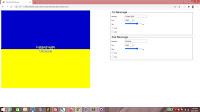
Now reload. You see that the messages now appear in the blue and yellow halves of the graphic.


Play with the controls by changing the text, adjusting sizes and checking or unchecking the boxes!


But we want the top half text to be next to the line. So add this to the CSS. The padding-top property should take care of this.
.bottom
{
    width: 100%;
    height: 300px;
    text-align: center;
    color: rgba(0, 0, 200, 0.8);
    background-color: rgba(255, 255, 0, 1);
}

#message1
{
    padding-top: 270px;
}


.dashboard
{
    width: 45%;
    float: right;
}


Yes!


And just remove the red outline.
div {outline: 0px solid red;}


Here we go.


And all of this means jackshit unless we can print the result. So add this media class to the CSS. When printing, dashboard will be invisible and image will take up full width.
label
{
    display: inline-block;
    width: 10em;
}

@media print
{
    .dashboard
    {
        display: none;
    }

    .image
    {
        width: 100%;
    }
}


Try to print it!


Standing with Ukraine

Politics is a dirty business, but it's the people who suffer most. So hey, if you've got enough to spare, send some money over to help save lives!

#StandWithUkraine,
T___T