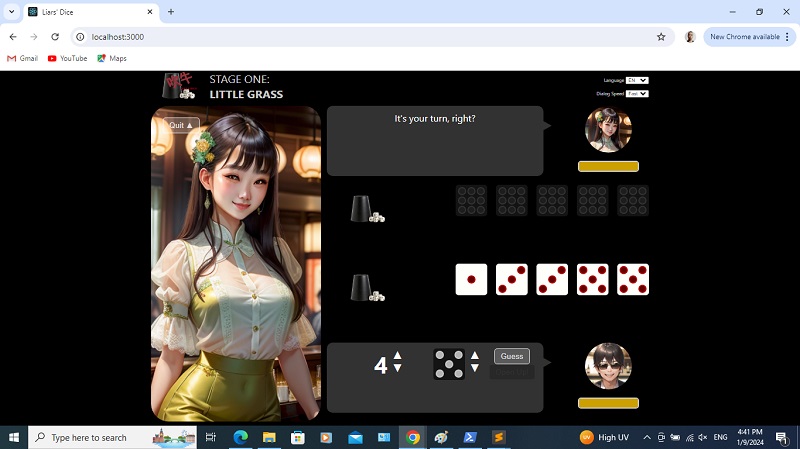
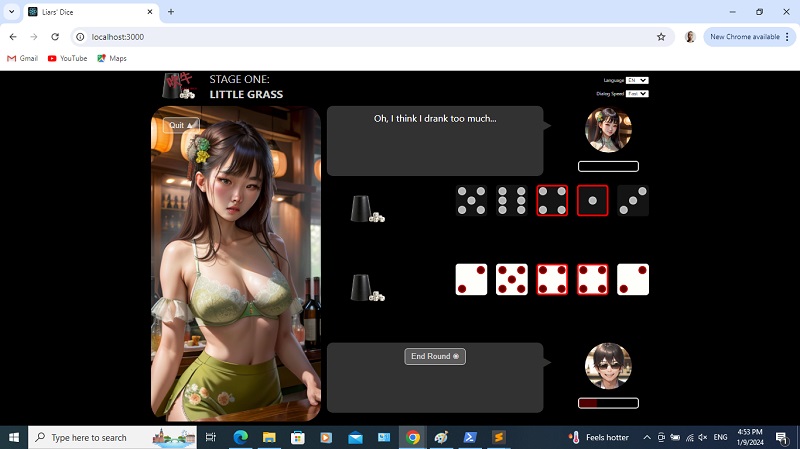
We've gone through a bit of gamplay. Now it's time to handle winning and losing.
It doesn't take a single win or loss to decide a stage. The stage is only won or lost when either player or oppoenent's intoxication level is 0, and said level is reduced by losing rounds.
So first, let's add winning and losing to the phrases. "win" and "lose" are for individual rounds. "stagewin" and "stagelose" are for entire stages.
src/utils/GetPhrases.js
{ personality: 1, phraseName: "openup", lang: "en", value: "Can you show me your dice?"},
{ personality: 1, phraseName: "openup", lang: "cn", value: "能开给我看吗?"},
{ personality: 1, phraseName: "openup", lang: "en", value: "I think we should open up!"},
{ personality: 1, phraseName: "openup", lang: "cn", value: "我想我们开吧!"},
{ personality: 1, phraseName: "win", lang: "en", value: "Looks like I've won! Please have a drink."},
{ personality: 1, phraseName: "win", lang: "cn", value: "看来我赢了! 请喝酒!"},
{ personality: 1, phraseName: "win", lang: "en", value: "I was lucky!"},
{ personality: 1, phraseName: "win", lang: "cn", value: "侥幸而已!"},
{ personality: 1, phraseName: "lose", lang: "en", value: "Does this mean I lose?"},
{ personality: 1, phraseName: "lose", lang: "cn", value: "我这算是输了吗?"},
{ personality: 1, phraseName: "lose", lang: "en", value: "Please be gentle! I'll drink."},
{ personality: 1, phraseName: "lose", lang: "cn", value: "温柔点! 我喝."},
{ personality: 1, phraseName: "stagewin", lang: "en", value: "I can't believe I won!"},
{ personality: 1, phraseName: "stagewin", lang: "cn", value: "我赢了! 难以相信!"},
{ personality: 1, phraseName: "stagewin", lang: "en", value: "Thank you for going easy on me!"},
{ personality: 1, phraseName: "stagewin", lang: "cn", value: "多谢手下留情!"},
{ personality: 1, phraseName: "stagelose", lang: "en", value: "Oh, I think I drank too much..."},
{ personality: 1, phraseName: "stagelose", lang: "cn", value: "哦我喝多了..."},
{ personality: 1, phraseName: "stagelose", lang: "en", value: "You're too good at this! I can't beat you."},
{ personality: 1, phraseName: "stagelose", lang: "cn", value: "你太厉害了! 我赢不了你."}
You'l notice that right now, the round can go on forever regardless of who wins or loses, because we have not yet handed win conditions with the
checkWin() function. So let's do that. We begin by declaring variable
diceQty as 0.
src/components/Game/Game.jsconst checkWin = function(isPlayerOpen, currentGuessQty, currentGuessDice) {
var diceQty = 0;
};
Then we use a
For loop to go through both the
opponentDice and
playerDice arrays. For every dice value that is 1 or matches
currentGuessDice, we increment
diceQty.
src/components/Game/Game.jsconst checkWin = function(isPlayerOpen, currentGuessQty, currentGuessDice) {
var diceQty = 0;
for (var i = 0; i < 5; i++) {
if (opponentDice[i] === 1 || opponentDice[i] === currentGuessDice) diceQty++;
if (playerDice[i] === 1 || playerDice[i] === currentGuessDice) diceQty++;
}
};
Declare
correctGuess - it's
true or
false depending on whether
diceQty is greater or equal to
currentGuessQty.
src/components/Game/Game.jsconst checkWin = function(isPlayerOpen, currentGuessQty, currentGuessDice) {
var diceQty = 0;
for (var i = 0; i < 5; i++) {
if (opponentDice[i] === 1 || opponentDice[i] === currentGuessDice) diceQty++;
if (playerDice[i] === 1 || playerDice[i] === currentGuessDice) diceQty++;
}
var correctGuess = (diceQty >= currentGuessQty);
};
We then declare
playerWin and assume it is
true. It will be
false if the opening up was called by the player (thus,
isplayerOpen being
true) and it's a correct guess, or if it was the opponent who called for opening up and the guess turned out to be wrong.
src/components/Game/Game.jsconst checkWin = function(isPlayerOpen, currentGuessQty, currentGuessDice) {
var diceQty = 0;
for (var i = 0; i < 5; i++) {
if (opponentDice[i] === 1 || opponentDice[i] === currentGuessDice) diceQty++;
if (playerDice[i] === 1 || playerDice[i] === currentGuessDice) diceQty++;
}
var correctGuess = (diceQty >= currentGuessQty);
var playerWin = true;
if (isPlayerOpen && correctGuess) playerWin = false;
if (!isPlayerOpen && !correctGuess) playerWin = false;
};
We then handle the cases for if the payer won or lost. If the player won, we set
opponentDialog using the phrase we created earlier, and reduce the
opponentIntoxication value (because the opponent takes a drink). The minimum is 0, so we need to check for that first.
src/components/Game/Game.jsconst checkWin = function(isPlayerOpen, currentGuessQty, currentGuessDice) {
var diceQty = 0;
for (var i = 0; i < 5; i++) {
if (opponentDice[i] === 1 || opponentDice[i] === currentGuessDice) diceQty++;
if (playerDice[i] === 1 || playerDice[i] === currentGuessDice) diceQty++;
}
var correctGuess = (diceQty >= currentGuessQty);
var playerWin = true;
if (isPlayerOpen && correctGuess) playerWin = false;
if (!isPlayerOpen && !correctGuess) playerWin = false;
if (playerWin) {
setOpponentDialog(GetPhrases(stage, "lose", lang));
var intoxication = opponentIntoxication - (35 - (stage * 5));
if (intoxication < 0) intoxication = 0;
setOpponentIntoxication(intoxication);
if (intoxication === 0) setOpponentDialog(GetPhrases(stage, "stagelose", lang));
} else {
}
};
And if the payer loses, we do the same, but with differences in
opponentDialog. And this time, it's
payerIntoxication that gets reduced.
src/components/Game/Game.jsconst checkWin = function(isPlayerOpen, currentGuessQty, currentGuessDice) {
var diceQty = 0;
for (var i = 0; i < 5; i++) {
if (opponentDice[i] === 1 || opponentDice[i] === currentGuessDice) diceQty++;
if (playerDice[i] === 1 || playerDice[i] === currentGuessDice) diceQty++;
}
var correctGuess = (diceQty >= currentGuessQty);
var playerWin = true;
if (isPlayerOpen && correctGuess) playerWin = false;
if (!isPlayerOpen && !correctGuess) playerWin = false;
if (playerWin) {
setOpponentDialog(GetPhrases(stage, "lose", lang));
var intoxication = opponentIntoxication - (35 - (stage * 5));
if (intoxication < 0) intoxication = 0;
setOpponentIntoxication(intoxication);
if (intoxication === 0) setOpponentDialog(GetPhrases(stage, "stagelose", lang));
} else {
setOpponentDialog(GetPhrases(stage, "win", lang));
var intoxication = playerIntoxication - 35;
if (intoxication < 0) intoxication = 0;
setPlayerIntoxication(intoxication);
if (intoxication === 0) setOpponentDialog(GetPhrases(stage, "stagewin", lang));
}
};
Try again! We start by guessing four fives.
Opponent opens up, and it looks like the player loses. See? The intoxication bar goes down and changes color. Click End Round and Start New Round.
Guess four fours.
Opponent raises it to six fours.
Click Open Up, and it looks like the opponent loses. See her meter bar!
And loses another round.
And another. See the stripping going on?
Finally, one more loss and the meter reaches 0.
Before we continue, you really should add in the phrases for all five stages in the
GetPhrases utility. The code is
here.
Now, if you click End Round, you should get this (because stage gets incremented at this point). Rinse and repeat, till you clear all five stages! If, at any time he player's intoxication meter reaches 0, we go right back to that stage's Intro screen.
Final screen!
If you clear all five stages, the value of
stage becomes 6. We'll handle it this way, inside the
If block we created early in this web tutorial. If
stage is 6, we will return a div with the id of
Champion.
src/components/Game/Game.jsif (stage === 6) {
return (
<div id="Champion">
</div>
);
}
We have a
h1 tag with a label we derive from calling
GetLabels(). And a button styled using
btnFinalQuit and
actionButton, that runs the
quit() function.
src/components/Game/Game.jsif (stage === 6) {
return (
<div id="Champion">
<h1>{ GetLabels("final", lang) }</h1>
<p>
<button className="btnFinalQuit actionButton" onClick={ ()=>{ quit(); } }>{ GetLabels("quit", lang) } ▲</button>
</p>
</div>
);
}
The label is as so...
src/utils/GetLabels.js
{ labelName: "8dice", lang: "en", value: "Eight"},
{ labelName: "8dice", lang: "cn", value: "八个"},
{ labelName: "9dice", lang: "en", value: "Nine"},
{ labelName: "9dice", lang: "cn", value: "九个"},
{ labelName: "10dice", lang: "en", value: "Ten"},
{ labelName: "10dice", lang: "cn", value: "十个"},
{ labelName: "final", lang: "en", value: "YOU ARE THE CHAMPION!"},
{ labelName: "final", lang: "cn", value: "你是冠军!"}
We want
Champion to take up full width with a limited height.
src/components/Game/Game.css
.btnStartStage {
margin: 50px auto 0 auto;
}
.btnQuit {
margin: 20px auto 0 20px;
}
#Champion {
width: 100%;
height: 200px;
float: left;
text-align: center;
font-size: 3em;
}
Like
btnStartStage,
btnFinalQuit is centered, so let it share the same styling.
src/components/Game/Game.css
.btnStartStage, .btnFinalQuit {
margin: 50px auto 0 auto;
}
There's that button and message.
Time to showcase all the defeated opponents! Let's start with just one. We have a div styled using the
final CSS class.
src/components/Game/Game.jsif (stage === 6) {
return (
<div id="Champion">
<h1>{ GetLabels("final", lang) }</h1>
<p>
<button className="btnFinalQuit actionButton" onClick={ ()=>{ quit(); } }>{ GetLabels("quit", lang) } ▲</button>
</p>
<div className="final">
</div>
</div>
);
}
Then we add a div inside it. It will be styled using
profile and the CSS class string returned by calling
GetOpponentImage(). In that function, we pass in 1 and 0 because we want the image for the first stage opponent but at 0 intoxication.
src/components/Game/Game.jsif (stage === 6) {
return (
<div id="Champion">
<h1>{ GetLabels("final", lang) }</h1>
<p>
<button className="btnFinalQuit actionButton" onClick={ ()=>{ quit(); } }>{ GetLabels("quit", lang) } ▲</button>
</p>
<div className="final">
<div className={ "profile " + GetOpponentImage(1, 0) }></div>
</div>
</div>
);
}
Then we have another div styled using the
words CSS class. In it, inside a
span tag styled using
opponentName, we gave the opponent's name and then after a break, we add in a phrase.
src/components/Game/Game.jsif (stage === 6) {
return (
<div id="Champion">
<h1>{ GetLabels("final", lang) }</h1>
<p>
<button className="btnFinalQuit actionButton" onClick={ ()=>{ quit(); } }>{ GetLabels("quit", lang) } ▲</button>
</p>
<div className="final">
<div className={ "profile " + GetOpponentImage(1, 0) }></div>
<div className="words"><span className="opponentName">{ GetLabels("opponent1", lang) }</span><br />"{ GetPhrases(1, "stagelose", lang) }"</div>
</div>
</div>
);
}
The CSS is as follows.
final will have only 20% width because there are going to be 5 of them. And it will be floated left. Any element styled using
profile inside
final, will have round corners and have a defined height and width.. The background is set to use one image without repeating. And finally, any element styled using
words inside
final, will have the properties as shown. Not a big deal, just more aesthetics. We don't need to specify the styling of
opponentName; we already defined it in
App.css earlier, so we're just reusing it now.
src/components/Game/Game.css
#Champion {
width: 100%;
height: 200px;
float: left;
text-align: center;
font-size: 3em;
}
.final {
width: 20%;
float: left;
}
.final .profile {
width: 150px;
height: 150px;
border-radius: 50%;
background-size: cover;
background-position: center top;
background-repeat: no-repeat;
}
.final .words {
padding: 1em;
font-size: 0.5em;
}
See that?
Now let's fill in the rest!
src/components/Game/Game.jsif (stage === 6) {
return (
<div id="Champion">
<h1>{ GetLabels("final", lang) }</h1>
<p>
<button className="btnFinalQuit actionButton" onClick={ ()=>{ quit(); } }>{ GetLabels("quit", lang) } ▲</button>
</p>
<div className="final">
<div className={ "profile " + GetOpponentImage(1, 0) }></div>
<div className="words"><span className="opponentName">{ GetLabels("opponent1", lang) }</span><br />"{ GetPhrases(1, "stagelose", lang) }"</div>
</div>
<div className="final">
<div className={ "profile " + GetOpponentImage(2, 0) }></div>
<div className="words"><span className="opponentName">{ GetLabels("opponent2", lang) }</span><br />"{ GetPhrases(2, "stagelose", lang) }"</div>
</div>
<div className="final">
<div className={ "profile " + GetOpponentImage(3, 0) }></div>
<div className="words"><span className="opponentName">{ GetLabels("opponent3", lang) }</span><br />"{ GetPhrases(3, "stagelose", lang) }"</div>
</div>
<div className="final">
<div className={ "profile " + GetOpponentImage(4, 0) }></div>
<div className="words"><span className="opponentName">{ GetLabels("opponent4", lang) }</span><br />"{ GetPhrases(4, "stagelose", lang) }"</div>
</div>
<div className="final">
<div className={ "profile " + GetOpponentImage(5, 0) }></div>
<div className="words"><span className="opponentName">{ GetLabels("opponent5", lang) }</span><br />"{ GetPhrases(5, "stagelose", lang) }"</div>
</div>
</div>
);
}
Beautiful!
That's it! Time to write tests!
I'll be honest - this app wasn't all that well-written. I certainly didn't write it in a way that was easy to test. That's on me. Still, there are some basic ones we can write, and run.
For the main one, we an check for these elements.
src/App.test.js
import React from "react";
import { render, screen } from "@testing-library/react";
import App from "./App";
describe("App", () => {
it("renders important elements", () => {
render(<App />);
expect(screen.getByTestId("start-button")).toBeInTheDocument();
expect(screen.getByTestId("dashboard-language")).toBeInTheDocument();
expect(screen.getByTestId("dashboard-dialogspeed")).toBeInTheDocument();
});
});
Of course, since we're using the
getByTestId() method, we'll need to add the appropriate attributes.
src/App.js
<button data-testid="start-button" onClick={ ()=>{ start(); }} className="actionButton" >{ GetLabels("start", lang) } ►</button>
src/App.js<label id="DashboardLanguage">
{ GetLabels("language", lang) }
<select data-testid="dashboard-language" onChange={ (e)=>{ setLang(e.currentTarget.value); }}>
<option value="cn">CN</option>
<option value="en">EN</option>
</select>
</label>
<label id="DashboardDialogSpeed">
{ GetLabels("dialogSpeed", lang) }
<select data-testid="dashboard-dialogspeed" onChange={ (e)=>{ setDialogSpeed(e.currentTarget.value); }}>
<option value="500">{ GetLabels("fast", lang) }</option>
<option value="1000">{ GetLabels("medium", lang) }</option>
<option value="1500">{ GetLabels("slow", lang) }</option>
</select>
</label>
For the
Game component, we'll need to import all this.
src/components/Game/Game.test.js
import React from "react";
import { render, screen } from "@testing-library/react";
import Game from "./Game";
import GetLabels from "../../utils/GetLabels";
We declare some variables that will act as parameters for the elements we'll be testing. These are the values that would normally be passed down from
App.
src/components/Game/Game.test.js
import React from "react";
import { render, screen } from "@testing-library/react";
import Game from "./Game";
import GetLabels from "../../utils/GetLabels";
let lang = "en";
let dialogSpeed = 500;
let stage;
let setStage = (val)=> {
stage = val;
};
let stageStarted;
let setStageStarted = (val)=> {
stageStarted = val;
};
We first ensure that certain elements are
not present when
stage is 0.
src/components/Game/Game.test.js
let lang = "en";
let dialogSpeed = 500;
let stage;
let setStage = (val)=> {
stage = val;
};
let stageStarted;
let setStageStarted = (val)=> {
stageStarted = val;
};
describe("Game", () => {
setStage(0);
setStageStarted(false);
it("renders nothing for stage 0", () => {
render(
<Game
lang = { lang }
dialogSpeed = { dialogSpeed }
stage={ stage }
setStage = { setStage }
stageStarted={ stageStarted }
setStageStarted = { setStageStarted }
/>
);
expect(screen.queryByTestId("game-main")).toBeNull();
});
});
Again we have to set
testing-id for the
Main div. Not really something I would normally recommend.
src/components/Game/Game.js<div id="Main" testing-id="game-main">
Then we will look for the text "YOU ARE THE CHAMPION!" when
stage is 6 and the language is "en".
src/components/Game/Game.test.js
describe("Game", () => {
setStage(0);
setStageStarted(false);
it("renders nothing for stage 0", () => {
render(
<Game
lang = { lang }
dialogSpeed = { dialogSpeed }
stage={ stage }
setStage = { setStage }
stageStarted={ stageStarted }
setStageStarted = { setStageStarted }
/>
);
expect(screen.queryByTestId("game-main")).toBeNull();
});
});
describe("Game", () => {
setStage(6);
setStageStarted(true);
it("renders champion div for stage 6", () => {
render(
<Game
lang = { lang }
dialogSpeed = { dialogSpeed }
stage={ stage }
setStage = { setStage }
stageStarted={ stageStarted }
setStageStarted = { setStageStarted }
/>
);
expect(screen.queryByText("YOU ARE THE CHAMPION!")).toBeInTheDocument();
});
});
Finally, the
Dice component, arguably the easiest one to test. These are all you'll need to import.
src/components/Dice/Dice.test.js
import React from "react";
import { render, screen } from "@testing-library/react";
import Dice from "./Dice";
If
val is 6, the number of elements in the array returned by
queryAllByTitle() with "dot val1" in the argument, will naturally be 6. We programmed it to be in the title ourselves!
src/components/Dice/Dice.test.js
import React from "react";
import { render, screen } from "@testing-library/react";
import Dice from "./Dice";
describe("Dice", () => {
it("renders dice for 6", () => {
render(
<Dice
dice = "6"
diceIndex = "0"
classPrefix = "opponentDice"
highlight = { false }
show = { true }
/>
);
expect(screen.queryAllByTitle("dot val1").length).toBe(6);
});
});
Similarly for
val1!
src/components/Dice/Dice.test.js
describe("Dice", () => {
it("renders dice for 6", () => {
render(
<Dice
dice = "6"
diceIndex = "0"
classPrefix = "opponentDice"
highlight = { false }
show = { true }
/>
);
expect(screen.queryAllByTitle("dot val1").length).toBe(6);
});
});
describe("Dice", () => {
it("renders dice for 1", () => {
render(
<Dice
dice = "1"
diceIndex = "0"
classPrefix = "opponentDice"
highlight = { false }
show = { true }
/>
);
expect(screen.queryAllByTitle("dot val1").length).toBe(1);
});
});
Now we test for if
show is
false. When that's the case, no matter the value of
val, the result is always 0.
src/components/Dice/Dice.test.js
describe("Dice", () => {
it("renders dice for 1", () => {
render(
<Dice
dice = "1"
diceIndex = "0"
classPrefix = "opponentDice"
highlight = { false }
show = { true }
/>
);
expect(screen.queryAllByTitle("dot val1").length).toBe(1);
});
});
describe("Dice", () => {
it("renders dice for 1 but not revealed", () => {
render(
<Dice
dice = "1"
diceIndex = "0"
classPrefix = "opponentDice"
highlight = { false }
show = { false }
/>
);
expect(screen.queryAllByTitle("dot val1").length).toBe(0);
});
});
We enter "npm test" in the CLI, and there it is!
Thanks for sticking with me!
Wasn't this fun? Well, it certainly was
my idea of fun. Probably explains why I've been doing this for so many years.


.jpg)